
Constrained Fuzzy OCR - The Three-Tier OCR Pipeline


Part 4: Image Intelligence introduced the ImageSummarizer wave architecture and the broader patterns. This article deep-dives into the OCR subsystem—three tiers of text extraction, intelligent routing, and the filmstrip optimization that achieves 30× token reduction for animated GIFs.
Why a separate article? The OCR pipeline evolved from "Tesseract with Vision LLM fallback" to a sophisticated three-tier system with ML-based OCR, multi-frame voting, text-only strip extraction, and cost-aware routing. It's complex enough to warrant its own detailed breakdown.
Related articles:
- Part 1: Constrained Fuzziness Pattern - The foundational pattern
- Part 2: Constrained Fuzzy MoM - Multiple model coordination
- Part 3: Context Dragging - Memory and time
- Part 4: Image Intelligence - Full wave architecture overview
- DocSummarizer - Document analysis with similar patterns
- DataSummarizer - Data profiling with determinism-first approach
The Problem: Text Extraction is Hard
OCR on real-world images fails in predictable ways:
- Stylized fonts: Tesseract trained on standard fonts, fails on decorative text
- Noisy GIFs: Frame compression artifacts, jitter, subtitle changes
- Low contrast: Dark text on dark backgrounds
- Rotated text: Non-horizontal text angles
- Mixed content: Screenshots with multiple text regions
- API costs: Vision LLM calls are expensive ($0.001-0.01 per image)
Traditional approach: "Run Tesseract, if it fails use Vision LLM"
Problem: This either misses stylized text (Tesseract fails) or costs too much (always use Vision LLM).
Solution: Add a middle tier (Florence-2 ONNX) that handles stylized fonts locally, escalating to Vision LLM only when both local methods fail.
The Three-Tier OCR Architecture
The system runs waves in priority order (higher number = later execution):
Wave Priority Order:
  40: TextLikelinessWave → Heuristic text detection
  50: OcrWave            → Tesseract OCR (if text-likely)
  51: MlOcrWave          → Florence-2 ML OCR (if Tesseract low confidence)
  55: Florence2Wave      → Florence-2 captions (optional)
  80: VisionLlmWave      → Vision LLM (escalation)
Tier 1: Tesseract (Traditional OCR)
| Priority | Speed | Cost | Best For | Limitations |
|---|---|---|---|---|
| 50 | ~50ms | Free | Clean text, high contrast, standard fonts | Stylized fonts, low quality, rotated text |
Signals emitted:
ocr.text- Extracted textocr.confidence- Tesseract mean confidence score
Tier 2: Florence-2 ONNX (ML OCR)
| Priority | Speed | Cost | Best For | Limitations |
|---|---|---|---|---|
| 51 | ~200ms | Free | Stylized fonts, memes, decorative text | Complex charts, rotated text |
Signals emitted:
ocr.ml.text- Single-frame Florence-2 OCRocr.ml.multiframe_text- Multi-frame GIF text (preferred for animations)ocr.ml.confidence- Model confidence score
Tier 3: Vision LLM (Cloud Fallback)
| Priority | Speed | Cost | Best For | Constraints |
|---|---|---|---|---|
| 80 | ~1-5s | $0.001-0.01 | Everything, especially complex scenes | Must respect deterministic signals |
Signals emitted:
ocr.vision.text- Vision LLM OCR text extractionocr.vision.confidence- LLM confidence (typically 0.95)caption.text- Optional descriptive caption (separate from OCR)
The ONNX Arsenal: Local ML Models
Before diving into the three OCR tiers, let's cover the deterministic ML models that power the system. All models run locally via ONNX Runtime—no API calls, no cloud dependencies, no costs.
Why ONNX?
- Runs locally: No API keys, no network latency, no recurring costs
- Deterministic: Same input = same output (no sampling/temperature randomness)*
- Fast: Hardware-accelerated (CPU/GPU), optimized inference
- Portable: Works on Windows, Linux, macOS
- Auto-downloaded: First run downloads models automatically
* Minor caveat: GPU execution providers can introduce negligible floating-point nondeterminism. The signal contract (confidence thresholds, routing logic) remains fully deterministic.
The Five ONNX Models
Note: Sizes are approximate and vary by variant/quantization. Typical download sizes shown below.
| Model | Approx. Size | Purpose | Speed | Model Type |
|---|---|---|---|---|
| EAST | ~100MB | Scene text detection | ~20ms | Text detection |
| CRAFT | ~150MB | Character-region text detection | ~30ms | Text detection |
| Florence-2 | ~250MB | OCR + captioning | ~200ms | Vision-language |
| Real-ESRGAN | ~60MB | 4× super-resolution upscaling | ~500ms | Image enhancement |
| CLIP | ~600MB | Semantic embeddings | ~100ms | Multimodal embedding |
Total disk space: ~1.0-1.5GB depending on model variants chosen.
1. EAST: Scene Text Detection
Efficient and Accurate Scene Text Detector - finds text regions in natural scenes.
// EAST detects text bounding boxes with confidence scores
var result = await textDetector.RunEastDetectionAsync(imagePath);

// Output: List of BoundingBox with coordinates + confidence
// Example: [BoundingBox(x1:50, y1:100, x2:300, y2:150, confidence:0.92)]
How it works:
- Deep learning model trained on scene text datasets
- Outputs score map (confidence) + geometry map (box coordinates)
- Handles rotated text, multi-scale text
- Uses Non-Maximum Suppression (NMS) to merge overlapping boxes
Why deterministic?
- No randomness in inference (frozen weights)
- Same image → same bounding boxes
- Confidence scores are reproducible
- Escalation thresholds are config-driven (e.g.,
< 0.5 → escalate)
Technical details:
// EAST preprocessing (from implementation)
- Input size: 320×320 (must be multiple of 32)
- Format: BGR with mean subtraction [123.68, 116.78, 103.94]
- Output stride: 4 (downsampled 4×)
- Score threshold: 0.5
- NMS IoU threshold: 0.4
Example output:
Input: meme.png (800×600)
EAST detection: 15 text regions found
  Region 1: (50, 480, 750, 580) - confidence 0.87 [bottom subtitle area]
  Region 2: (100, 50, 300, 90) - confidence 0.62 [top text]
  Region 3: ...
Route decision: ANIMATED (subtitle pattern in bottom 30%)
2. CRAFT: Character Region Awareness
Character-level text detection - excels at curved, artistic, and stylized text.
// CRAFT finds character-level regions, then groups into words
var result = await textDetector.RunCraftDetectionAsync(imagePath);

// Better than EAST for: decorative fonts, curved text, logos
How it works:
- Detects individual character regions (more granular than EAST)
- Uses affinity score to group characters into words
- Flood-fill algorithm finds connected text components
- Handles curved text that EAST misses
When CRAFT is used:
- EAST is unavailable or failed
- Image has artistic/decorative fonts (auto-detected)
- User explicitly selects CRAFT detector
Technical details:
// CRAFT preprocessing
- Max dimension: 1280px (maintains aspect ratio)
- Format: RGB normalized with ImageNet stats
- Mean: [0.485, 0.456, 0.406]
- Std: [0.229, 0.224, 0.225]
- Output stride: 2 (downsampled 2×)
- Threshold: 0.4 for character regions
EAST vs CRAFT comparison:
| Feature | EAST | CRAFT |
|---|---|---|
| Detection level | Word/line | Character |
| Speed | ~20ms | ~30ms |
| Best for | Standard text, subtitles | Decorative fonts, logos |
| Curved text | Limited | Excellent |
| Model size | 100MB | 150MB |
3. Real-ESRGAN: Super-Resolution Upscaling
Enhances low-quality images before OCR - 4× upscaling for blurry/small text.
// Upscale low-quality image before running OCR
if (quality.Sharpness < 30)  // Laplacian variance threshold
{
    var upscaled = await esrganService.UpscaleAsync(imagePath, scale: 4);
    // Now run OCR on the enhanced image
}
When it's used:
- Image sharpness < 30 (Laplacian variance)
- Text regions detected but very small (< 20px height)
- OCR confidence low but text regions present
- User explicitly requests upscaling
Example:
Input:  100×75 screenshot with tiny text
        Laplacian variance: 18 (very blurry)

ESRGAN: Upscale to 400×300 (~500ms)
        New Laplacian variance: 87 (sharp)

OCR:    Tesseract confidence: 0.92 (vs 0.42 before upscaling)
        Text: "Click here to continue" (vs garbled before)
Technical details:
// Real-ESRGAN processing
- Input: Any size (processed in 128×128 tiles if large)
- Output: 4× scaled (200×150 → 800×600)
- Model: x4plus variant (general photos)
- Processing: ~500ms for 800×600 image
- Memory: ~2GB peak (tiles reduce this)
Token economics:
Scenario: Screenshot with tiny text

Option 1: Send low-res to Vision LLM
  Image: 100×75 = ~20 tokens
  LLM can't read tiny text → fails
  Cost: $0.0002 (wasted)

Option 2: Upscale with ESRGAN, use Tesseract
  ESRGAN: Free (local), 500ms
  Tesseract: Free (local), 50ms
  Success: 92% confidence
  Cost: $0

Result: ESRGAN + local OCR beats Vision LLM for low-res images
4. CLIP: Semantic Embeddings
Multimodal embeddings for semantic image search - projects images and text into shared vector space.
// Generate embedding for semantic search
var embedding = await clipService.GenerateEmbeddingAsync(imagePath);
// Returns: float[512] vector

// Later: semantic search across thousands of images
var similarImages = await vectorDb.SearchAsync(queryEmbedding, topK: 10);
How it works:
- CLIP ViT-B/32 visual encoder (350MB)
- Projects images to 512-dimensional vectors
- Trained to align with text descriptions
- Enables "find images like this" without keywords
Use cases:
- Semantic image search in RAG systems
- Duplicate detection (even if edited/cropped)
- Content-based clustering
- Similar image recommendations
Technical details:
// CLIP visual encoder
- Model: ViT-B/32 (Vision Transformer)
- Input: 224×224 RGB (center crop + resize)
- Output: 512-dimensional embedding
- Normalized: L2 norm = 1.0
- Speed: ~100ms per image
Example:
Input images:
  cat_on_couch.jpg → [0.23, -0.51, 0.88, ...]
  dog_on_couch.jpg → [0.19, -0.48, 0.91, ...]
  car_photo.jpg    → [-0.67, 0.33, -0.12, ...]

Query: "animals on furniture"
  Text embedding → [0.21, -0.50, 0.89, ...]

Cosine similarity:
  cat_on_couch: 0.94 (very similar!)
  dog_on_couch: 0.91 (similar)
  car_photo: 0.12 (not similar)

Result: Returns cat and dog images
5. Florence-2: Vision-Language Model (Covered in Tier 2)
See Tier 2 section for full details on Florence-2 ONNX OCR and captioning.
Auto-Download System
All models are downloaded automatically on first use:
$ imagesummarizer image.png --pipeline auto

[First run]
Downloading EAST scene text detector (~100MB)...
  Progress: ████████████████████ 100% (102.4 MB)
Downloading Florence-2 base model (~250MB)...
  Progress: ████████████████████ 100% (248.7 MB)
Downloading CLIP ViT-B/32 visual (~350MB)...
  Progress: ████████████████████ 100% (347.2 MB)

Models saved to: ~/.mostlylucid/models/
Total disk space: 1.16 GB

[Subsequent runs]
All models cached, analysis starts immediately
Graceful degradation:
// If ONNX model download fails, system falls back gracefully
EAST unavailable → Try CRAFT → Fall back to Tesseract PSM
Real-ESRGAN unavailable → Skip upscaling, use original image
CLIP unavailable → Skip embeddings, OCR still works
Florence-2 unavailable → Use Tesseract → Vision LLM escalation
Every ONNX model failure is logged with fallback path, ensuring the system never crashes due to missing models.
Why This Matters
Pricing note: Cost examples below use illustrative pricing (~$0.005/image for Vision LLM). Actual API costs vary by provider and model. The core insight—local processing eliminates most API calls—holds regardless of specific pricing.
Without ONNX models (baseline):
Every image → Send to Vision LLM
  Cost: ~$0.005/image (example pricing)
  Time: ~2s network + inference
  100 images = ~$0.50, ~200s
With ONNX models (local-first):
85 images → EAST + Florence-2 (local)
  Cost: $0
  Time: ~200ms

10 images → EAST + Tesseract (local)
  Cost: $0
  Time: ~50ms

5 images → EAST + Vision LLM (escalation)
  Cost: ~$0.025 (5 × $0.005)
  Time: ~2s each

100 images = ~$0.025, ~30s total
Savings: ~95% cost reduction, ~85% faster, deterministic routing.
The ONNX models transform the system from "probabilistic all the way down" to "deterministic foundation + probabilistic escalation only when needed."
Tier 1: Tesseract OCR
The baseline. Fast, deterministic, works great for clean text.
public class OcrWave : IAnalysisWave
{
    public string Name => "OcrWave";
    public int Priority => 60;  // After color/identity

    public async Task<IEnumerable<Signal>> AnalyzeAsync(
        string imagePath,
        AnalysisContext context,
        CancellationToken ct)
    {
        var signals = new List<Signal>();

        // Get preprocessed image from cache
        var image = context.GetCached<Image<Rgba32>>("image");

        // Run Tesseract OCR
        using var engine = new TesseractEngine(@"./tessdata", "eng", EngineMode.Default);
        using var page = engine.Process(image);

        var text = page.GetText();
        var confidence = page.GetMeanConfidence();

        signals.Add(new Signal
        {
            Key = "ocr.text",  // Tesseract OCR result
            Value = text,
            Confidence = confidence,
            Source = Name,
            Tags = new List<string> { "ocr", "text" },
            Metadata = new Dictionary<string, object>
            {
                ["engine"] = "tesseract",
                ["mean_confidence"] = confidence,
                ["word_count"] = text.Split(' ').Length
            }
        });

        signals.Add(new Signal
        {
            Key = "ocr.confidence",
            Value = confidence,
            Confidence = 1.0,
            Source = Name
        });

        return signals;
    }
}
Key signals:
ocr.full_text- The extracted textocr.early_exit- Signal to skip Tier 2/3 if confidence is high- Confidence score drives escalation decisions
Tier 2: Florence-2 ONNX
Microsoft's Florence-2 is a vision-language model that excels at dense captioning and OCR. The ONNX version runs locally with no API costs.
Why Florence-2?
- Better than Tesseract for stylized fonts: Handles decorative text, memes, logos
- Faster than Vision LLM: ~200ms vs 1-5s
- Free: Runs locally, no API key required
- Multimodal understanding: Can extract text in context (e.g., speech bubbles)
Implementation
public class MlOcrWave : IAnalysisWave
{
    private readonly Florence2OnnxModel _model;

    public string Name => "MlOcrWave";
    public int Priority => 51;  // Runs AFTER Tesseract (priority 50)

    public async Task<IEnumerable<Signal>> AnalyzeAsync(
        string imagePath,
        AnalysisContext context,
        CancellationToken ct)
    {
        var signals = new List<Signal>();

        // Check if Tesseract already succeeded with high confidence
        var tesseractConfidence = context.GetValue<double>("ocr.confidence");
        if (tesseractConfidence >= 0.95)
        {
            signals.Add(new Signal
            {
                Key = "ocr.ml.skipped",  // Consistent namespace: ocr.ml.*
                Value = true,
                Confidence = 1.0,
                Source = Name,
                Metadata = new Dictionary<string, object>
                {
                    ["reason"] = "tesseract_high_confidence",
                    ["tesseract_confidence"] = tesseractConfidence
                }
            });
            return signals;
        }

        // Run Florence-2 OCR
        var result = await _model.ExtractTextAsync(imagePath, ct);

        signals.Add(new Signal
        {
            Key = "ocr.ml.text",  // Florence-2 ML OCR text
            Value = result.Text,
            Confidence = result.Confidence,
            Source = Name,
            Tags = new List<string> { "ocr", "text", "ml" },
            Metadata = new Dictionary<string, object>
            {
                ["model"] = "florence2-base",
                ["inference_time_ms"] = result.InferenceTime,
                ["token_count"] = result.TokenCount
            }
        });

        // For animated GIFs, extract all unique frames
        if (context.GetValue<int>("identity.frame_count") > 1)
        {
            var frameResults = await ExtractMultiFrameTextAsync(
                imagePath,
                maxFrames: 10,
                ct);

            signals.Add(new Signal
            {
                Key = "ocr.ml.multiframe_text",
                Value = frameResults.CombinedText,
                Confidence = frameResults.AverageConfidence,
                Source = Name,
                Metadata = new Dictionary<string, object>
                {
                    ["frames_processed"] = frameResults.FrameCount,
                    ["unique_text_segments"] = frameResults.UniqueSegments,
                    ["deduplication_method"] = "levenshtein_85"
                }
            });
        }

        return signals;
    }
}
Multi-Frame GIF Processing
For animated GIFs, Florence-2 processes up to 10 sampled frames in parallel:
private async Task<MultiFrameResult> ExtractMultiFrameTextAsync(
    string imagePath,
    int maxFrames,
    CancellationToken ct)
{
    // Load GIF and extract frames
    using var image = await Image.LoadAsync<Rgba32>(imagePath, ct);
    var frames = new List<Image<Rgba32>>();

    int frameCount = image.Frames.Count;
    int step = Math.Max(1, frameCount / maxFrames);

    for (int i = 0; i < frameCount; i += step)
    {
        frames.Add(image.Frames.CloneFrame(i));
    }

    // Process all frames in parallel (bounded concurrency to avoid thrashing)
    var semaphore = new SemaphoreSlim(4);  // Max 4 concurrent inferences
    var tasks = frames.Select(async frame =>
    {
        await semaphore.WaitAsync(ct);
        try
        {
            var result = await _model.ExtractTextAsync(frame, ct);
            return result;
        }
        finally
        {
            semaphore.Release();
        }
    });

    var results = await Task.WhenAll(tasks);
    semaphore.Dispose();

    // Deduplicate using Levenshtein distance
    var uniqueTexts = DeduplicateByLevenshtein(
        results.Select(r => r.Text).ToList(),
        threshold: 0.85);

    return new MultiFrameResult
    {
        CombinedText = string.Join("\n", uniqueTexts),
        FrameCount = frames.Count,
        UniqueSegments = uniqueTexts.Count,
        AverageConfidence = results.Average(r => r.Confidence)
    };
}

private List<string> DeduplicateByLevenshtein(
    List<string> texts,
    double threshold)
{
    var unique = new List<string>();

    foreach (var text in texts)
    {
        bool isDuplicate = false;
        foreach (var existing in unique)
        {
            var distance = LevenshteinDistance(text, existing);
            var maxLen = Math.Max(text.Length, existing.Length);
            var similarity = 1.0 - (distance / (double)maxLen);

            if (similarity >= threshold)
            {
                isDuplicate = true;
                break;
            }
        }

        if (!isDuplicate)
        {
            unique.Add(text);
        }
    }

    return unique;
}
Example: 93-frame GIF → 10 sampled frames → 2 unique text results
Frame 1-45:  "I'm not even mad."
Frame 46-93: "That's amazing."
The Routing Decision
OpenCV text detection (~5-20ms) determines which path to take:
public class TextDetectionService
{
    public TextDetectionResult DetectText(Image<Rgba32> image)
    {
        // Use OpenCV EAST text detector
        var (regions, confidence) = RunEastDetector(image);

        return new TextDetectionResult
        {
            HasText = regions.Count > 0,
            RegionCount = regions.Count,
            Confidence = confidence,
            Route = SelectRoute(regions, confidence, image)
        };
    }

    private ProcessingRoute SelectRoute(
        List<TextRegion> regions,
        double confidence,
        Image<Rgba32> image)
    {
        // No text detected
        if (regions.Count == 0)
            return ProcessingRoute.NoOcr;

        // Animated GIF with subtitle pattern
        if (image.Frames.Count > 1 && HasSubtitlePattern(regions))
            return ProcessingRoute.AnimatedFilmstrip;

        // High confidence, standard text
        if (confidence >= 0.8 && HasStandardTextCharacteristics(regions))
            return ProcessingRoute.Fast;  // Florence-2 only

        // Moderate confidence
        if (confidence >= 0.5)
            return ProcessingRoute.Balanced;  // Florence-2 + Tesseract voting

        // Low confidence, complex image
        return ProcessingRoute.Quality;  // Full pipeline + Vision LLM
    }

    private bool HasSubtitlePattern(List<TextRegion> regions)
    {
        // Subtitles are typically in bottom 30% of frame
        var bottomRegions = regions.Where(r =>
            r.BoundingBox.Y > r.ImageHeight * 0.7);

        return bottomRegions.Count() >= regions.Count * 0.5;
    }
}
Route Performance
| Route | Triggers When | Processing | Time | Cost |
|---|---|---|---|---|
| FAST | High confidence (>0.8), standard text | Florence-2 only | ~100ms | Free |
| BALANCED | Moderate confidence (0.5-0.8) | Florence-2 + Tesseract voting | ~300ms | Free |
| QUALITY | Low confidence (<0.5), complex | Multi-frame + Vision LLM | ~1-5s | $0.001-0.01 |
| ANIMATED | GIF with subtitle pattern | Text-only filmstrip | ~2-3s | $0.002-0.005 |
Text-Only Strip Extraction
The breakthrough optimization for GIF subtitles: extract only the text regions, not full frames.
The Problem
Traditional approach for a 93-frame GIF with subtitles:
Option 1: Process every frame
  93 frames × 300×185 × ~150 tokens/frame = 13,950 tokens
  Cost: ~$0.14 @ $0.01/1K tokens
  Time: ~27 seconds

Option 2: Sample 10 frames
  10 frames × 300×185 × ~150 tokens/frame = 1,500 tokens
  Cost: ~$0.015
  Time: ~3 seconds
  Problem: Might miss subtitle changes
The Solution: Text-Only Strips
Extract only the text bounding boxes, eliminating background pixels:
2 text regions × 250×50 × ~25 tokens/region = 50 tokens
Cost: ~$0.0005
Time: ~2 seconds
Token reduction: 30×
Implementation
public class FilmstripService
{
    public async Task<TextOnlyStrip> CreateTextOnlyStripAsync(
        string imagePath,
        CancellationToken ct)
    {
        using var gif = await Image.LoadAsync<Rgba32>(imagePath, ct);

        // 1. Detect subtitle region (bottom 30% of frames)
        var subtitleRegion = DetectSubtitleRegion(gif);

        // 2. Extract frames with text changes
        var uniqueFrames = ExtractUniqueTextFrames(gif, subtitleRegion);

        // 3. Extract tight bounding boxes around text
        var textRegions = ExtractTextBoundingBoxes(uniqueFrames);

        // 4. Create horizontal strip of text-only regions
        var strip = CreateHorizontalStrip(textRegions);

        return new TextOnlyStrip
        {
            Image = strip,
            RegionCount = textRegions.Count,
            TotalTokens = EstimateTokens(strip),
            OriginalTokens = EstimateTokens(gif),
            Reduction = CalculateReduction(strip, gif)
        };
    }

    private Rectangle DetectSubtitleRegion(Image<Rgba32> gif)
    {
        // Analyze bottom 30% of frame for text patterns
        int subtitleHeight = (int)(gif.Height * 0.3);
        int subtitleY = gif.Height - subtitleHeight;

        return new Rectangle(0, subtitleY, gif.Width, subtitleHeight);
    }

    private List<Image<Rgba32>> ExtractUniqueTextFrames(
        Image<Rgba32> gif,
        Rectangle subtitleRegion)
    {
        var uniqueFrames = new List<Image<Rgba32>>();
        Image<Rgba32>? previousFrame = null;

        for (int i = 0; i < gif.Frames.Count; i++)
        {
            var frame = gif.Frames.CloneFrame(i);
            var subtitleCrop = frame.Clone(ctx =>
                ctx.Crop(subtitleRegion));

            // Compare with previous frame
            if (previousFrame == null ||
                HasTextChanged(subtitleCrop, previousFrame, threshold: 0.05))
            {
                uniqueFrames.Add(subtitleCrop);
                previousFrame = subtitleCrop;
            }
        }

        return uniqueFrames;
    }

    private bool HasTextChanged(
        Image<Rgba32> current,
        Image<Rgba32> previous,
        double threshold)
    {
        // Threshold bright pixels (white/yellow text on dark background)
        var currentBright = CountBrightPixels(current);
        var previousBright = CountBrightPixels(previous);

        // Calculate Jaccard similarity of bright pixels
        var intersection = currentBright.Intersect(previousBright).Count();
        var union = currentBright.Union(previousBright).Count();

        var similarity = union > 0 ? intersection / (double)union : 1.0;

        // Text changed if similarity drops below threshold
        return similarity < (1.0 - threshold);
    }

    // Helper type for bounding box + crop
    private record TextCrop
    {
        public required Image<Rgba32> CroppedImage { get; init; }
        public required Rectangle Bounds { get; init; }
    }

    private List<TextCrop> ExtractTextBoundingBoxes(
        List<Image<Rgba32>> frames)
    {
        var textCrops = new List<TextCrop>();

        foreach (var frame in frames)
        {
            // Threshold to get text mask
            var mask = ThresholdBrightPixels(frame, minValue: 200);

            // Find connected components (text regions)
            var components = FindConnectedComponents(mask);

            // Get tight bounding box around all components
            var bbox = GetTightBoundingBox(components);

            // Add padding
            bbox.Inflate(5, 5);

            // Clone the region (dispose properly in production!)
            var cropped = frame.Clone(ctx => ctx.Crop(bbox));

            textCrops.Add(new TextCrop
            {
                CroppedImage = cropped,
                Bounds = bbox
            });
        }

        return textCrops;
    }

    private Image<Rgba32> CreateHorizontalStrip(
        List<TextCrop> textCrops)
    {
        // Calculate strip dimensions
        int totalWidth = textCrops.Sum(c => c.Bounds.Width);
        int maxHeight = textCrops.Max(c => c.Bounds.Height);

        // Create blank canvas
        var strip = new Image<Rgba32>(totalWidth, maxHeight);

        // Paste text regions horizontally
        int xOffset = 0;
        foreach (var crop in textCrops)
        {
            strip.Mutate(ctx => ctx.DrawImage(
                crop.CroppedImage,
                new Point(xOffset, 0),
                opacity: 1.0f));

            xOffset += crop.Bounds.Width;

            // Dispose crop after use (important!)
            crop.CroppedImage.Dispose();
        }

        return strip;
    }
}
Visual Example
Input: anchorman-not-even-mad.gif (93 frames, 300×185)
Processing:
1. Detect subtitle region: bottom 30% (300×55)
2. Extract unique frames: 93 frames → 2 text changes
3. Extract tight bounding boxes:
   - Frame 1-45: "I'm not even mad." → 252×49 bbox
   - Frame 46-93: "That's amazing." → 198×49 bbox
4. Create horizontal strip: 450×49 total
Output: Text-only strip (450×49)
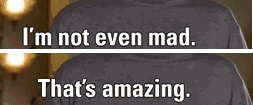
Token Economics:
- Full frames (10 sampled): 300×185 × 10 = ~1500 tokens
- OCR strip (2 frames): 300×185 × 2 = ~300 tokens
- Text-only strip: 450×49 = ~50 tokens
30× reduction while preserving all subtitle text.
Tier 3: Vision LLM Escalation
When both Tesseract and Florence-2 fail or produce low-confidence results, escalate to a Vision LLM (GPT-4o, Claude 3.5 Sonnet, Gemini Pro Vision, or Ollama models like minicpm-v).
The Quality Gate
public class OcrQualityWave : IAnalysisWave
{
    private readonly SpellChecker _spellChecker;

    public string Name => "OcrQualityWave";
    public int Priority => 58;  // After Florence-2 and Tesseract

    public async Task<IEnumerable<Signal>> AnalyzeAsync(
        string imagePath,
        AnalysisContext context,
        CancellationToken ct)
    {
        var signals = new List<Signal>();

        // Get best OCR result from earlier waves (priority order)
        string? ocrText =
            context.GetValue<string>("ocr.ml.text") ??  // Florence-2 (priority 51)
            context.GetValue<string>("ocr.text");        // Tesseract (priority 50)

        if (string.IsNullOrWhiteSpace(ocrText))
        {
            signals.Add(new Signal
            {
                Key = "ocr.quality.no_text",
                Value = true,
                Confidence = 1.0,
                Source = Name
            });
            return signals;
        }

        // Run spell check (deterministic quality assessment)
        var spellResult = _spellChecker.CheckTextQuality(ocrText);

        // Additional quality signals to avoid false positives
        var alphanumRatio = CalculateAlphanumericRatio(ocrText);  // Letters/digits vs junk
        var avgTokenLength = CalculateAverageTokenLength(ocrText);

        signals.Add(new Signal
        {
            Key = "ocr.quality.spell_check_score",
            Value = spellResult.CorrectWordsRatio,
            Confidence = 1.0,
            Source = Name,
            Metadata = new Dictionary<string, object>
            {
                ["total_words"] = spellResult.TotalWords,
                ["correct_words"] = spellResult.CorrectWords,
                ["garbled_words"] = spellResult.GarbledWords,
                ["alphanum_ratio"] = alphanumRatio,
                ["avg_token_length"] = avgTokenLength
            }
        });

        // Deterministic escalation threshold
        // NOTE: Spellcheck alone can false-trigger on proper nouns, memes, brand names.
        // Use additional signals (alphanum ratio, token length) to reduce false escalations.
        bool isGarbled = spellResult.CorrectWordsRatio < 0.5 &&
                         alphanumRatio > 0.7;  // Mostly valid characters, just not in dictionary

        signals.Add(new Signal
        {
            Key = "ocr.quality.is_garbled",
          Value = isGarbled,
            Confidence = 1.0,
            Source = Name
        });

        // Signal Vision LLM escalation
        if (isGarbled)
        {
            signals.Add(new Signal
            {
                Key = "ocr.quality.escalation_required",
                Value = true,
                Confidence = 1.0,
                Source = Name,
                Tags = new List<string> { "action_required", "escalation" },
                Metadata = new Dictionary<string, object>
                {
                    ["reason"] = "spell_check_below_threshold",
                    ["quality_score"] = spellResult.CorrectWordsRatio,
                    ["threshold"] = 0.5,
                    ["target_tier"] = "vision_llm"
                }
            });

            // Cache garbled text for Vision LLM to access
            context.SetCached("ocr.garbled_text", ocrText);
        }

        return signals;
    }
}
Escalation is deterministic: spell check score < 50% → escalate. No probabilistic judgment.
Vision LLM with Filmstrip
When escalation is triggered for animated GIFs, use the text-only strip:
public class VisionLlmWave : IAnalysisWave
{
    private readonly IVisionLlmClient _client;

    public string Name => "VisionLlmWave";
    public int Priority => 50;

    public async Task<IEnumerable<Signal>> AnalyzeAsync(
        string imagePath,
        AnalysisContext context,
        CancellationToken ct)
    {
        var signals = new List<Signal>();

        // Check if escalation is required
        var escalationRequired = context.GetValue<bool>(
            "ocr.quality.escalation_required");

        if (!escalationRequired)
        {
            signals.Add(new Signal
            {
                Key = "vision.llm.skipped",
                Value = true,
                Confidence = 1.0,
                Source = Name,
                Metadata = new Dictionary<string, object>
                {
                    ["reason"] = "no_escalation_required"
                }
            });
            return signals;
        }

        // For animated GIFs, use text-only strip
        string imageToProcess = imagePath;
        bool usedFilmstrip = false;

        if (context.GetValue<int>("identity.frame_count") > 1)
        {
            var filmstrip = await CreateTextOnlyStripAsync(imagePath, ct);
            imageToProcess = filmstrip.Path;
            usedFilmstrip = true;

            signals.Add(new Signal
            {
                Key = "vision.filmstrip.created",
                Value = true,
                Confidence = 1.0,
                Source = Name,
                Metadata = new Dictionary<string, object>
                {
                    ["mode"] = "text_only",
                    ["region_count"] = filmstrip.RegionCount,
                    ["token_reduction"] = filmstrip.Reduction,
                    ["original_tokens"] = filmstrip.OriginalTokens,
                    ["final_tokens"] = filmstrip.TotalTokens
                }
            });
        }

        // Build constrained prompt
        var prompt = BuildConstrainedPrompt(context);

        // Call Vision LLM
        var result = await _client.ExtractTextAsync(
            imageToProcess,
            prompt,
            ct);

        // Emit OCR text signal (Vision LLM tier)
        signals.Add(new Signal
        {
            Key = "ocr.vision.text",  // Vision LLM OCR result
            Value = result.Text,
            Confidence = 0.95,  // High but not 1.0 - still probabilistic
            Source = Name,
            Tags = new List<string> { "ocr", "vision", "llm" },
            Metadata = new Dictionary<string, object>
            {
                ["model"] = result.Model,
                ["used_filmstrip"] = usedFilmstrip,
                ["inference_time_ms"] = result.InferenceTime,
                ["token_count"] = result.TokenCount,
                ["cost_usd"] = result.Cost
            }
        });

        // Optionally emit caption if requested (separate from OCR)
        if (result.Caption != null)
        {
            signals.Add(new Signal
            {
                Key = "caption.text",  // Descriptive caption, not OCR
                Value = result.Caption,
                Confidence = 0.90,
                Source = Name,
                Tags = new List<string> { "caption", "description" }
            });
        }

        return signals;
    }

    private string BuildConstrainedPrompt(AnalysisContext context)
    {
        var sb = new StringBuilder();

        sb.AppendLine("Extract all text from this image.");
        sb.AppendLine();
        sb.AppendLine("CONSTRAINTS:");
        sb.AppendLine("- Only extract text that is actually visible");
        sb.AppendLine("- Preserve formatting and line breaks");
        sb.AppendLine("- If no text is present, return empty string");
        sb.AppendLine();

        // Add context from earlier waves
        var garbledText = context.GetCached<string>("ocr.garbled_text");
        if (!string.IsNullOrEmpty(garbledText))
        {
            sb.AppendLine("CONTEXT:");
            sb.AppendLine("Traditional OCR detected garbled text:");
            sb.AppendLine($"  \"{garbledText}\"");
            sb.AppendLine("Use this as a hint for stylized or unusual fonts.");
            sb.AppendLine();
        }

        sb.AppendLine("Return only the extracted text, no commentary.");

        return sb.ToString();
    }
}
The Priority Chain
When all tiers complete, the final text selection uses a strict priority order:
public static string? GetFinalText(DynamicImageProfile profile)
{
    // Priority chain (highest to lowest quality)
    // NOTE: This selects ONE source, but the ledger exposes ALL sources
    // with confidence scores for downstream inspection

    // 1. Vision LLM OCR (best for complex/garbled text)
    var visionText = profile.GetValue<string>("ocr.vision.text");
    if (!string.IsNullOrEmpty(visionText))
        return visionText;

    // 2. Florence-2 multi-frame GIF OCR (best for animations)
    var florenceMultiText = profile.GetValue<string>("ocr.ml.multiframe_text");
    if (!string.IsNullOrEmpty(florenceMultiText))
        return florenceMultiText;

    // 3. Florence-2 single-frame ML OCR (good for stylized fonts)
    var florenceText = profile.GetValue<string>("ocr.ml.text");
    if (!string.IsNullOrEmpty(florenceText))
        return florenceText;

    // 4. Tesseract OCR (reliable for clean standard text)
    var tesseractText = profile.GetValue<string>("ocr.text");
    if (!string.IsNullOrEmpty(tesseractText))
        return tesseractText;

    // 5. Fallback (empty)
    return string.Empty;
}
Each tier has known characteristics:
| Source | Signal Key | Best For | Confidence | Cost | Speed |
|---|---|---|---|---|---|
| Vision LLM OCR | ocr.vision.text |
Complex charts, rotated text, garbled | 0.95 | $0.001-0.01 | ~1-5s |
| Florence-2 (GIF) | ocr.ml.multiframe_text |
Animated GIFs with subtitles | 0.85-0.92 | Free | ~200ms |
| Florence-2 (single) | ocr.ml.text |
Stylized fonts, memes, decorative text | 0.85-0.90 | Free | ~200ms |
| Tesseract | ocr.text |
Clean standard text, high contrast | Varies | Free | ~50ms |
Cost Analysis
Before Three-Tier System
100 images, all using Vision LLM:
100 images × $0.005/image = $0.50
Total time: 100 × 2s = 200 seconds
After Three-Tier System
Route distribution (typical):
- 60 images → FAST route (Florence-2 only, free, ~100ms)
- 25 images → BALANCED route (Florence-2 + Tesseract, free, ~300ms)
- 10 images → QUALITY route (+ Vision LLM, $0.005, ~2s)
- 5 images → ANIMATED route (filmstrip, $0.002, ~2.5s)
Cost:
  60 × $0 = $0
  25 × $0 = $0
  10 × $0.005 = $0.05
  5 × $0.002 = $0.01
  Total: $0.06

Time:
  60 × 0.1s = 6s
  25 × 0.3s = 7.5s
  10 × 2s = 20s
  5 × 2.5s = 12.5s
  Total: 46 seconds

Savings:
  Cost: 88% reduction ($0.50 → $0.06)
  Time: 77% reduction (200s → 46s)
The middle tier (Florence-2) handles 85% of images at zero cost.
Putting It All Together
Here's the full flow for a meme GIF with subtitles:
1. Load image: anchorman-not-even-mad.gif (93 frames)

2. IdentityWave (priority 10):
   → identity.frame_count = 93
   → identity.format = "gif"
   → identity.is_animated = true

3. TextLikelinessWave (priority 40, ~10ms):
   → Heuristic text detection: 15 regions in bottom 30%
   → Subtitle pattern: DETECTED
   → text.likeliness = 0.85

4. OcrWave (priority 50, ~60ms):
   → Run Tesseract OCR on first frame
   → ocr.text = "I'm not emn mad."  (garbled)
   → ocr.confidence = 0.62

5. MlOcrWave (priority 51, ~180ms):
   → Tesseract confidence < 0.95, run Florence-2
   → Sample 10 frames (animated GIF)
   → Run Florence-2 on each frame (parallel)
   → Deduplicate: 10 results → 2 unique texts
   → ocr.ml.multiframe_text = "I'm not even mad.\nThat's amazing."
   → ocr.ml.confidence = 0.91

6. OcrQualityWave (priority 58, ~5ms):
   → Check Florence-2 result
   → Spell check: 6/6 words correct (100%)
   → ocr.quality.is_garbled = false
   → ocr.quality.escalation_required = false

7. VisionLlmWave (priority 80, SKIPPED):
   → No escalation required (Florence-2 succeeded)

Final output:
  Text: "I'm not even mad.\nThat's amazing."
  Source: ocr.ml.multiframe_text
  Confidence: 0.91
  Cost: $0 (local processing)
  Time: ~250ms total (Tesseract + Florence-2)
If Florence-2 had failed (confidence < 0.5), the flow would continue:
6. OcrQualityWave:
   → Spell check: 2/6 words correct (33%)
   → ocr.quality.is_garbled = true
   → ocr.quality.escalation_required = true

7. VisionLlmWave:
   → Create text-only filmstrip (2 regions, 450×49)
   → Send to Vision LLM: "Extract all text from this strip"
   → vision.llm.text = "I'm not even mad.\nThat's amazing."
   → Confidence: 0.95
   → Cost: ~$0.002 (30× token reduction vs full frames)
   → Time: ~2.3s
Configuration
The three-tier system is fully configurable:
{
  "DocSummarizer": {
    "Ocr": {
      "Tesseract": {
        "Enabled": true,
        "DataPath": "/usr/share/tesseract-ocr/4.00/tessdata",
        "Languages": ["eng"],
        "EarlyExitThreshold": 0.95
      },
      "Florence2": {
        "Enabled": true,
        "ModelPath": "models/florence2-base",
        "ConfidenceThreshold": 0.85,
        "MaxFrames": 10,
        "DeduplicationMethod": "levenshtein",
        "LevenshteinThreshold": 0.85
      },
      "Quality": {
        "SpellCheckThreshold": 0.5,
        "EscalationEnabled": true
      }
    },
    "VisionLlm": {
      "Enabled": true,
      "Provider": "ollama",
      "OllamaUrl": "http://localhost:11434",
      "Model": "minicpm-v:8b",
      "MaxRetries": 3,
      "TimeoutSeconds": 30
    },
    "Filmstrip": {
      "TextOnlyMode": true,
      "SubtitleRegionPercent": 0.3,
      "BrightPixelThreshold": 200,
      "TextChangeThreshold": 0.05
    },
    "Routing": {
      "FastRouteConfidence": 0.8,
      "BalancedRouteConfidence": 0.5,
      "TextDetectionEnabled": true
    }
  }
}
Failure Modes
| Failure | Detection | Response |
|---|---|---|
| Tesseract fails | Confidence < 0.7 OR spell check < 0.5 | Escalate to Florence-2 |
| Florence-2 fails | Confidence < 0.5 OR spell check < 0.5 | Escalate to Vision LLM |
| Vision LLM timeout | Request exceeds 30s | Fall back to best available OCR result |
| All tiers fail | All results empty or garbled | Return empty string with confidence 0.0 |
| API cost limit | Daily budget exceeded | Disable Vision LLM, use Florence-2 only |
| Model not available | Florence-2/Vision LLM offline | Skip tier, continue to next |
Every failure is deterministic and logged with full provenance.
Comparison to Other Approaches
Traditional: Tesseract + Manual Fallback
For each image:
  1. Run Tesseract
  2. If looks wrong, manually fix or skip

Problems:
- No middle tier (binary: works or doesn't)
- Manual intervention required
- No cost optimization
Cloud-First: Always Use Vision LLM
For each image:
  1. Send to GPT-4o/Claude
  2. Pay $0.005-0.01 per image

Problems:
- Expensive (85% of images could be free)
- Slow (network latency)
- Still hallucinates without constraints
Three-Tier: Local-First with Smart Escalation
For each image:
  1. OpenCV text detection (5-20ms, free)
  2. Route to appropriate tier
  3. Florence-2 handles 85% locally (200ms, free)
  4. Vision LLM only for complex cases (2-5s, $0.001-0.01)

Benefits:
- 88% cost reduction
- 77% faster (most images process locally)
- Deterministic escalation (auditable)
- Filmstrip optimization (30× token reduction)
- Constrained by deterministic signals
Conclusion
The three-tier OCR pipeline proves that cost-aware routing and local-first processing can dramatically improve both performance and economics without sacrificing quality.
Key insights:
- Florence-2 ONNX is the sweet spot: Better than Tesseract for stylized fonts, faster and cheaper than Vision LLMs
- Text-only strips achieve 30× token reduction: Extract bounding boxes, not full frames
- Routing is deterministic: OpenCV detection + confidence thresholds, no guessing
- Escalation is auditable: Every tier emits signals with provenance
- Failure is graceful: Priority chain ensures fallback to best available source
The pattern scales: local deterministic analysis → local ML model → cloud escalation, each tier with known characteristics and cost trade-offs.
This is Constrained Fuzziness applied to OCR: deterministic signals (spell check, text detection) constrain probabilistic models (Florence-2, Vision LLM), and the final output aggregates sources by quality.
Resources
LucidRAG Documentation
- ImageSummarizer Library - Source code
- Vision OCR Integration - Routing, filmstrips, token economics
- Architecture Guide - Waves, signals, escalation
- Pipeline Documentation - Auto, balanced, quality routes
- Signals Reference - Complete signal catalog
CLI Tools
- ImageSummarizer CLI - Command-line tool
- CLI README - Usage and configuration
- Demo Images - Sample GIFs and frame strips
Research Papers
- Florence-2 Paper - Microsoft's vision-language model
- EAST Text Detector - Efficient scene text detection
- CRAFT Paper - Character region awareness
- Real-ESRGAN - Practical super-resolution
- CLIP Paper - Learning transferable visual models
Related Articles
- Part 4: Image Intelligence - Wave architecture overview
- DocSummarizer - Document analysis pipeline
- DataSummarizer - Data profiling approach
The Series
| Part | Pattern | Focus |
|---|---|---|
| 1 | Constrained Fuzziness | Single component |
| 2 | Constrained Fuzzy MoM | Multiple components |
| 3 | Context Dragging | Time / memory |
| 4 | Image Intelligence | Wave architecture, patterns |
| 4.1 | The Three-Tier OCR Pipeline (this article) | OCR, ONNX models, filmstrips |
Next: Part 5 will show how ImageSummarizer, DocSummarizer, and DataSummarizer compose into multi-modal graph RAG with LucidRAG.
All parts follow the same invariant: probabilistic components propose; deterministic systems persist.