


A FastAPI implementation EXACTLY copying the API of EasyNMT (https://github.com/UKPLab/EasyNMT) an excellent but abandoned neural-machine-translation project. But I've added SO MANY nice features to increase reliability and make it ready for use in a production system. Think fast translation self hosted...
Since the start of this blog, a big passion has been auto-translating blog articles. YES I do know that 'google does this' in browsers etc...etc...but that's not the point. I wanted to know HOW to do it! Plus it's nice to be welcoming to people who don't read English (even if they read English as a second language, it's FAR harder to parse). So I worked out how to do it; as well as sharing how to build this sort of system. Oh and it gave me ideas on how to use it in ASP.NET for automatic localization of text (including dynamic text) using SignalR & a slick realtime updating system. (stay tuned!).
Oh and I've made a demo available here; https://nmtdemo.mostlylucid.net/demo/ it's only running in an old laptop with no GPU but gives you the idea (and lets me test lengevity).
Essentially; humans write crap text which is SUPER noisy for machines to handle efficiently. So a lot was figuring out how to work around issues with EasyNMT (it was really ever a research project). Now mostlylucid-nmt is designed to be a battle tested (well translating the tens of thousands of words on here!) useful system for any translation. Kind of a BabelFish API.
It also has all the learnings i have from three decades of building production servers & systems. Ranging from 429 codes to tell the client to back off, returning metadata about translations to help clients, extra endpoints to get more data and OF COURSE a demo page which lets both me while developing as well as you a way to have a play.
I wrote a whole system to make that happen with an amazing project called EasyNMT. HOWEVER, if you just checked that repo you know there's an issue...it's not been touched for YEARS. It's a simple, quick way to get a translation API without the need to pay for some service or run a full-size LLM to get translation (slowly).
In our previous posts, we discussed how to integrate EasyNMT with ASP.NET applications for background translation. But as time went on, the cracks started to show. It was time for something better.
As usual it's all on GitHub and all free for use etc...


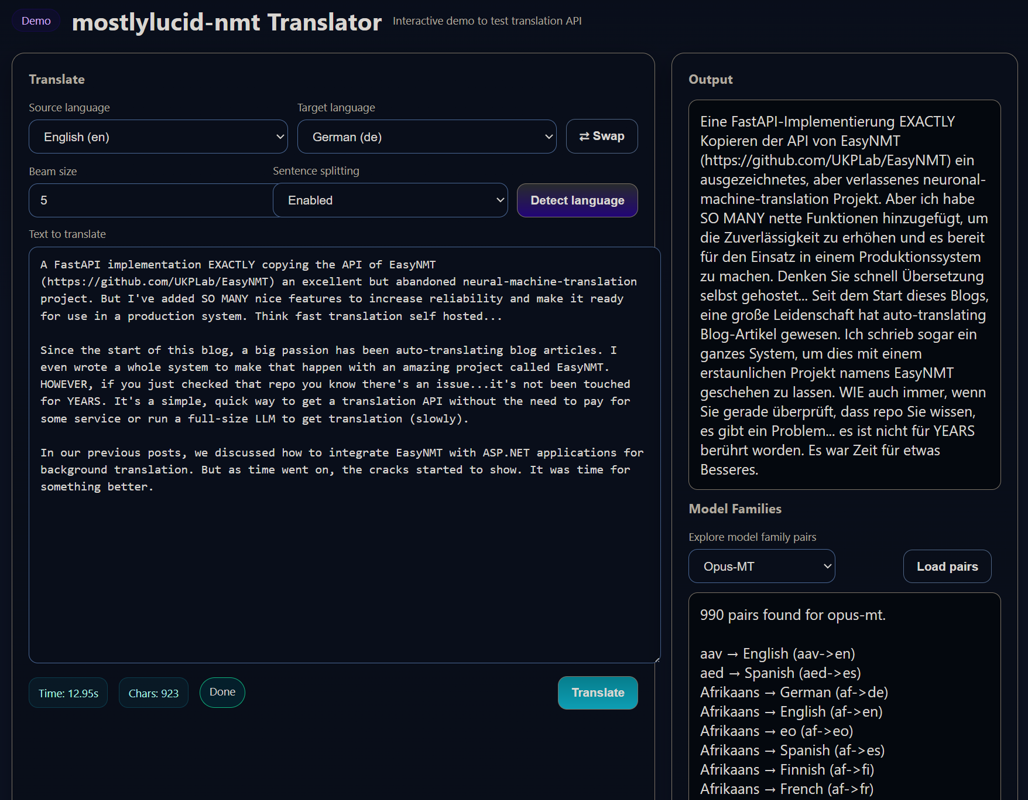
A full featured (mostly) interactive demo page (at http://<server>:<port>/demo or just the root)
Before we dive into the quick start, here's what makes this version game-changing:
New in v3.1: The latest version brings massive improvements to reliability, performance visibility, and intelligent model selection!
1. Smart Model Caching with Visibility - See exactly what's happening:
Reusing loaded model for en->de (3/10 models in cache)Need to load model for en->fr (3/10 models in cache)2. Enhanced Download Progress - No more wondering if it's stuck:
====================================================================================================
  🚀 DOWNLOADING MODEL
  Model: facebook/mbart-large-50-many-to-many-mmt
  Family: mbart50
  Direction: en → bn
  Device: GPU (cuda:0)
  Total Size: 2.46 GB
  Files: 6 main files
====================================================================================================
[Progress bars for each file...]
====================================================================================================
  ✅ MODEL READY
  Model: facebook/mbart-large-50-many-to-many-mmt
  Translation: en → bn is now available
====================================================================================================
3. Data-Driven Intelligent Pivot Selection - No more blind attempts:
[Pivot] Languages reachable from en: 85 languages
[Pivot] Languages that can reach bn: 42 languages
[Pivot] Found 38 possible pivot languages
[Pivot] Selected pivot: en → hi → bn (both legs verified)
4. Fixed Automatic Fallback - No more double-tries:
Request: en→bn with opus-mt
Trying families: ['opus-mt', 'mbart50', 'm2m100']  ✓ All three!
opus-mt: Failed (model doesn't exist)
mbart50: Success! (auto-fallback worked)
5. GPU Clarity - Always know where your models are:
Loading mbart50 model on GPU (cuda:0)Model loaded on device: cuda:0Successfully loaded... on GPU (cuda:0)6. Pivot Model Caching - Efficient pivot reuse:
en->hi, hi->bn[Pivot] Both legs loaded and cached. Ready to translate.7. Per-Request Model Selection - Already works in demo:
model_family parameter per request1. Enhanced Demo Page - Production-ready interactive interface:
2. Performance-Optimised Defaults - "Fast as possible" out of the box:
3. Production Build Optimisation - Smaller, faster images:
requirements-prod.txt for minimal footprint4. Comprehensive Testing & Load Testing - Validate everything:
5. Deployment Documentation - Production-ready from day one:
6. Three Model Families - Choose the best for your needs:
7. Auto-Fallback - Intelligently selects best available model:
8. Model Discovery - Dynamically query available models:
/discover/opus-mt - All 1200+ pairs from Hugging Face/discover/mbart50 - All mBART50 pairs/discover/m2m100 - All M2M100 pairs9. Minimal Images - Smaller, flexible deployments:
10. Single Docker Repository - All variants in one place:
scottgal/mostlylucid-nmt:cpu (or :latest) - CPUscottgal/mostlylucid-nmt:cpu-min - CPU minimalscottgal/mostlylucid-nmt:gpu - GPU with CUDA 12.6scottgal/mostlylucid-nmt:gpu-min - GPU minimal11. Proper Versioning - All images include datetime versioning:
latest, min, gpu, gpu-min) always point to most recent build20250108.143022) for pinning specific builds12. Latest Base Images - Security and performance improvements:
13. Fixed Deprecation Warnings - Future-proof:
Want to just get translating? Here's the absolute simplest way to run mostlylucid-nmt:
All variants are available from one repository with different tags:
| Tag | Full Image Name | Size | Description | Use Case |
|---|---|---|---|---|
cpu (or latest) |
scottgal/mostlylucid-nmt:cpu |
~2.5GB | CPU with source code | Production CPU deployments |
cpu-min |
scottgal/mostlylucid-nmt:cpu-min |
~1.5GB | CPU minimal, no preloaded models | Volume-mapped cache, flexible |
gpu |
scottgal/mostlylucid-nmt:gpu |
~5GB | GPU with CUDA 12.6 + source | Production GPU deployments |
gpu-min |
scottgal/mostlylucid-nmt:gpu-min |
~4GB | GPU minimal, no preloaded models | GPU with volume-mapped cache |
Minimal images are recommended for:
1. Pull and run:
docker run -d \
  --name mostlylucid-nmt \
  -p 8000:8000 \
  scottgal/mostlylucid-nmt
2. Translate some text:
curl -X POST "http://localhost:8000/translate" \
  -H "Content-Type: application/json" \
  -d '{
    "text": ["Hello, how are you?"],
    "target_lang": "de"
  }'
Response:
{
  "translated": ["Hallo, wie geht es Ihnen?"],
  "target_lang": "de",
  "source_lang": "en",
  "translation_time": 0.34
}
Requires NVIDIA Docker runtime:
docker run -d \
  --name mostlylucid-nmt \
  --gpus all \
  -p 8000:8000 \
  -e EASYNMT_MODEL_ARGS='{"torch_dtype":"fp16"}' \
  scottgal/mostlylucid-nmt:gpu
Download models once and keep them across container restarts:
Linux/Mac:
docker run -d \
  --name mostlylucid-nmt \
  -p 8000:8000 \
  -v $HOME/model-cache:/models \
  -e MODEL_CACHE_DIR=/models \
  scottgal/mostlylucid-nmt:cpu-min
Windows (PowerShell):
docker run -d `
  --name mostlylucid-nmt `
  -p 8000:8000 `
  -v ${HOME}/model-cache:/models `
  -e MODEL_CACHE_DIR=/models `
  scottgal/mostlylucid-nmt:cpu-min
Windows (CMD):
docker run -d ^
  --name mostlylucid-nmt ^
  -p 8000:8000 ^
  -v %USERPROFILE%/model-cache:/models ^
  -e MODEL_CACHE_DIR=/models ^
  scottgal/mostlylucid-nmt:cpu-min
Models download automatically on first use and persist in your local directory!
Health check:
curl http://localhost:8000/healthz
That's the 5-minute quick start! For production deployment, configuration, and advanced features, keep reading.
The service includes a full-featured interactive demo page that makes it easy to test translations without writing any code. Access it at:
http://localhost:8000/demo/
The demo page provides a complete translation testing environment with:
1. Language Selection
2. Smart Text Chunking
3. Language Detection
4. Advanced Options
5. Real-Time Statistics
6. Model Family Discovery
The demo implements intelligent text chunking on the client side:
// Example: Translating a 5000-word article
Input: Long article with multiple paragraphs

Step 1: Split by paragraphs (preserves structure)
  → Paragraph 1 (800 chars)
  → Paragraph 2 (1200 chars)
  → Paragraph 3 (600 chars)
  ...

Step 2: Group into ~1000 character chunks
  → Chunk 1: Paragraphs 1-2
  → Chunk 2: Paragraph 3-4
  → Chunk 3: Paragraphs 5-6

Step 3: Translate each chunk sequentially
  → Shows progress: "Translating chunk 1/3..."
  → Shows progress: "Translating chunk 2/3..."
  → Shows progress: "Translating chunk 3/3..."

Step 4: Reassemble with paragraph breaks
  → Final output: Complete translated article with preserved formatting
Quick Testing
Development Aid
Client Reference
Simple Translation:
Long Document Translation:
Language Detection:
The demo page is:
Access the live demo at /demo/ on your running instance!
Now this isn't dumping on EasyNMT it did soething nothing else could and I've built a LOT of projects using it. It's just getting long in the tooth so...what problems have we?
Oh my, there's many. EasyNMT was built almost a decade ago. Technology has moved on...plus it was never intended to be a production-level system. Here are some of the issues:
So...I decided to build a new and improved EasyNMT, now mostlylucid-nmt. This isn't just a patch job; it's a complete rewrite with production use in mind. Here's what makes it better:
MostlyLucid-NMT now supports three translation model families, giving you flexibility based on your needs:
Switching is easy - just set the MODEL_FAMILY environment variable:
# Opus-MT (default, best quality)
MODEL_FAMILY=opus-mt

# mBART50 (50 languages, single model)
MODEL_FAMILY=mbart50

# M2M100 (100 languages, broadest coverage)
MODEL_FAMILY=m2m100
One of the most powerful new features is automatic fallback between model families. This ensures maximum language pair coverage whilst prioritising translation quality.
How it works:
MODEL_FAMILY (e.g., opus-mt for best quality)Example scenario:
# Set primary to Opus-MT (best quality)
MODEL_FAMILY=opus-mt
AUTO_MODEL_FALLBACK=1
MODEL_FALLBACK_ORDER=opus-mt,mbart50,m2m100

# Request Ukrainian → French
# 1. Try Opus-MT first (not available)
# 2. Automatically fall back to mBART50 (available!)
# 3. Translation succeeds with mBART50
Benefits:
Configuration:
# Enable auto-fallback (default: enabled)
AUTO_MODEL_FALLBACK=1

# Set fallback priority (default: opus-mt → mbart50 → m2m100)
MODEL_FALLBACK_ORDER="opus-mt,mbart50,m2m100"

# Disable for strict single-family mode
AUTO_MODEL_FALLBACK=0
This feature is perfect for production environments where you want maximum coverage without sacrificing quality!
-min variants with volume-mapped cache for smaller deployments.You might be wondering: "Why use a dedicated NMT service when LLMs like GPT-4, Claude, or Llama can translate?" Great question. Here's the reality check based on production use:
NMT (mostlylucid-nmt):
LLMs:
Real example: Translating a 1000-word blog post:
When you're auto-translating hundreds of blog posts to 12+ languages, that speed difference is MASSIVE.
NMT Models:
LLMs:
Storage impact:
# NMT: Fits on a USB stick
du -sh model-cache/
2.5G    model-cache/

# LLM: Needs serious storage
du -sh llama-models/
140G    llama-models/
NMT CPU Deployment:
LLM Requirements:
Real cost comparison for 10,000 blog post translations:
| Method | Cost | Time |
|---|---|---|
| mostlylucid-nmt (CPU) | $20/month VPS | 2-3 hours |
| mostlylucid-nmt (GPU) | $50/month GPU VPS | 15-30 minutes |
| GPT-4 API | $150-300 | 8-15 hours |
| Claude API | $200-400 | 6-12 hours |
| Local Llama 70B | $1000+/month hardware | 20-40 hours |
NMT strengths:
LLM challenges:
Example scenario:
Input: "The API returns a 429 status code when rate limited."

NMT (Opus-MT): "Die API gibt einen 429-Statuscode zurück, wenn sie ratenbegrenzt ist."
(Accurate, preserves technical terms)

LLM (might do): "Die API sendet den Fehlercode 429, wenn zu viele Anfragen gestellt werden."
(Interprets rather than translates, adds context not in original)
Use NMT (mostlylucid-nmt) when:
Use LLMs when:
For automated blog translation (my use case), NMT is the clear winner:
Trying this with LLMs would cost hundreds of dollars per month in API fees or require a $2000+ GPU server to self-host. The speed difference alone makes NMT the only practical choice for production translation pipelines.
TL;DR: NMT is purpose-built for translation, runs on modest hardware, and is 10-100x faster than LLMs. If you need fast, consistent, cost-effective translation at scale, NMT wins hands down.
flowchart LR
    A[HTTP Client] --> B[API Gateway]
    B --> C[Translation Endpoint]
    C --> D{Has Capacity?}
    D -->|Yes| E[Translation Service]
    D -->|No| F[Queue with 429]
    F --> E
    E --> G[Process Pipeline]
    G --> H[Get Model from Cache]
    H --> I[Translate]
    I --> J[Return Response]
    J --> A
The request flow is straightforward:
Retry-After headerKey Design: The backpressure mechanism (queue + HTTP 429) prevents crashes under load. When overwhelmed, the service queues requests instead of dying, giving clients intelligent retry timing via Retry-After headers.
When a translation request comes in, here's what happens:
sequenceDiagram
    participant Client
    participant API
    participant Queue
    participant Translator
    participant Cache
    participant Model

    Client->>API: POST /translate
    API->>Queue: Acquire slot

    alt Queue has space
        Queue-->>API: Slot acquired
        API->>Translator: Process translation
        Translator->>Translator: Sanitize input
        Translator->>Translator: Split sentences
        Translator->>Translator: Chunk text
        Translator->>Translator: Mask symbols
        Translator->>Cache: Get model (en→de)

        alt Cache hit
            Cache-->>Translator: Return cached model
        else Cache miss
            Cache->>Model: Load from Hugging Face
            Model-->>Cache: Pipeline loaded
            Cache->>Cache: Evict old if at capacity
            Cache-->>Translator: Return model
        end

        Translator->>Model: Translate batches
        Model-->>Translator: Translations
        Translator->>Translator: Unmask symbols
        Translator->>Translator: Post-process
        Translator-->>API: Translations
        API->>Queue: Release slot
        API-->>Client: 200 OK + translations
    else Queue full
        Queue-->>API: Overflow error
        API-->>Client: 429 Too Many Requests\nRetry-After: X seconds
    end
The service uses a sophisticated multi-stage pipeline to handle messy real-world text:
graph LR
    A[Raw Input] --> B{Sanitize?}
    B -->|Yes| C[Check Noise]
    B -->|No| D[Split Sentences]
    C -->|Is Noise| Z[Return Placeholder]
    C -->|Valid| D

    D --> E[Enforce Max Length]
    E --> F[Chunk for Batching]
    F --> G{Symbol Masking?}

    G -->|Yes| H[Mask Digits/Punct/Emoji]
    G -->|No| I[Translate]
    H --> I

    I --> J{Direct Model?}
    J -->|Available| K[Direct Translation]
    J -->|Not Available| L{Pivot Fallback?}

    L -->|Yes| M[src→en→tgt]
    L -->|No| Z
    K --> N[Unmask Syis robust input handling. Here's what happens:

**Noise Detection:**
- Strips control characters (except \t, \n, \r)
- Checks minimum character count (default: 1)
- Calculates alphanumeric ratio (default: must be ≥20%)
- Rejects pure emoji, pure punctuation, or pure whitespace

**Symbol Masking:**
Why mask symbols? Translation models are trained on text, not emoji or special symbols. These can confuse them or get mangled. So we:

1. Extract all digits, punctuation, and emoji as contiguous runs
2. Replace them with sentinel tokens: `⟪MSK0⟫`, `⟪MSK1⟫`, etc.
3. Translate the masked text
4. Restore the original symbols in their positions

Example:
Input: "Hello 👋 world! Price: $99.99" Masked: "Hello ⟪MSK0⟫ world⟪MSK1⟫ Price⟪MSK2⟫ ⟪MSK3⟫" (👋) (!) (:) ($99.99)
**Post-Processing:**
After translation, we remove "symbol loops" - repeated symbols that weren't in the source:
Source: "Hello world" Bad translation: "Hola mundo!!!!!!!" Cleaned: "Hola mundo" # Removes the !!!! loop
### Sentence Splitting & Chunking

Long texts get split intelligently:

```mermaid
graph TD
    A[Long Text] --> B[Split on . ! ? …]
    B --> C{Sentence > 500 chars?}
    C -->|Yes| D[Split on word boundaries]
    C -->|No| E[Keep sentence]
    D --> E

    E --> F[Group into chunks ≤900 chars]
    F --> G[Translate each chunk]
    G --> H[Join with space]
This ensures:
The LRU cache is smart about GPU memory:
stateDiagram-v2
    [*] --> CheckCache
    CheckCache --> CacheHit: Model exists
    CheckCache --> CacheMiss: Model not loaded

    CacheHit --> MoveToEnd: Update LRU order
    MoveToEnd --> ReturnModel

    CacheMiss --> CheckCapacity
    CheckCapacity --> LoadModel: Space available
    CheckCapacity --> EvictOldest: Cache full

    EvictOldest --> MoveToCPU: Free VRAM
    MoveToCPU --> ClearCUDA: torch.cuda.empty_cache()
    ClearCUDA --> LoadModel

    LoadModel --> AddToCache
    AddToCache --> ReturnModel
    ReturnModel --> [*]
Why this matters:
Instead of crashing under load, the service queues requests:
# Semaphore limits concurrent translations
MAX_INFLIGHT = 1  # On GPU, 1 at a time for efficiency
MAX_QUEUE_SIZE = 1000  # Up to 1000 waiting

# When full:
# - Returns 429 Too Many Requests
# - Includes Retry-After header
# - Estimates wait time based on average duration
The retry estimate is smart:
avg_duration = 2.5 seconds (tracked with EMA)
waiters = 100
slots = 1
estimated_wait = (100 / 1) * 2.5 = 250 seconds
clamped = min(250, 120) = 120 seconds
Retry-After: 120
Not all language pairs have direct models on Hugging Face. Solution? Pivot through English:
graph LR
    A[Ukrainian Text] --> B{Direct uk→fr?}
    B -->|Exists| C[Translate Directly]
    B -->|Missing| D[Pivot via English]

    D --> E[uk→en]
    E --> F[en→fr]
    F --> G[French Result]
    C --> G
This doubles latency but ensures coverage for all supported language pairs.
Let's explore some of the most interesting parts of the codebase! These are real production patterns that make the service robust and efficient. Each snippet includes explanations suitable for non-Python developers.
One of the coolest features is the intelligent model cache that knows how to handle GPU memory:
# src/core/cache.py
from collections import OrderedDict
import torch

class LRUPipelineCache:
    """LRU cache that automatically cleans up GPU memory when evicting models."""

    def __init__(self, capacity: int):
        self.cache = OrderedDict()  # Maintains insertion order
        self.capacity = capacity

    def get(self, key: str):
        """Get model from cache, moves it to end (most recently used)."""
        if key not in self.cache:
            return None
        self.cache.move_to_end(key)  # Mark as recently used
        return self.cache[key]

    def put(self, key: str, value):
        """Add model to cache, evicting oldest if at capacity."""
        if key in self.cache:
            self.cache.move_to_end(key)
        else:
            self.cache[key] = value

        # If cache is full, evict the oldest model
        if len(self.cache) > self.capacity:
            oldest_key, oldest_pipeline = self.cache.popitem(last=False)

            # MAGIC: Move evicted model to CPU to free GPU memory
            try:
                oldest_pipeline.model.to("cpu")
                if torch.cuda.is_available():
                    torch.cuda.empty_cache()  # Tell GPU to release memory
                logger.info(f"Evicted {oldest_key}, freed GPU memory")
            except Exception as e:
                logger.warning(f"Failed to clean GPU memory: {e}")
What's happening here?
OrderedDict: Like a regular dictionary, but remembers the order items were addedThis clever feature tries multiple AI model providers automatically if the first one doesn't have the language pair you need:
# src/services/model_manager.py
def get_pipeline(self, src: str, tgt: str):
    """Try to get translation model, with automatic fallback to other providers."""

    # Determine which model families support this language pair
    families_to_try = []

    if config.AUTO_MODEL_FALLBACK:
        # Try families in priority order: opus-mt → mbart50 → m2m100
        for family in config.MODEL_FALLBACK_ORDER.split(","):
            if self._is_pair_supported(src, tgt, family.strip()):
                families_to_try.append(family.strip())

    # Try each family until one succeeds
    last_error = None
    for family in families_to_try:
        try:
            model_name, src_lang, tgt_lang, _ = self._get_model_name_and_langs(src, tgt, family)

            if family != config.MODEL_FAMILY:
                logger.info(f"Using fallback '{family}' for {src}->{tgt}")

            # Load the model from HuggingFace
            pipeline = transformers.pipeline(
                "translation",
                model=model_name,
                device=device_manager.device_index,
                src_lang=src_lang,
                tgt_lang=tgt_lang
            )

            self.cache.put(f"{src}->{tgt}", pipeline)
            return pipeline

        except Exception as e:
            last_error = e
            logger.warning(f"Family '{family}' failed for {src}->{tgt}: {e}")
            continue  # Try next family

    # All families failed
    raise ModelLoadError(f"{src}->{tgt}", last_error)
What's happening here?
Production-grade queuing that prevents server crashes under heavy load:
# src/services/queue_manager.py
import asyncio
from contextlib import asynccontextmanager

class QueueManager:
    """Manages request queuing and backpressure."""

    def __init__(self, max_inflight: int, max_queue: int):
        self.semaphore = asyncio.Semaphore(max_inflight)  # Limit concurrent translations
        self.max_queue_size = max_queue
        self.waiting_count = 0
        self.inflight_count = 0
        self.avg_duration_sec = 5.0  # Exponential moving average

    @asynccontextmanager
    async def acquire_slot(self):
        """Try to get a translation slot, track metrics, handle queueing."""

        # Check if queue is too full
        if self.waiting_count >= self.max_queue_size:
            # Calculate how long client should wait before retrying
            retry_after = self._estimate_retry_after()
            raise QueueOverflowError(self.waiting_count, retry_after)

        self.waiting_count += 1
        try:
            # Wait for available slot (this is the queue!)
            await self.semaphore.acquire()
            self.waiting_count -= 1
            self.inflight_count += 1

            start_time = time.time()
            yield  # Let the translation happen

            # Update average duration for retry-after estimates
            duration = time.time() - start_time
            alpha = config.RETRY_AFTER_ALPHA  # Smoothing factor (0.2)
            self.avg_duration_sec = alpha * duration + (1 - alpha) * self.avg_duration_sec

        finally:
            self.inflight_count -= 1
            self.semaphore.release()

    def _estimate_retry_after(self) -> int:
        """Smart calculation: how many waiting / how many slots * avg time per request."""
        if self.inflight_count == 0:
            return config.RETRY_AFTER_MIN_SEC

        # If 10 people waiting and 2 slots available, and each takes 5 seconds:
        # retry_after = (10 / 2) * 5 = 25 seconds
        retry_sec = (self.waiting_count / self.semaphore._value) * self.avg_duration_sec

        # Clamp between min and max
        return max(
            config.RETRY_AFTER_MIN_SEC,
            min(int(retry_sec), config.RETRY_AFTER_MAX_SEC)
        )
What's happening here?
max_inflight)@asynccontextmanager): Automatically tracks metrics and cleans upPreserves special characters (emojis, symbols) that translation models might mess up:
# src/utils/symbol_masking.py
import re

def mask_symbols(text: str) -> tuple[str, dict[str, str]]:
    """Replace special symbols with placeholders before translation."""

    originals = {}
    masked_text = text
    placeholder_counter = 0

    # Pattern: Match emojis, symbols, special punctuation
    # \U0001F300-\U0001F9FF = emoji range
    # [\u2600-\u26FF\u2700-\u27BF] = misc symbols
    symbol_pattern = re.compile(
        r'[\U0001F300-\U0001F9FF\u2600-\u26FF\u2700-\u27BF'
        r'\u00A9\u00AE\u2122\u2139\u3030\u303D\u3297\u3299]+'
    )

    for match in symbol_pattern.finditer(text):
        symbol = match.group()
        placeholder = f"__SYMBOL_{placeholder_counter}__"
        originals[placeholder] = symbol
        masked_text = masked_text.replace(symbol, placeholder, 1)
        placeholder_counter += 1

    return masked_text, originals

def unmask_symbols(text: str, originals: dict[str, str]) -> str:
    """Restore original symbols after translation."""
    for placeholder, original in originals.items():
        text = text.replace(placeholder, original)
    return text
Example usage:
# Before translation:
text = "Hello! 👋 Check out this cool feature 🚀"

# Mask symbols:
masked, originals = mask_symbols(text)
# masked = "Hello! __SYMBOL_0__ Check out this cool feature __SYMBOL_1__"
# originals = {"__SYMBOL_0__": "👋", "__SYMBOL_1__": "🚀"}

# Translate the masked text:
translated = translate(masked, "de")  # → "Hallo! __SYMBOL_0__ Schau dir diese coole Funktion an __SYMBOL_1__"

# Unmask symbols:
final = unmask_symbols(translated, originals)
# final = "Hallo! 👋 Schau dir diese coole Funktion an 🚀"
What's happening here?
👋 with __SYMBOL_0__ temporarilyBreaks long texts into chunks that fit model limits while preserving sentence boundaries:
# src/utils/text_processing.py
def chunk_sentences(sentences: list[str], max_chars: int = 900) -> list[list[str]]:
    """Group sentences into chunks that fit within model's max input length."""

    chunks = []
    current_chunk = []
    current_length = 0

    for sentence in sentences:
        sentence_len = len(sentence)

        # If this sentence alone is too long, it goes in its own chunk
        if sentence_len > max_chars:
            if current_chunk:
                chunks.append(current_chunk)
                current_chunk = []
                current_length = 0
            chunks.append([sentence])
            continue

        # If adding this sentence exceeds limit, start new chunk
        if current_length + sentence_len + 1 > max_chars:
            chunks.append(current_chunk)
            current_chunk = [sentence]
            current_length = sentence_len
        else:
            current_chunk.append(sentence)
            current_length += sentence_len + 1  # +1 for space

    # Don't forget the last chunk!
    if current_chunk:
        chunks.append(current_chunk)

    return chunks

def split_sentences(text: str, max_sentence_chars: int = 500) -> list[str]:
    """Split text into sentences, enforcing max length."""

    # Split on common sentence terminators
    sentences = re.split(r'([.!?…]+\s+)', text)

    result = []
    for sentence in sentences:
        if not sentence or sentence.isspace():
            continue

        # If sentence is too long, split on word boundaries
        if len(sentence) > max_sentence_chars:
            words = sentence.split()
            current = []
            current_len = 0

            for word in words:
                if current_len + len(word) + 1 > max_sentence_chars:
                    result.append(' '.join(current))
                    current = [word]
                    current_len = len(word)
                else:
                    current.append(word)
                    current_len += len(word) + 1

            if current:
                result.append(' '.join(current))
        else:
            result.append(sentence.strip())

    return result
What's happening here?
.!?… while preserving the punctuationDynamically discovers available translation models from HuggingFace:
# src/services/model_discovery.py
import httpx
from datetime import datetime, timedelta

class ModelDiscoveryService:
    """Discovers available translation models with 1-hour cache."""

    def __init__(self):
        self._cache = {}  # Cache results to avoid hammering HuggingFace API
        self._cache_ttl = timedelta(hours=1)
        self._hf_api_base = "https://huggingface.co/api/models"

    async def discover_opus_mt_pairs(self, force_refresh: bool = False):
        """Query HuggingFace for all Helsinki-NLP Opus-MT models."""

        cache_key = "opus-mt"

        # Check cache first
        if not force_refresh and cache_key in self._cache:
            cached_data, cached_time = self._cache[cache_key]
            if datetime.now() - cached_time < self._cache_ttl:
                return cached_data  # Cache hit!

        # Cache miss - query HuggingFace API
        async with httpx.AsyncClient() as client:
            response = await client.get(
                self._hf_api_base,
                params={
                    "author": "Helsinki-NLP",
                    "search": "opus-mt",
                    "limit": 1000
                },
                timeout=30.0
            )
            models = response.json()

        # Extract language pairs from model names
        # Example: "Helsinki-NLP/opus-mt-en-de" → ("en", "de")
        pairs = []
        for model in models:
            model_id = model.get("modelId", "")
            if model_id.startswith("Helsinki-NLP/opus-mt-"):
                # Extract the language codes after "opus-mt-"
                lang_part = model_id.replace("Helsinki-NLP/opus-mt-", "")
                if "-" in lang_part:
                    src, tgt = lang_part.split("-", 1)
                    pairs.append({"source": src, "target": tgt})

        # Cache the results
        self._cache[cache_key] = (pairs, datetime.now())

        return pairs
What's happening here?
httpx): Makes non-blocking HTTP requests to HuggingFaceen and de from Helsinki-NLP/opus-mt-en-deAutomatically detects and uses GPU if available:
# src/core/device.py
import torch

class DeviceManager:
    """Smart device selection with GPU auto-detection."""

    def __init__(self):
        self.use_gpu = self._should_use_gpu()
        self.device_index = self._resolve_device()
        self.device_str = "cpu" if self.device_index < 0 else f"cuda:{self.device_index}"

        # Auto-configure parallel translation slots based on device
        if self.device_index >= 0:
            # GPU: Run translations serially to avoid VRAM fragmentation
            self.max_inflight = 1
        else:
            # CPU: Can handle multiple translations in parallel
            self.max_inflight = config.MAX_WORKERS_BACKEND

        self._log_device_info()

    def _should_use_gpu(self) -> bool:
        """Check if GPU should be used."""
        if config.USE_GPU.lower() == "false":
            return False
        if config.USE_GPU.lower() == "true":
            return torch.cuda.is_available()
        # "auto" mode: use GPU if available
        return torch.cuda.is_available()

    def _resolve_device(self) -> int:
        """Returns device index: -1 for CPU, 0+ for CUDA."""
        if not self.use_gpu:
            return -1

        # Check if specific CUDA device requested
        if config.DEVICE and config.DEVICE.startswith("cuda:"):
            device_num = int(config.DEVICE.split(":")[1])
            return device_num

        return 0  # Use first GPU

    def _log_device_info(self):
        """Log device information at startup."""
        if self.device_index >= 0:
            gpu_name = torch.cuda.get_device_name(self.device_index)
            vram_gb = torch.cuda.get_device_properties(self.device_index).total_memory / 1e9
            logger.info(f"Using GPU: {gpu_name} ({vram_gb:.1f}GB VRAM)")
            logger.info(f"Max inflight translations: {self.max_inflight} (GPU mode)")
        else:
            cpu_count = os.cpu_count()
            logger.info(f"Using CPU ({cpu_count} cores)")
            logger.info(f"Max inflight translations: {self.max_inflight} (CPU mode)")

# Global singleton instance
device_manager = DeviceManager()
What's happening here?
max_inflight=1 on GPU (avoid VRAM fragmentation) vs max_inflight=4 on CPU (maximise parallelism)DEVICE=cuda:1Smooth retry-after estimation that adapts to actual request durations:
# Snippet from QueueManager showing EMA calculation
def update_avg_duration(self, new_duration: float):
    """Update average duration using exponential moving average."""

    # EMA formula: new_avg = α × new_value + (1 - α) × old_avg
    # α = smoothing factor (0.0 to 1.0)
    #   - Higher α = more weight to recent values (faster adaptation)
    #   - Lower α = more weight to historical values (more stable)

    alpha = 0.2  # 20% weight to new value, 80% to historical

    self.avg_duration_sec = (
        alpha * new_duration +
        (1 - alpha) * self.avg_duration_sec
    )
Example:
# Initial average: 5.0 seconds
# New request takes: 10.0 seconds

# EMA calculation:
new_avg = 0.2 * 10.0 + 0.8 * 5.0
        = 2.0 + 4.0
        = 6.0 seconds

# Next request takes: 3.0 seconds
new_avg = 0.2 * 3.0 + 0.8 * 6.0
        = 0.6 + 4.8
        = 5.4 seconds
What's happening here?
Retry-After times that adapt to current system loadThese code patterns demonstrate production-grade Python practices:
Each of these features solves a real production problem that would cause crashes, errors, or poor user experience without them!
The service is highly configurable via environment variables. Here's the complete guide:
# Prefer GPU if available (default)
USE_GPU=auto

# Force GPU
USE_GPU=true

# Force CPU
USE_GPU=false

# Explicit device override
DEVICE=cuda:0
DEVICE=cpu
# Model family selection (NEW in v2.0!)
MODEL_FAMILY=opus-mt   # Best quality (default)
MODEL_FAMILY=mbart50   # 50 languages, single model
MODEL_FAMILY=m2m100    # 100 languages, maximum coverage

# Auto-fallback between model families (NEW in v2.0!)
AUTO_MODEL_FALLBACK=1  # Enabled by default
MODEL_FALLBACK_ORDER="opus-mt,mbart50,m2m100"  # Priority order

# Volume-mapped model cache (NEW in v2.0!)
MODEL_CACHE_DIR=/models  # Persistent cache directory

# Model arguments passed to transformers.pipeline
EASYNMT_MODEL_ARGS='{"torch_dtype":"fp16"}'
EASYNMT_MODEL_ARGS='{"torch_dtype":"bf16","cache_dir":"/models"}'

# Preload models at startup (reduces first-request latency)
PRELOAD_MODELS="en->de,de->en,fr->en"

# LRU cache capacity
MAX_CACHED_MODELS=6
New Configuration Explained:
MODEL_FAMILY: Choose which model family to use as primary
opus-mt: Best quality, 1200+ pairs, separate modelsmbart50: Good quality, 50 languages, single 2.4GB modelm2m100: Good quality, 100 languages, single 2.2GB modelAUTO_MODEL_FALLBACK: Automatically try other families if pair unavailable
1 (default): Enabled - maximum coverage0: Disabled - strict single-family modeMODEL_FALLBACK_ORDER: Priority order for fallback
"opus-mt,mbart50,m2m100" (quality first)"m2m100,mbart50,opus-mt" (coverage first)MODEL_CACHE_DIR: Persistent model storage via Docker volumes
/models and map volume: -v ./model-cache:/modelstorch_dtype options:
fp16 (float16): 2x faster on GPU, half the memory, negligible quality lossbf16 (bfloat16): Better numerical stability than fp16, requires modern GPUsfp32 (float32): Full precision, slowest but most accurate# Batch size for translation (higher = faster but more VRAM)
EASYNMT_BATCH_SIZE=16 # CPU: 8-16, GPU: 32-64
# Maximum text length per item
EASYNMT_MAX_TEXT_LEN=1000
# Maximum beam size (higher = better quality but slower)
EASYNMT_MAX_BEAM_SIZE=5
# Worker thread pools
MAX_WORKERS_BACKEND=1 # Translation workers
MAX_WORKERS_FRONTEND=2 # Language detection workers
# Enable request queueing (highly recommended)
ENABLE_QUEUE=1

# Max concurrent translations
# Auto: 1 on GPU, MAX_WORKERS_BACKEND on CPU
MAX_INFLIGHT_TRANSLATIONS=1

# Max queued requests before 429
MAX_QUEUE_SIZE=1000

# Per-request timeout (0 = disabled)
TRANSLATE_TIMEOUT_SEC=180

# Retry-After estimation
RETRY_AFTER_MIN_SEC=1      # Floor
RETRY_AFTER_MAX_SEC=120    # Ceiling
RETRY_AFTER_ALPHA=0.2      # EMA smoothing factor
# Enable input filtering
INPUT_SANITIZE=1

# Minimum alphanumeric ratio (0.2 = 20%)
INPUT_MIN_ALNUM_RATIO=0.2

# Minimum character count
INPUT_MIN_CHARS=1

# Language code for undetermined/noise
UNDETERMINED_LANG_CODE=und
# Default sentence splitting behavior
PERFORM_SENTENCE_SPLITTING_DEFAULT=1

# Max chars per sentence before word-boundary split
MAX_SENTENCE_CHARS=500

# Max chars per chunk for batching
MAX_CHUNK_CHARS=900

# Sentence joiner
JOIN_SENTENCES_WITH=" "
# Enable symbol masking
SYMBOL_MASKING=1

# What to mask
MASK_DIGITS=1    # Mask 0-9
MASK_PUNCT=1     # Mask .,!? etc.
MASK_EMOJI=1     # Mask 😀🎉 etc.
# Align response array length to input
ALIGN_RESPONSES=1

# Placeholder for failed items (when aligned)
SANITIZE_PLACEHOLDER=""

# Response format
EASYNMT_RESPONSE_MODE=strings    # ["translation1", "translation2"]
EASYNMT_RESPONSE_MODE=objects    # [{"text":"translation1"}, ...]
# Enable two-hop translation via pivot
PIVOT_FALLBACK=1

# Pivot language (usually English)
PIVOT_LANG=en
# Log level
LOG_LEVEL=INFO

# Per-request logging (verbose)
REQUEST_LOG=1

# Format
LOG_FORMAT=plain    # Human-readable
LOG_FORMAT=json     # Structured JSON

# File logging with rotation
LOG_TO_FILE=1
LOG_FILE_PATH=/var/log/marian-translator/app.log
LOG_FILE_MAX_BYTES=10485760    # 10MB
LOG_FILE_BACKUP_COUNT=5

# Include raw text in logs (privacy risk!)
LOG_INCLUDE_TEXT=0
# Periodically clear CUDA cache (seconds, 0=disabled)
CUDA_CACHE_CLEAR_INTERVAL_SEC=0
# Worker count (use 1 for single GPU)
WEB_CONCURRENCY=1

# Request timeout
TIMEOUT=60

# Graceful shutdown timeout
GRACEFUL_TIMEOUT=20

# Keep-alive timeout
KEEP_ALIVE=5
# GET request
curl "http://localhost:8000/translate?target_lang=de&text=Hello%20world&source_lang=en"

# Response
{
  "translations": ["Hallo Welt"]
}
# POST request
curl -X POST http://localhost:8000/translate \
  -H 'Content-Type: application/json' \
  -d '{
    "text": [
      "Hello world",
      "This is a test",
      "Machine translation is amazing"
    ],
    "target_lang": "de",
    "source_lang": "en",
    "beam_size": 1,
    "perform_sentence_splitting": true
  }'

# Response
{
  "target_lang": "de",
  "source_lang": "en",
  "translated": [
    "Hallo Welt",
    "Das ist ein Test",
    "Maschinenübersetzung ist erstaunlich"
  ],
  "translation_time": 0.342
}
# Omit source_lang for auto-detection
curl -X POST http://localhost:8000/translate \
  -H 'Content-Type: application/json' \
  -d '{
    "text": ["Bonjour le monde"],
    "target_lang": "en"
  }'

# Response
{
  "target_lang": "en",
  "source_lang": "fr",  # Detected
  "translated": ["Hello world"],
  "translation_time": 0.156
}
# GET
curl "http://localhost:8000/language_detection?text=Hola%20mundo"
# {"language": "es"}

# POST with batch
curl -X POST http://localhost:8000/language_detection \
  -H 'Content-Type: application/json' \
  -d '{"text": ["Hello", "Bonjour", "Hola"]}'
# {"languages": ["en", "fr", "es"]}
# Health check
curl http://localhost:8000/healthz
# {"status": "ok"}

# Readiness
curl http://localhost:8000/readyz
# {
#   "status": "ready",
#   "device": "cuda:0",
#   "queue_enabled": true,
#   "max_inflight": 1
# }

# Cache status
curl http://localhost:8000/cache
# {
#   "capacity": 6,
#   "size": 3,
#   "keys": ["en->de", "de->en", "fr->en"],
#   "device": "cuda:0",
#   "inflight": 1,
#   "queue_enabled": true
# }

# Model info
curl http://localhost:8000/model_name | jq
# When queue is full, you get 429
curl -X POST http://localhost:8000/translate \
  -H 'Content-Type: application/json' \
  -d '{"text": ["test"], "target_lang": "de"}'

# Response: 429 Too Many Requests
# Headers: Retry-After: 45
# Body:
{
  "message": "Too many requests; queue full",
  "retry_after_sec": 45
}

# Proper client behavior:
# 1. Read Retry-After header
# 2. Wait that long + jitter
# 3. Retry request
All Docker images now include proper versioning and metadata for tracking.
Build all 4 variants with automatic datetime versioning:
Windows:
.\build-all.ps1
Linux/Mac:
chmod +x build-all.sh
./build-all.sh
Each build creates two tags:
latest, min, gpu, gpu-min) - always points to most recent20250108.143022) - immutable snapshotExamples:
# Always get the latest version
docker pull scottgal/mostlylucid-nmt:cpu
# Or use the :latest alias
docker pull scottgal/mostlylucid-nmt:latest

# Pin to a specific version for reproducibility
docker pull scottgal/mostlylucid-nmt:cpu-20250108.143022
docker pull scottgal/mostlylucid-nmt:cpu-min-20250108.143022
Each image includes metadata:
Inspect labels:
docker inspect scottgal/mostlylucid-nmt:cpu | jq '.[0].Config.Labels'
For detailed build instructions and CI/CD integration, see BUILD.md.
# Using pre-built image from Docker Hub (recommended)
docker run -d \
  --name translator \
  -p 8000:8000 \
  -e ENABLE_QUEUE=1 \
  -e MAX_QUEUE_SIZE=500 \
  -e EASYNMT_BATCH_SIZE=16 \
  -e TIMEOUT=180 \
  -e LOG_LEVEL=INFO \
  -e REQUEST_LOG=0 \
  scottgal/mostlylucid-nmt

# Or build locally
docker build -t mostlylucid-nmt .
docker run -d --name translator -p 8000:8000 mostlylucid-nmt

# Check logs
docker logs -f translator
# Using pre-built GPU image from Docker Hub (recommended)
docker run -d \
  --name translator-gpu \
  --gpus all \
  -p 8000:8000 \
  -e USE_GPU=true \
  -e DEVICE=cuda:0 \
  -e PRELOAD_MODELS="en->de,de->en,en->fr,fr->en,en->es,es->en" \
  -e EASYNMT_MODEL_ARGS='{"torch_dtype":"fp16"}' \
  -e EASYNMT_BATCH_SIZE=64 \
  -e MAX_CACHED_MODELS=8 \
  -e ENABLE_QUEUE=1 \
  -e MAX_QUEUE_SIZE=2000 \
  -e WEB_CONCURRENCY=1 \
  -e TIMEOUT=180 \
  -e GRACEFUL_TIMEOUT=30 \
  -e LOG_FORMAT=json \
  -e LOG_TO_FILE=1 \
  -v /var/log/translator:/var/log/marian-translator \
  scottgal/mostlylucid-nmt:gpu

# Or build locally
docker build -f Dockerfile.gpu -t mostlylucid-nmt:gpu .
docker run -d --name translator-gpu --gpus all -p 8000:8000 mostlylucid-nmt:gpu

# Monitor cache and performance
watch -n 5 "curl -s http://localhost:8000/cache | jq"
version: '3.8'

services:
  translator:
    image: scottgal/mostlylucid-nmt:gpu  # Use pre-built image
    container_name: translator
    restart: unless-stopped

    deploy:
      resources:
        reservations:
          devices:
            - driver: nvidia
              count: 1
              capabilities: [gpu]

    ports:
      - "8000:8000"

    environment:
      USE_GPU: "true"
      DEVICE: "cuda:0"
      PRELOAD_MODELS: "en->de,de->en,en->fr,fr->en"
      EASYNMT_MODEL_ARGS: '{"torch_dtype":"fp16"}'
      EASYNMT_BATCH_SIZE: "64"
      MAX_CACHED_MODELS: "8"
      ENABLE_QUEUE: "1"
      MAX_QUEUE_SIZE: "2000"
      WEB_CONCURRENCY: "1"
      TIMEOUT: "180"
      LOG_FORMAT: "json"
      LOG_TO_FILE: "1"

    volumes:
      - translator-logs:/var/log/marian-translator
      - translator-cache:/root/.cache/huggingface

    healthcheck:
      test: ["CMD", "curl", "-f", "http://localhost:8000/healthz"]
      interval: 30s
      timeout: 10s
      retries: 3
      start_period: 40s

volumes:
  translator-logs:
  translator-cache:
apiVersion: apps/v1
kind: Deployment
metadata:
  name: translator
spec:
  replicas: 2  # Scale horizontally for CPU, use 1 per GPU
  selector:
    matchLabels:
      app: translator
  template:
    metadata:
      labels:
        app: translator
    spec:
      containers:
      - name: translator
        image: scottgal/mostlylucid-nmt:gpu
        ports:
        - containerPort: 8000
        env:
        - name: USE_GPU
          value: "true"
        - name: EASYNMT_MODEL_ARGS
          value: '{"torch_dtype":"fp16"}'
        - name: PRELOAD_MODELS
          value: "en->de,de->en"
        - name: ENABLE_QUEUE
          value: "1"
        - name: MAX_QUEUE_SIZE
          value: "2000"

        resources:
          requests:
            memory: "4Gi"
            cpu: "2"
            nvidia.com/gpu: 1
          limits:
            memory: "8Gi"
            cpu: "4"
            nvidia.com/gpu: 1

        livenessProbe:
          httpGet:
            path: /healthz
            port: 8000
          initialDelaySeconds: 30
          periodSeconds: 10

        readinessProbe:
          httpGet:
            path: /readyz
            port: 8000
          initialDelaySeconds: 20
          periodSeconds: 5

---
apiVersion: v1
kind: Service
metadata:
  name: translator
spec:
  selector:
    app: translator
  ports:
  - port: 80
    targetPort: 8000
  type: LoadBalancer
Use FP16 precision
EASYNMT_MODEL_ARGS='{"torch_dtype":"fp16"}'
Tune batch size
# Start high, reduce if you get OOM
EASYNMT_BATCH_SIZE=64  # Try 128 on large GPUs
Preload hot models
PRELOAD_MODELS="en->de,de->en,en->fr,fr->en,en->es,es->en"
Single worker per GPU
WEB_CONCURRENCY=1
MAX_INFLIGHT_TRANSLATIONS=1
Increase cache size
MAX_CACHED_MODELS=10 # Keep more models in VRAM
Lower beam size for throughput
# beam_size=1 is 3-5x faster than beam_size=5
# Quality difference is often minimal
curl -X POST ... -d '{"beam_size": 1, ...}'
Lower batch size
EASYNMT_BATCH_SIZE=8
Increase parallelism
MAX_WORKERS_BACKEND=4
MAX_INFLIGHT_TRANSLATIONS=4
WEB_CONCURRENCY=2
Disable sentence splitting for short texts
PERFORM_SENTENCE_SPLITTING_DEFAULT=0
Batch requests
// Bad: 100 separate requests
for (const text of texts) {
  await translate(text);
}

// Good: 1 batch request
await translate(texts);
Respect Retry-After
async function translateWithRetry(texts) {
  try {
    return await translate(texts);
  } catch (err) {
    if (err.status === 429) {
      const retryAfter = err.headers['retry-after'];
      const jitter = Math.random() * 5;
      await sleep((retryAfter + jitter) * 1000);
      return translateWithRetry(texts);
    }
    throw err;
  }
}
Use connection pooling
// Reuse HTTP connections
const agent = new https.Agent({ keepAlive: true });
Group by language pair
// Bad: mixed language pairs in one request
translate([
  { text: "Hello", sourceLang: "en", targetLang: "de" },
  { text: "Bonjour", sourceLang: "fr", targetLang: "de" }
]);

// Good: group by language pair
translateBatch(enToDe, "en", "de");
translateBatch(frToDe, "fr", "de");
If you integrate Prometheus (not built-in, but easy to add):
translation_requests_total{lang_pair="en->de",status="success"} 1523
translation_requests_total{lang_pair="en->de",status="error"} 7
translation_duration_seconds{lang_pair="en->de",quantile="0.5"} 0.342
translation_duration_seconds{lang_pair="en->de",quantile="0.95"} 1.234
translation_queue_depth 23
translation_cache_size 6
translation_cache_hits_total 8234
translation_cache_misses_total 142
# Enable JSON logging
LOG_FORMAT=json REQUEST_LOG=1

# Output example
{
  "ts": "2025-01-08T15:30:45+0000",
  "level": "INFO",
  "name": "app",
  "message": "translate_post done items=5 dt=0.342s",
  "req_id": "a3d2f5b1-c4e6-4f7a-9d8c-1e2f3a4b5c6d",
  "endpoint": "/translate",
  "src": "en",
  "tgt": "de",
  "items": 5,
  "duration_ms": 342
}
You can pipe this to Elasticsearch, CloudWatch, or any log aggregator.
| Feature | EasyNMT | MostlyLucid-NMT |
|---|---|---|
| Stability | Crashes frequently | Production-ready, graceful error handling |
| Input Handling | Fails on emoji/symbols | Robust sanitisation + symbol masking |
| Backpressure | None, OOMs under load | Semaphore + queue with retry-after |
| Observability | Minimal | Health/ready/cache endpoints, structured logs |
| GPU Support | CUDA 10.x (ancient) | CUDA 12.6, FP16/BF16 support |
| Model Management | Manual, no caching | LRU cache with auto-eviction |
| Sentence Handling | Basic splitting | Smart chunking + batching |
| Pivot Translation | No | Automatic fallback via English |
| Graceful Shutdown | No | Yes, with timeout |
| Configuration | Limited | 40+ env vars for fine-tuning |
| API Compatibility | EasyNMT endpoints | 100% compatible + extensions |
| Code Quality | Unmaintained, monolithic | Modular, typed, tested |
Cause: Queue is full.
Solution:
MAX_QUEUE_SIZEMAX_INFLIGHT_TRANSLATIONS (if you have headroom)Cause: Queueing disabled and all slots busy.
Solution:
ENABLE_QUEUE=1Cause: Batch size too high or too many models cached.
Solution:
EASYNMT_BATCH_SIZEMAX_CACHED_MODELSEASYNMT_MODEL_ARGS='{"torch_dtype":"fp16"}'WEB_CONCURRENCY=1 and MAX_INFLIGHT_TRANSLATIONS=1Cause: Model not preloaded.
Solution:
PRELOAD_MODELS="en->de,de->en"
Cause: Helsinki-NLP/opus-mt-{src}-{tgt} doesn't exist on Hugging Face.
Solution:
PIVOT_FALLBACK=1 (routes via English)curl http://localhost:8000/lang_pairsCause: Symbol masking might be too aggressive.
Solution:
MASK_EMOJI=0 or MASK_PUNCT=0SYMBOL_MASKING=0If you're following along from our previous posts on EasyNMT integration, here's how to update your C# client:
public class MostlyLucidNmtClient
{
    private readonly HttpClient _httpClient;
    private readonly string _baseUrl;

    public MostlyLucidNmtClient(HttpClient httpClient, string baseUrl)
    {
        _httpClient = httpClient;
        _baseUrl = baseUrl;
    }

    public async Task<TranslationResponse> TranslateAsync(
        List<string> texts,
        string targetLang,
        string sourceLang = "",
        int beamSize = 1,
        bool performSentenceSplitting = true,
        CancellationToken cancellationToken = default)
    {
        var request = new TranslationRequest
        {
            Text = texts,
            TargetLang = targetLang,
            SourceLang = sourceLang,
            BeamSize = beamSize,
            PerformSentenceSplitting = performSentenceSplitting
        };

        var response = await _httpClient.PostAsJsonAsync(
            $"{_baseUrl}/translate",
            request,
            cancellationToken);

        if (response.StatusCode == System.Net.HttpStatusCode.TooManyRequests)
        {
            // Read Retry-After header
            var retryAfter = response.Headers.RetryAfter?.Delta?.TotalSeconds ?? 30;
            var jitter = Random.Shared.Next(0, 5);
            await Task.Delay(TimeSpan.FromSeconds(retryAfter + jitter), cancellationToken);

            // Retry
            return await TranslateAsync(texts, targetLang, sourceLang, beamSize,
                performSentenceSplitting, cancellationToken);
        }

        response.EnsureSuccessStatusCode();
        return await response.Content.ReadFromJsonAsync<TranslationResponse>(cancellationToken);
    }
}

public class TranslationRequest
{
    [JsonPropertyName("text")]
    public List<string> Text { get; set; }

    [JsonPropertyName("target_lang")]
    public string TargetLang { get; set; }

    [JsonPropertyName("source_lang")]
    public string SourceLang { get; set; }

    [JsonPropertyName("beam_size")]
    public int BeamSize { get; set; }

    [JsonPropertyName("perform_sentence_splitting")]
    public bool PerformSentenceSplitting { get; set; }
}

public class TranslationResponse
{
    [JsonPropertyName("target_lang")]
    public string TargetLang { get; set; }

    [JsonPropertyName("source_lang")]
    public string SourceLang { get; set; }

    [JsonPropertyName("translated")]
    public List<string> Translated { get; set; }

    [JsonPropertyName("translation_time")]
    public double TranslationTime { get; set; }
}
Register in your DI container:
services.AddHttpClient<MostlyLucidNmtClient>(client =>
{
    client.BaseAddress = new Uri("http://translator:8000");
    client.Timeout = TimeSpan.FromMinutes(3);
});
MostlyLucid-NMT is a complete rewrite of the EasyNMT concept with production reliability in mind. Version 2.0 takes it to the next level with multi-model family support and intelligent fallback.
1. Maximum Language Coverage
2. Quality-First Approach
3. Flexible Deployment
4. Production-Ready
The service has been battle-tested translating thousands of blog posts across 100+ languages (up from 13 in v1.0!). It runs reliably in production on both CPU and GPU, handles spiky traffic gracefully, and provides sub-second translations for typical blog content.
# Maximum coverage with auto-fallback (recommended!)
docker run -d -p 8000:8000 \
  -v ./model-cache:/models \
  -e MODEL_CACHE_DIR=/models \
  -e AUTO_MODEL_FALLBACK=1 \
  -e MODEL_FALLBACK_ORDER="opus-mt,mbart50,m2m100" \
  scottgal/mostlylucid-nmt:cpu-min

# GPU with best quality
docker run -d --gpus all -p 8000:8000 \
  -e USE_GPU=true \
  -e MODEL_FAMILY=opus-mt \
  -e EASYNMT_MODEL_ARGS='{"torch_dtype":"fp16"}' \
  scottgal/mostlylucid-nmt:gpu

# Test it
curl -X POST http://localhost:8000/translate \
  -H 'Content-Type: application/json' \
  -d '{"text": ["Hello world"], "target_lang": "de"}'
The entire service is a single Docker container. No complex setup, no external dependencies beyond the Hugging Face model downloads.
Just pull, run, and translate 100+ languages with the best available models!
Happy translating!
The full source code is available at [your-repo-link]. Contributions welcome!
Translation NMT Neural Machine Translation Python FastAPI Docker CUDA PyTorch Transformers Helsinki-NLP Production Microservices API

© 2026 Scott Galloway — Unlicense — All content and source code on this site is free to use, copy, modify, and sell.
