


NOTE: This article is primarily AI generated as part of my nuget package as release documentation. It's pretty interesting so I put it here but if that's a problem for you please ignore it.
Have you ever needed to test against an API that wasn't ready yet? Or wanted to develop offline without hitting rate limits? The OpenAPI Dynamic Mock Generator lets you load any OpenAPI specification and instantly creates a fully-functional mock API with realistic, LLM-generated data.
No configuration files. No manual endpoint creation. Just point it at an OpenAPI spec and start making requests.


You can find the GitHub here for the project, all public domain etc...
Modern applications depend on dozens of external APIs. During development, you face several challenges:
graph TD
    A[Your App] --> B{External API}
    B -->|Not Ready| C[Development Blocked]
    B -->|Rate Limited| D[Can't Test Freely]
    B -->|Requires Auth| E[Complex Setup]
    B -->|Expensive| F[Cost Concerns]
    B -->|Unreliable| G[Flaky Tests]
Traditional solutions involve:
Point the system at any OpenAPI spec, and it automatically:
sequenceDiagram
    participant Dev as Developer
    participant System as Mock System
    participant Spec as OpenAPI Spec
    participant LLM as Local LLM

    Dev->>System: Load spec from URL/file
    System->>Spec: Parse OpenAPI document
    Spec-->>System: Endpoints, schemas, descriptions
    System->>System: Register dynamic routes

    Dev->>System: GET /petstore/pet/123
    System->>LLM: Generate data for "Pet" schema
    LLM-->>System: Realistic pet data
    System-->>Dev: {"id": 123, "name": "Max", ...}
The OpenAPI system consists of several coordinated components:
graph TB
    A[HTTP Request] --> B{Route Matches?}
    B -->|No| C[404 Not Found]
    B -->|Yes| D[DynamicOpenApiManager]
    D --> E[Find Matching Endpoint]
    E --> F[OpenApiRequestHandler]
    F --> G[Extract Schema from Spec]
    G --> H[Build LLM Prompt]
    H --> I[PromptBuilder]
    I --> J[Include Context?]
    J -->|Yes| K[OpenApiContextManager]
    J -->|No| L[LLM Client]
    K --> L
    L --> M[Get Response]
    M --> N[JsonExtractor]
    N --> O[Return Mock Data]
Key Components:
Specs can be loaded from three sources:
1. Remote URL
POST /api/openapi/specs
Content-Type: application/json

{
  "name": "petstore",
  "source": "https://petstore3.swagger.io/api/v3/openapi.json",
  "basePath": "/petstore"
}
2. Local File
POST /api/openapi/specs
Content-Type: application/json

{
  "name": "my-api",
  "source": "./specs/my-api.yaml",
  "basePath": "/api/v1"
}
3. Data URL (Base64 Encoded)
POST /api/openapi/specs
Content-Type: application/json

{
  "name": "inline-api",
  "source": "data:application/json;base64,eyJvcGVuYXBpIjoiMy...",
  "basePath": "/api"
}
Here's what happens when you load a spec:
public async Task<SpecLoadResult> LoadSpecAsync(
    string name,
    string source,
    string? basePath = null,
    string? contextName = null)
{
    // 1. Use scoped service factory for OpenApiSpecLoader
    using var scope = _scopeFactory.CreateScope();
    var specLoader = scope.ServiceProvider
        .GetRequiredService<OpenApiSpecLoader>();

    // 2. Load the OpenAPI document
    var document = await specLoader.LoadSpecAsync(source);

    // 3. Determine base path from spec or parameter
    var effectiveBasePath = basePath
        ?? document.Servers?.FirstOrDefault()?.Url
        ?? "/api";

    // 4. Store spec with configuration
    var config = new OpenApiSpecConfig
    {
        Name = name,
        Source = source,
        Document = document,
        BasePath = effectiveBasePath,
        ContextName = contextName,
        LoadedAt = DateTimeOffset.UtcNow
    };

    _specs.AddOrUpdate(name, config, (_, __) => config);

    // 5. Notify listeners via SignalR
    await NotifySpecLoaded(name, effectiveBasePath);

    return new SpecLoadResult
    {
        Name = name,
        BasePath = effectiveBasePath,
        EndpointCount = CountEndpoints(document),
        Success = true
    };
}
When a request arrives, the system matches it against all loaded specs:
public OpenApiEndpointMatch? FindMatchingEndpoint(string path, string method)
{
    // Try each loaded spec
    foreach (var spec in _specs.Values)
    {
        // Remove base path prefix
        var relativePath = path;
        if (path.StartsWith(spec.BasePath))
        {
            relativePath = path.Substring(spec.BasePath.Length);
        }

        // Find matching path in OpenAPI document
        var (pathTemplate, operation) = FindOperation(
            spec.Document,
            relativePath,
            method);

        if (operation != null)
        {
            return new OpenApiEndpointMatch
            {
                Spec = spec,
                PathTemplate = pathTemplate,
                Operation = operation,
                Method = ParseMethod(method)
            };
        }
    }

    return null;
}
Once a matching endpoint is found, the handler generates a response:
public async Task<string> HandleRequestAsync(
    HttpContext context,
    OpenApiDocument document,
    string path,
    OperationType method,
    OpenApiOperation operation,
    string? contextName = null,
    CancellationToken cancellationToken = default)
{
    // 1. Extract request body
    var requestBody = await ReadRequestBodyAsync(context.Request);

    // 2. Get success response schema
    var shape = ExtractResponseSchema(operation);

    // 3. Get context history if using contexts
    var contextHistory = !string.IsNullOrWhiteSpace(contextName)
        ? _contextManager.GetContextForPrompt(contextName)
        : null;

    // 4. Build prompt from OpenAPI metadata
    var description = operation.Summary ?? operation.Description;
    var prompt = _promptBuilder.BuildPrompt(
        method.ToString(),
        path,
        requestBody,
        new ShapeInfo { Shape = shape },
        streaming: false,
        description: description,
        contextHistory: contextHistory);

    // 5. Get response from LLM
    var rawResponse = await _llmClient.GetCompletionAsync(
        prompt,
        cancellationToken);

    // 6. Extract clean JSON
    var jsonResponse = JsonExtractor.ExtractJson(rawResponse);

    // 7. Store in context if configured
    if (!string.IsNullOrWhiteSpace(contextName))
    {
        _contextManager.AddToContext(
            contextName,
            method.ToString(),
            path,
            requestBody,
            jsonResponse);
    }

    return jsonResponse;
}
The system extracts response schemas from OpenAPI definitions:
private string? ExtractResponseSchema(OpenApiOperation operation)
{
    // Look for successful response (2xx)
    var successResponse = operation.Responses
        .FirstOrDefault(r => r.Key.StartsWith("2"))
        .Value;

    if (successResponse == null)
        return null;

    // Get JSON content
    var jsonContent = successResponse.Content
        .FirstOrDefault(c => c.Key.Contains("json"))
        .Value;

    if (jsonContent?.Schema == null)
        return null;

    // Convert OpenAPI schema to JSON Schema
    return ConvertToJsonSchema(jsonContent.Schema);
}

private string ConvertToJsonSchema(OpenApiSchema schema)
{
    // Recursively build JSON Schema representation
    var builder = new StringBuilder();
    builder.Append("{");

    if (schema.Type != null)
    {
        builder.Append($"\"type\":\"{schema.Type}\"");
    }

    if (schema.Properties?.Count > 0)
    {
        builder.Append(",\"properties\":{");
        var props = schema.Properties
            .Select(p => $"\"{p.Key}\":{ConvertToJsonSchema(p.Value)}");
        builder.Append(string.Join(",", props));
        builder.Append("}");
    }

    if (schema.Items != null)
    {
        builder.Append(",\"items\":");
        builder.Append(ConvertToJsonSchema(schema.Items));
    }

    builder.Append("}");
    return builder.ToString();
}
Let's walk through mocking the classic Petstore API:
Step 1: Load the Spec
POST /api/openapi/specs
Content-Type: application/json

{
  "name": "petstore",
  "source": "https://petstore3.swagger.io/api/v3/openapi.json",
  "basePath": "/petstore"
}
Response:
{
  "name": "petstore",
  "basePath": "/petstore",
  "endpointCount": 19,
  "endpoints": [
    {"path": "/petstore/pet", "method": "POST"},
    {"path": "/petstore/pet/{petId}", "method": "GET"},
    {"path": "/petstore/pet/findByStatus", "method": "GET"},
    ...
  ],
  "success": true
}
Step 2: Use the Mock Endpoints
Now all 19 endpoints are available:
### Get a pet by ID
GET /petstore/pet/123

### Response (auto-generated):
{
  "id": 123,
  "name": "Max",
  "category": {
    "id": 1,
    "name": "Dogs"
  },
  "photoUrls": [
    "https://example.com/max1.jpg"
  ],
  "tags": [
    {"id": 1, "name": "friendly"},
    {"id": 2, "name": "trained"}
  ],
  "status": "available"
}
### Find pets by status
GET /petstore/pet/findByStatus?status=available

### Response (auto-generated array):
[
  {
    "id": 42,
    "name": "Buddy",
    "status": "available",
    ...
  },
  {
    "id": 43,
    "name": "Luna",
    "status": "available",
    ...
  }
]
Step 3: Inspect the Spec
GET /api/openapi/specs/petstore

### Shows full details:
### - All endpoints
### - Load time
### - Context configuration
### - Base path
Step 4: Reload if Spec Changes
POST /api/openapi/specs/petstore/reload
Step 5: Remove When Done
DELETE /api/openapi/specs/petstore
You can load multiple specs at once, each with its own base path:
### Load Petstore at /petstore
POST /api/openapi/specs
{"name": "petstore", "source": "...", "basePath": "/petstore"}

### Load GitHub API at /github
POST /api/openapi/specs
{"name": "github", "source": "...", "basePath": "/github"}

### Load Stripe API at /stripe
POST /api/openapi/specs
{"name": "stripe", "source": "...", "basePath": "/stripe"}

### All three APIs now available simultaneously:
GET /petstore/pet/123
GET /github/users/octocat
GET /stripe/customers/cus_123
For even more realism, assign a context to a spec:
POST /api/openapi/specs
Content-Type: application/json

{
  "name": "petstore",
  "source": "https://petstore3.swagger.io/api/v3/openapi.json",
  "basePath": "/petstore",
  "contextName": "petstore-session"
}
Now all petstore endpoints share the same context:
### Create a pet
POST /petstore/pet
{"name": "Max", "status": "available"}

### Response: {"id": 42, "name": "Max", "status": "available"}

### Get the pet (will reference same ID and name)
GET /petstore/pet/42

### Response: {"id": 42, "name": "Max", "status": "available"}
### Notice: Consistent ID and name from context
The test endpoint lets you try an endpoint without making a real request:
POST /api/openapi/test
Content-Type: application/json

{
  "specName": "petstore",
  "path": "/pet/123",
  "method": "GET"
}

### Returns mock response without affecting routes
This is useful for:
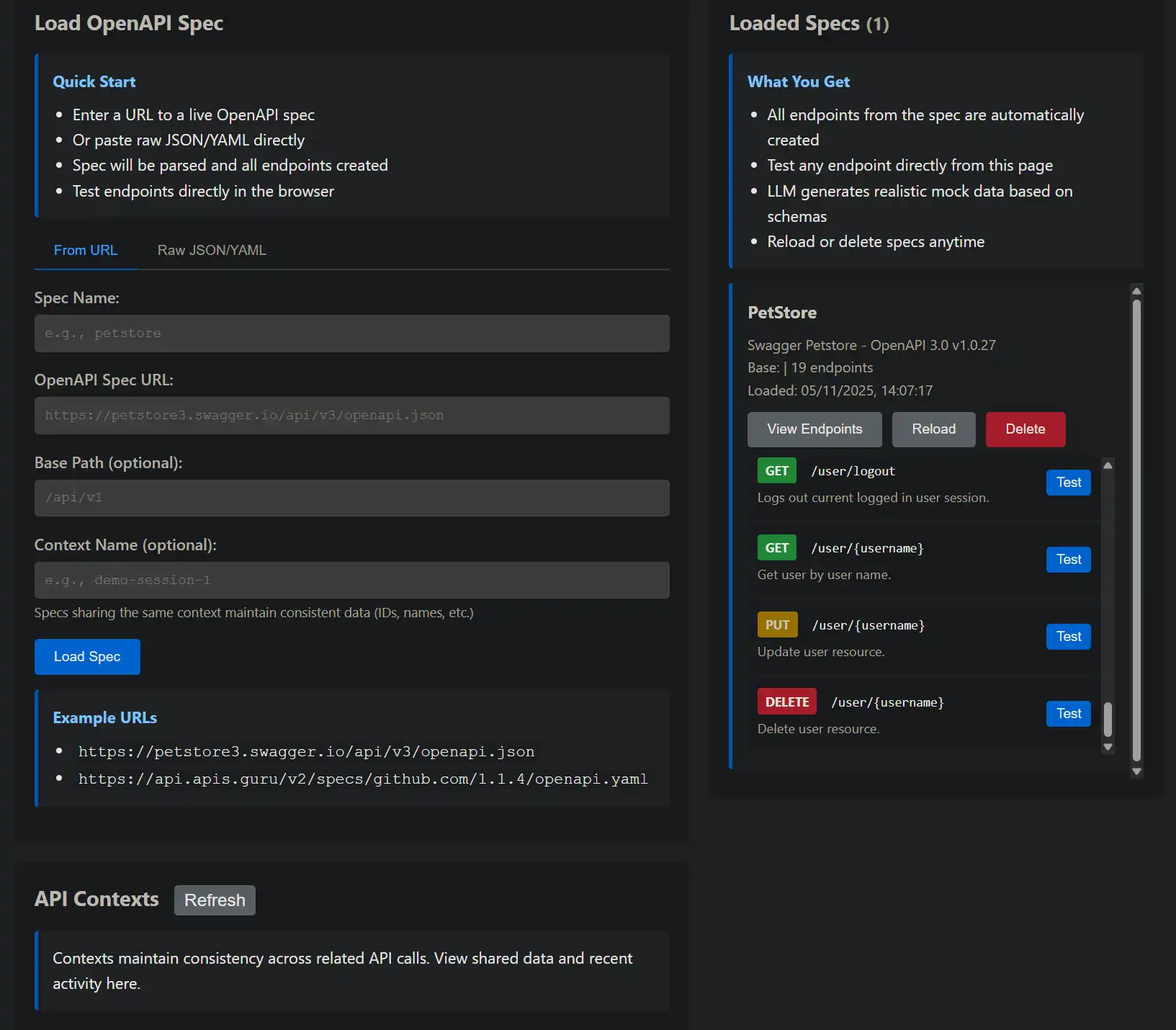
For visual management, visit http://localhost:5116/OpenApi:
graph TD
    A[OpenAPI Manager UI] --> B[Load Spec Section]
    A --> C[Spec List]
    A --> D[Context Viewer]

    B --> E[URL Input]
    B --> F[JSON Input]
    B --> G[Context Configuration]

    C --> H[Spec Card]
    H --> I[Reload Button]
    H --> J[Delete Button]
    H --> K[View Endpoints]

    D --> L[Active Contexts]
    L --> M[Context Details]
    L --> N[Clear Context]
Features:
Path parameters are automatically extracted:
# OpenAPI Spec
/pet/{petId}:
  get:
    parameters:
      - name: petId
        in: path
        schema:
          type: integer
GET /petstore/pet/123
### LLM receives: "Generate data for Pet with petId=123"
### Response: {"id": 123, ...}
Query parameters influence the response:
/pet/findByStatus:
  get:
    parameters:
      - name: status
        in: query
        schema:
          type: string
          enum: [available, pending, sold]
GET /petstore/pet/findByStatus?status=available
### LLM receives: "Generate array of Pets with status=available"
### Response: [{"status": "available", ...}, ...]
POST/PUT bodies are included in the prompt:
/pet:
  post:
    requestBody:
      content:
        application/json:
          schema:
            $ref: '#/components/schemas/Pet'
POST /petstore/pet
Content-Type: application/json

{"name": "Max", "status": "available"}

### LLM receives: "Generate response for creating Pet with name=Max, status=available"
### Response: {"id": 42, "name": "Max", "status": "available"}
OpenAPI descriptions guide the LLM:
/pet/{petId}:
  get:
    summary: Find pet by ID
    description: Returns a single pet based on the ID provided
These are included in the prompt, helping the LLM understand the endpoint's purpose.
The system uses the first successful (2xx) response:
responses:
  '200':
    description: Successful operation
    content:
      application/json:
        schema:
          $ref: '#/components/schemas/Pet'
  '404':
    description: Pet not found
Only the 200 schema is used for mock generation (404s are not currently simulated).
When specs are loaded/deleted, the UI receives real-time notifications via SignalR:
public async Task NotifySpecLoaded(string name, string basePath)
{
    await _hubContext.Clients.All.SendAsync("SpecLoaded", new
    {
        name,
        basePath,
        timestamp = DateTimeOffset.UtcNow
    });
}

public async Task NotifySpecDeleted(string name)
{
    await _hubContext.Clients.All.SendAsync("SpecDeleted", new
    {
        name,
        timestamp = DateTimeOffset.UtcNow
    });
}
JavaScript UI code:
const connection = new signalR.HubConnectionBuilder()
    .withUrl('/hubs/openapi')
    .build();

connection.on('SpecLoaded', (data) => {
    showNotification(`Spec "${data.name}" loaded at ${data.basePath}`, 'success');
    refreshSpecList();
});

connection.on('SpecDeleted', (data) => {
    showNotification(`Spec "${data.name}" deleted`, 'info');
    refreshSpecList();
});
The system supports:
Both JSON and YAML specs are automatically detected and parsed.
 Bad:  {"name": "spec1", ...}
 Good: {"name": "github-v3", ...}
Avoid conflicts by using unique base paths:
### Good separation
/petstore/...
/github/...
/stripe/...

### Bad (conflicts!)
/api/... (multiple specs)
If your OpenAPI spec is updated, reload it:
POST /api/openapi/specs/my-api/reload
POST /api/openapi/specs
{
  "name": "petstore",
  "source": "...",
  "contextName": "test-session"
}

### Now all petstore calls maintain consistency
Remove specs you're no longer using:
DELETE /api/openapi/specs/old-spec
OpenAPI specs work alongside regular /api/mock endpoints:
### OpenAPI-based (from spec)
GET /petstore/pet/123
### Uses Pet schema from OpenAPI spec

### Regular mock (shape-based)
GET /api/mock/custom?shape={"id":0,"name":"string"}
### Uses explicit shape parameter
Both use the same underlying LLM but differ in how the schema is provided.
Loaded specs are cached in memory:
private readonly ConcurrentDictionary<string, OpenApiSpecConfig> _specs = new();
DynamicOpenApiManager is a singleton, so specs remain loaded for the application lifetime.
Multiple specs can be loaded in parallel:
### Send these simultaneously
POST /api/openapi/specs {"name": "spec1", ...}
POST /api/openapi/specs {"name": "spec2", ...}
POST /api/openapi/specs {"name": "spec3", ...}
All three will load in parallel, not sequentially.
Problem: Spec loading fails
Solutions:
Problem: 404 on expected endpoint
Solutions:
/petstore + /pet/123 = /petstore/pet/123Problem: Generated data doesn't match expected schema
Solutions:
The OpenAPI Dynamic Mock Generator turns any OpenAPI specification into a fully-functional mock API in seconds. No manual configuration, no hardcoded responses, no maintenance overhead.
Simply load a spec and start making requests. The LLM generates realistic, varied data that conforms to your schemas, making it perfect for:
Combined with API Contexts, you get stateful mock APIs that maintain consistency across calls, providing an even more realistic simulation of production systems.
The future of mock APIs is dynamic, intelligent, and driven by the same LLMs that power modern development tools. Welcome to the new era of API mocking.

© 2026 Scott Galloway — Unlicense — All content and source code on this site is free to use, copy, modify, and sell.
