This is a viewer only at the moment see the article on how this works.
To update the preview hit Ctrl-Alt-R (or ⌘-Alt-R on Mac) or Enter to refresh. The Save icon lets you save the markdown file to disk
This is a preview from the server running through my markdig pipeline
Friday, 07 November 2025
npm Package Available: This implementation is now available as @mostlylucid/mermaid-enhancements - a production-ready npm package. See Publishing Mermaid Enhancements as an npm Package for details on how to use it in your projects.
Mermaid is a fantastic tool for creating diagrams from text, but the default rendering can be limiting for complex diagrams. Users can't easily zoom in to see details, pan around large diagrams, or export them for documentation. In this article, I'll show you how I enhanced Mermaid diagrams on this site with interactive pan/zoom controls, fullscreen lightbox viewing, and export functionality (both PNG and SVG formats).
This implementation is production-ready, handles dark mode switching gracefully, and is resilient to Cloudflare Rocket Loader interference.
So what we're going for is this. A nice in page (and popout) mermaid.js display that's sorta like GitHub's but better. Means diagrams don't take up SCREENS but are still easuu to read.
Out of the box, Mermaid diagrams have several limitations:
I've implemented a comprehensive enhancement system that adds:
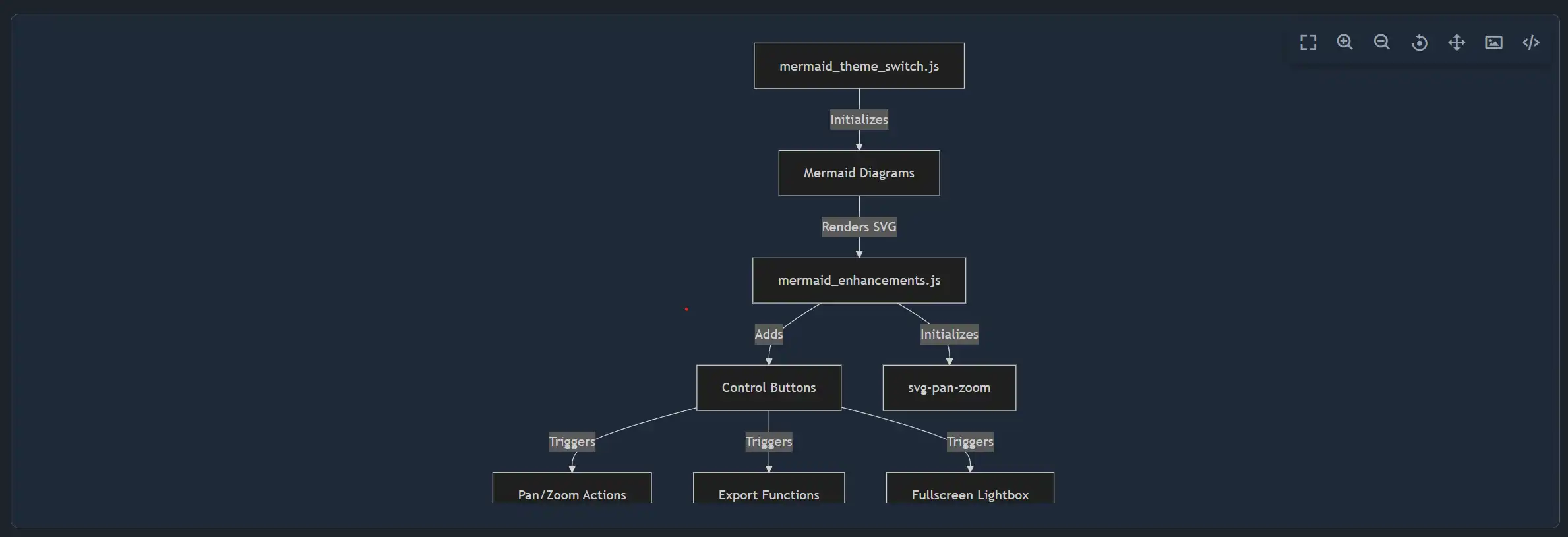
The solution consists of three main components:
graph TB
    A[mermaid_theme_switch.js] -->|Initializes| B[Mermaid Diagrams]
    B -->|Renders SVG| C[mermaid_enhancements.js]
    C -->|Adds| D[Control Buttons]
    C -->|Initializes| E[svg-pan-zoom]
    D -->|Triggers| F[Pan/Zoom Actions]
    D -->|Triggers| G[Export Functions]
    D -->|Triggers| H[Fullscreen Lightbox]
First, install the required npm packages:
npm install svg-pan-zoom html-to-image
These libraries provide:
svg-pan-zoom - Interactive pan and zoom functionality for SVG elementshtml-to-image - Export SVG/PNG functionalityThe main enhancement module (mermaid_enhancements.js) handles all the interactive features.
Each diagram gets a floating control panel with buttons for all actions:
function createControlButtons(container, diagramId) {
    // Check if controls already exist
    if (container.querySelector('.mermaid-controls')) {
        return;
    }

    const controlsDiv = document.createElement('div');
    controlsDiv.className = 'mermaid-controls';

    const buttons = [
        { icon: 'bx-fullscreen', title: 'Fullscreen', action: 'fullscreen' },
        { icon: 'bx-zoom-in', title: 'Zoom In', action: 'zoomIn' },
        { icon: 'bx-zoom-out', title: 'Zoom Out', action: 'zoomOut' },
        { icon: 'bx-reset', title: 'Reset View', action: 'reset' },
        { icon: 'bx-move', title: 'Pan', action: 'pan' },
        { icon: 'bx-image', title: 'Export as PNG', action: 'exportPng' },
        { icon: 'bx-code-alt', title: 'Export as SVG', action: 'exportSvg' }
    ];

    buttons.forEach(btn => {
        const button = document.createElement('button');
        button.className = `mermaid-control-btn bx ${btn.icon}`;
        button.setAttribute('title', btn.title);
        button.setAttribute('aria-label', btn.title);
        button.setAttribute('data-action', btn.action);
        button.setAttribute('data-diagram-id', diagramId);
        controlsDiv.appendChild(button);
    });

    container.appendChild(controlsDiv);
}
The svg-pan-zoom library provides smooth, performant interaction:
function initPanZoom(svgElement, diagramId) {
    // Clean up existing instance if present
    if (panZoomInstances.has(diagramId)) {
        try {
            panZoomInstances.get(diagramId).destroy();
        } catch (e) {
            console.warn('Failed to destroy existing pan-zoom instance:', e);
        }
        panZoomInstances.delete(diagramId);
    }

    try {
        const panZoomInstance = svgPanZoom(svgElement, {
            zoomEnabled: true,
            controlIconsEnabled: false, // We use custom controls
            fit: true,
            center: true,
            minZoom: 0.1,
            maxZoom: 10,
            zoomScaleSensitivity: 0.3,
            dblClickZoomEnabled: true,
            mouseWheelZoomEnabled: true,
            preventMouseEventsDefault: true,
            contain: false
        });

        panZoomInstances.set(diagramId, panZoomInstance);
        return panZoomInstance;
    } catch (error) {
        console.error('Failed to initialize pan-zoom:', error);
        return null;
    }
}
The export system preserves diagram quality and handles both PNG and SVG formats:
async function exportDiagram(container, format, diagramId) {
    try {
        const svgElement = container.querySelector('svg');
        if (!svgElement) {
            window.showToast && window.showToast('No diagram found to export', 3000, 'error');
            return;
        }

        // Clone the SVG to avoid modifying the original
        const clonedSvg = svgElement.cloneNode(true);

        // Get the viewBox or calculate from bounding box
        let viewBox = clonedSvg.getAttribute('viewBox');
        if (!viewBox) {
            const bbox = svgElement.getBBox();
            viewBox = `${bbox.x} ${bbox.y} ${bbox.width} ${bbox.height}`;
            clonedSvg.setAttribute('viewBox', viewBox);
        }

        // Parse viewBox to get dimensions
        const [, , vbWidth, vbHeight] = viewBox.split(' ').map(Number);

        // Set explicit dimensions based on viewBox for proper export
        clonedSvg.setAttribute('width', vbWidth);
        clonedSvg.setAttribute('height', vbHeight);

        // Remove inline styles but keep viewBox
        clonedSvg.removeAttribute('style');
        clonedSvg.style.backgroundColor = 'transparent';
        clonedSvg.style.maxWidth = 'none';

        // Create temporary container
        const tempDiv = document.createElement('div');
        tempDiv.style.position = 'absolute';
        tempDiv.style.left = '-9999px';
        tempDiv.appendChild(clonedSvg);
        document.body.appendChild(tempDiv);

        let dataUrl;
        const timestamp = new Date().toISOString().replace(/[:.]/g, '-');
        const filename = `mermaid-diagram-${timestamp}`;

        if (format === 'png') {
            dataUrl = await toPng(clonedSvg, {
                backgroundColor: 'white',
                pixelRatio: 2 // Higher quality
            });
            downloadFile(dataUrl, `${filename}.png`);
        } else {
            dataUrl = await toSvg(clonedSvg, {
                backgroundColor: 'transparent'
            });
            downloadFile(dataUrl, `${filename}.svg`);
        }

        // Clean up
        document.body.removeChild(tempDiv);

        window.showToast && window.showToast(`Diagram exported as ${format.toUpperCase()}`, 3000, 'success');
    } catch (error) {
        console.error('Failed to export diagram:', error);
        window.showToast && window.showToast('Failed to export diagram', 3000, 'error');
    }
}
Key export considerations:
pixelRatio: 2 for crisp PNG exportsThe lightbox provides an immersive viewing experience:
function openFullscreenLightbox(container, diagramId) {
    const svgElement = container.querySelector('svg');
    if (!svgElement) return;

    // Create lightbox overlay
    const lightbox = document.createElement('div');
    lightbox.className = 'mermaid-lightbox';
    lightbox.innerHTML = `
        <div class="mermaid-lightbox-content">
            <button class="mermaid-lightbox-close bx bx-x" aria-label="Close"></button>
            <div class="mermaid-lightbox-diagram-wrapper">
                <div class="mermaid-lightbox-diagram"></div>
            </div>
        </div>
    `;

    // Clone and prepare SVG
    const clonedSvg = svgElement.cloneNode(true);
    clonedSvg.removeAttribute('width');
    clonedSvg.removeAttribute('height');
    clonedSvg.style.width = '100%';
    clonedSvg.style.height = '100%';

    const diagramContainer = lightbox.querySelector('.mermaid-lightbox-diagram');
    diagramContainer.appendChild(clonedSvg);

    // Add controls to lightbox
    const wrapper = lightbox.querySelector('.mermaid-lightbox-diagram-wrapper');
    const lightboxDiagramId = `${diagramId}-lightbox`;
    createControlButtons(wrapper, lightboxDiagramId);

    document.body.appendChild(lightbox);

    // Initialize pan-zoom after layout completes
    setTimeout(() => {
        const panZoom = initPanZoom(clonedSvg, lightboxDiagramId);
        if (panZoom) {
            panZoom.resize();
            panZoom.fit();
            panZoom.center();
        }
    }, 100);

    // Close handlers
    const closeLightbox = () => {
        if (panZoomInstances.has(lightboxDiagramId)) {
            try {
                panZoomInstances.get(lightboxDiagramId).destroy();
            } catch (e) {
                console.warn('Failed to destroy lightbox pan-zoom:', e);
            }
            panZoomInstances.delete(lightboxDiagramId);
        }
        lightbox.remove();
    };

    lightbox.querySelector('.mermaid-lightbox-close').addEventListener('click', closeLightbox);
    lightbox.addEventListener('click', (e) => {
        if (e.target === lightbox) closeLightbox();
    });

    // ESC key to close
    const escHandler = (e) => {
        if (e.key === 'Escape') {
            closeLightbox();
            document.removeEventListener('keydown', escHandler);
        }
    };
    document.addEventListener('keydown', escHandler);
}
This ties everything together and is called after Mermaid renders:
export function enhanceMermaidDiagrams() {
    const diagrams = document.querySelectorAll('.mermaid[data-processed="true"]');

    diagrams.forEach(diagram => {
        const svgElement = diagram.querySelector('svg');
        if (!svgElement) return;

        // CRITICAL: Remove inline max-width constraint that Mermaid adds
        svgElement.style.maxWidth = 'none';

        // Wrap diagram with controls
        const diagramId = wrapDiagramWithControls(diagram);

        // Initialize pan/zoom and auto-fit
        const panZoom = initPanZoom(svgElement, diagramId);
        if (panZoom) {
            // Fit diagram to container by default
            setTimeout(() => {
                panZoom.resize();
                panZoom.fit();
                panZoom.center();
            }, 100);
        }
    });

    // Set up event delegation for control buttons (only once)
    if (!document.body.hasAttribute('data-mermaid-controls-initialized')) {
        document.body.addEventListener('click', handleControlClick);
        document.body.setAttribute('data-mermaid-controls-initialized', 'true');
    }
}
Critical fix: Mermaid applies an inline style="max-width: 1020px" to SVG elements, which prevents full-width display. Removing this is essential for proper responsive behavior.
The theme switcher ensures diagrams re-render correctly when switching between light and dark modes:
import { enhanceMermaidDiagrams } from './mermaid_enhancements';

const loadMermaid = async (theme) => {
    if (!window.mermaid) return;
    try {
        window.mermaid.initialize({
            startOnLoad: false,
            theme,
            themeVariables: {
                background: 'transparent'
            }
        });
        await window.mermaid.run({
            querySelector: elementSelector,
        });

        // Enhance diagrams after rendering completes
        // Use requestAnimationFrame for better timing
        await new Promise(resolve => {
            requestAnimationFrame(() => {
                requestAnimationFrame(() => {
                    enhanceMermaidDiagrams();
                    resolve();
                });
            });
        });
    } catch (err) {
        console.error('Mermaid render error:', err);
    }
};
Using requestAnimationFrame twice ensures the browser has completed painting the SVG before we try to enhance it.
Cloudflare's Rocket Loader can delay JavaScript execution, breaking initialization. Here's the bulletproof solution:
// Wait for all dependencies to load with exponential backoff
function waitForDependencies(maxAttempts = 50) {
    return new Promise((resolve) => {
        let attempts = 0;

        const checkDependencies = () => {
            attempts++;

            const depsReady =
                typeof window.hljs !== 'undefined' &&
                typeof window.mermaid !== 'undefined' &&
                typeof window.Alpine !== 'undefined' &&
                typeof window.htmx !== 'undefined';

            if (depsReady) {
                console.log('All dependencies loaded after', attempts, 'attempts');

                // Start Alpine.js now that it's loaded
                if (window.Alpine && !window.Alpine.version) {
                    try {
                        window.Alpine.start();
                        console.log('Alpine.js started');
                    } catch (err) {
                        console.error('Failed to start Alpine:', err);
                    }
                }

                resolve();
            } else if (attempts >= maxAttempts) {
                console.warn('Timeout waiting for dependencies');
                resolve(); // Continue anyway
            } else {
                // Retry with exponential backoff
                const delay = Math.min(50 * Math.pow(1.2, attempts), 500);
                setTimeout(checkDependencies, delay);
            }
        };

        checkDependencies();
    });
}

// Robust initialization
async function safeInitialize() {
    try {
        await waitForDependencies();

        if (document.readyState === 'loading') {
            await new Promise(resolve => {
                document.addEventListener('DOMContentLoaded', resolve, { once: true });
            });
        }

        await initializePage();
    } catch (err) {
        console.error('Failed to initialize page:', err);
        // Retry once after delay
        setTimeout(() => {
            initializePage().catch(e => console.error('Retry failed:', e));
        }, 1000);
    }
}

safeInitialize();
Also ensure your main script has the data-cfasync="false" attribute to exclude it from Rocket Loader:
<script src="~/js/dist/main.js" type="module" asp-append-version="true" data-cfasync="false"></script>
The CSS uses Tailwind utility classes and custom styling for polish:
/* Mermaid diagram wrapper */
.mermaid-wrapper {
    @apply relative rounded-lg overflow-hidden w-full;
    margin: 1rem 0;
}

.mermaid-wrapper .mermaid {
    @apply m-0 w-full;
    min-height: 500px;
    display: flex;
    align-items: center;
    justify-content: center;
    padding: 1rem;
}

.mermaid-wrapper .mermaid svg {
    width: 100% !important;
    height: auto !important;
    min-height: 450px;
}

/* Control buttons */
.mermaid-controls {
    @apply absolute top-2 right-2 flex gap-1 z-10;
    background: rgba(255, 255, 255, 0.9);
    border-radius: 0.5rem;
    padding: 0.25rem;
    box-shadow: 0 2px 8px rgba(0, 0, 0, 0.1);
}

.dark .mermaid-controls {
    background: rgba(31, 41, 55, 0.95);
    box-shadow: 0 2px 8px rgba(0, 0, 0, 0.3);
}

.mermaid-control-btn {
    @apply p-2 rounded cursor-pointer transition-all duration-200;
    background: transparent;
    border: none;
    color: #4b5563;
    font-size: 1.25rem;
    display: flex;
    align-items: center;
    justify-content: center;
    width: 2rem;
    height: 2rem;
}

.mermaid-control-btn:hover {
    background: rgba(37, 99, 235, 0.1);
    color: #2563eb;
    transform: scale(1.1);
}

.dark .mermaid-control-btn {
    color: #9ca3af;
}

.dark .mermaid-control-btn:hover {
    background: rgba(55, 65, 81, 0.8);
    color: #60a5fa;
}

/* Lightbox */
.mermaid-lightbox {
    @apply fixed inset-0 z-50 flex items-center justify-center;
    background: rgba(0, 0, 0, 0.85);
    backdrop-filter: blur(4px);
    animation: fadeIn 0.2s ease-out;
}

.dark .mermaid-lightbox {
    background: rgba(0, 0, 0, 0.95);
}

.mermaid-lightbox-content {
    @apply relative w-11/12 h-5/6 bg-white rounded-lg shadow-2xl;
    max-width: 1400px;
}

.dark .mermaid-lightbox-content {
    @apply bg-gray-800;
}

.mermaid-lightbox-close {
    @apply absolute top-4 right-4 z-10 p-2 rounded-full cursor-pointer transition-all;
    background: rgba(0, 0, 0, 0.5);
    border: none;
    color: white;
    font-size: 2rem;
    width: 3rem;
    height: 3rem;
    display: flex;
    align-items: center;
    justify-content: center;
}

.mermaid-lightbox-close:hover {
    background: rgba(220, 38, 38, 0.8);
    transform: scale(1.1);
}

@keyframes fadeIn {
    from { opacity: 0; }
    to { opacity: 1; }
}
Here's how to verify everything works:
With proper initialization, you should see:
All dependencies loaded after 1 attempts
Alpine.js started
Highlight.js copy plugin registered
Highlight.js initialized on page load
Mermaid initialized on page load
Document is ready - all initializations complete
HTMX event listener registered successfully
After HTMX swaps, you should see:
HTMX afterSettle triggered for: contentcontainer
Highlight.js applied after HTMX swap
Mermaid initialized
Mermaid applied after HTMX swap
HTMX afterSettle complete for: contentcontainer
Tested and working on:
IE11 is not supported due to modern JavaScript features (const, arrow functions, async/await, requestAnimationFrame).
This comprehensive enhancement transforms static Mermaid diagrams into interactive, exportable visualizations. The implementation is production-ready, resilient to edge cases, and provides an excellent user experience.
Key takeaways:
max-width constraint for full-width diagramsRather than copying code, you can now install this functionality as an npm package:
npm install @mostlylucid/mermaid-enhancements
import { init } from '@mostlylucid/mermaid-enhancements';
import '@mostlylucid/mermaid-enhancements/styles.css';

await init();
See Publishing Mermaid Enhancements as an npm Package for full documentation, framework integration examples, and advanced configuration options.
The complete source code is also available in this blog's repository at Mostlylucid/src/js/mermaid_enhancements.js and as an open-source npm package at mostlylucidweb/mostlylucid-mermaid.
Here's a complex example showing the architecture of this blog's content system:
graph TB
    subgraph Client["Client Browser"]
        A[User Request] -->|HTMX| B[Blog Controller]
        B -->|Cache Miss| C[Blog Service]
        C -->|File Mode| D[Markdown Service]
        C -->|DB Mode| E[EF Core Context]
        D -->|Parse| F[Markdig Pipeline]
        F -->|Render| G[HTML + Mermaid]
        E -->|Query| H[PostgreSQL]
        H -->|Full-Text Search| I[GIN Index]
        G -->|Enhance| J[mermaid_enhancements.js]
        J -->|Initialize| K[svg-pan-zoom]
        J -->|Add| L[Control Buttons]
        L -->|Export| M[html-to-image]
    end

    subgraph Background["Background Services"]
        N[File Watcher] -->|Change Detected| O[Saves to DB]
        O -->|Trigger| P[Translation Service]
        P -->|Batch| Q[EasyNMT API]
        Q -->|12 Languages| R[Translated Files]
    end

    style A stroke:#22c55e,stroke-width:3px,color:#4ade80
    style G stroke:#3b82f6,stroke-width:3px,color:#60a5fa
    style J stroke:#f59e0b,stroke-width:3px,color:#f59e0b
    style K stroke:#ec4899,stroke-width:3px,color:#ec4899
    style M stroke:#8b5cf6,stroke-width:3px,color:#8b5cf6
Try clicking the controls on the diagram above!

© 2026 Scott Galloway — Unlicense — All content and source code on this site is free to use, copy, modify, and sell.
