This is a viewer only at the moment see the article on how this works.
To update the preview hit Ctrl-Alt-R (or ⌘-Alt-R on Mac) or Enter to refresh. The Save icon lets you save the markdown file to disk
This is a preview from the server running through my markdig pipeline
Sunday, 16 November 2025
When your tools track themselves, evolve themselves, and choose themselves
Note: This is Part 8 in the Semantic Intelligence series. Part 7 covered the overall DSE architecture. This article dives deep into something I glossed over: how the tools themselves work, track usage, evolve, and get smarter over time.
Note: If you thought the workflow evolution in Part 7 was wild, wait until you see what happens when every single tool has the same capabilities.
In Part 7, I showed you Directed Synthetic Evolution: workflows that plan, generate, execute, evaluate, and improve. I mentioned "tools" a bunch of times.
Here's what I didn't explain:
Those tools? They're not static. They're not configuration files that sit there unchanged.
They're living artifacts that:
In other words: Tools are nodes. Nodes are tools. Everything is evolving.
And it gets weirder.
Let me show you what the system actually has:
$ ls -la tools/
drwxr-xr-x  llm/          # LLM-based tools (27 specialists)
drwxr-xr-x  executable/   # Executable validators/generators
drwxr-xr-x  openapi/      # External API integrations
drwxr-xr-x  custom/       # User-defined tools
-rw-r--r--  index.json    # 5,464 lines of tool metadata
That index.json? 5,464 lines of tool definitions, usage stats, version history, fitness scores, and lineage tracking.
Every tool in there:
NOTE: The system will actually run WITHOUT any tools. Just less efficiently; and dumber. Without them tools would be generated as a normal part of the workflow decomposition. It would still slowly adapt but it'd take WAY more tokens.
Let's look at what a tool actually is.
Here's a real tool definition from the system:
tools/llm/long_form_writer.yaml
name: "Long-Form Content Writer"
type: "llm"
description: "Specialized for writing long-form content (novels, books, long articles) using mistral-nemo's massive 128K context window."

cost_tier: "high"
speed_tier: "slow"
quality_tier: "excellent"
max_output_length: "very-long"

llm:
  model: "mistral-nemo"
  endpoint: null
  system_prompt: "You are a creative writer specializing in long-form content. You have a massive 128K token context window..."
  prompt_template: "{prompt}\n\nPrevious context:\n{context}\n\nGenerate the next section maintaining consistency."

tags: ["creative-writing", "novel", "story", "long-form", "article", "book", "large-context"]
Notice what's there:
But here's what's not in the YAML:
# Auto-generated at runtime:
tool.usage_count = 47           # How many times used
tool.version = "1.2.0"          # Semantic versioning
tool.definition_hash = "a3f5..."# Change detection
tool.quality_score = 0.89       # From evaluations
tool.avg_latency_ms = 12_400    # Performance tracking
tool.last_updated = "2025-11-15"
The system augments static definitions with runtime learning.
Here's what happens when you use a tool:
# User request
result = tools_manager.invoke_llm_tool(
    tool_id="long_form_writer",
    prompt="Write a romance novel chapter"
)

# Behind the scenes:
sequenceDiagram
    participant U as User
    participant TM as ToolsManager
    participant RAG as RAG Memory
    participant LLM as Long Form Writer
    participant Metrics as Metrics Tracker

    U->>TM: invoke_llm_tool("long_form_writer", prompt)

    TM->>RAG: Check cache (tool + prompt hash)

    alt Cache Hit
        RAG-->>TM: Cached response (v1.2.0, fitness: 0.89)
        TM->>Metrics: Increment cache_hits
        TM-->>U: Return cached result ✓
    else Cache Miss
        TM->>Metrics: Start timer
        TM->>LLM: Generate response
        LLM-->>TM: Response
        TM->>Metrics: Record latency, quality
        TM->>RAG: Store invocation with metadata
        TM->>TM: Update tool.usage_count++
        TM-->>U: Return result
    end

    TM->>Metrics: Update adaptive timeout stats
    TM->>RAG: Update tool fitness score
What gets tracked:
Let's look at the caching mechanism.
The most clever bit: the system caches tool invocations at multiple levels.
Level 1: Exact Match Caching
def invoke_llm_tool(self, tool_id: str, prompt: str) -> str:
    """Invoke LLM tool with hierarchical caching."""

    # Normalize prompt for exact matching
    normalized_prompt = prompt.lower().strip()

    # Search RAG for previous invocations
    tool_invocations = self.rag_memory.find_by_tags(
        ["tool_invocation", tool_id],
        limit=100
    )

    # Find ALL exact matches for this tool + prompt
    matches = []
    for artifact in tool_invocations:
        cached_prompt = artifact.metadata.get("user_prompt", "").lower().strip()
        if cached_prompt == normalized_prompt:
            # Collect fitness and version
            matches.append({
                "artifact": artifact,
                "fitness": artifact.metadata.get("fitness_score", 0.0),
                "version": artifact.metadata.get("version", "1.0.0"),
                "timestamp": artifact.metadata.get("timestamp", 0)
            })

    if matches:
        # Select LATEST, HIGHEST FITNESS version
        best_match = sorted(
            matches,
            key=lambda m: (m["fitness"], m["timestamp"]),
            reverse=True
        )[0]

        logger.info(
            f"✓ CACHE HIT: Reusing result for '{tool.name}' "
            f"(version {best_match['version']}, fitness {best_match['fitness']:.2f})"
        )

        # Increment usage counters
        self.increment_usage(tool_id)
        self.rag_memory.increment_usage(artifact.artifact_id)

        return best_match["artifact"].content
Why this matters:
If you ask the system to "write a haiku about code" twice, the second time is instant. The LLM doesn't run. The RAG memory returns the cached result.
But here's the clever bit: it returns the BEST version if multiple exist.
Example:
Invocation 1: "write a haiku about code"
  → Generated with tool v1.0.0
  → Fitness: 0.75
  → Stored in RAG

Invocation 2: "write a haiku about code" (exact match!)
  → Tool evolved to v1.1.0
  → Fitness: 0.92 (better!)
  → Stored in RAG

Invocation 3: "write a haiku about code"
  → Finds BOTH cached versions
  → Selects v1.1.0 (higher fitness + later timestamp)
  → Returns best result instantly
The system automatically selects the highest-quality cached result.
One of the subtler features: the system learns how long each model takes to respond.
The Problem:
Different models have wildly different response times:
tinyllama (2B): ~3 secondsllama3 (8B): ~10 secondsqwen2.5-coder (14B): ~25 secondsdeepseek-coder-v2 (16B): ~60 secondsIf you set a global timeout (say, 30s), you waste 27 seconds waiting for tinyllama, and you kill deepseek before it finishes.
The Solution: Adaptive Learning
def _update_adaptive_timeout(
    self,
    model: str,
    tool_id: str,
    response_time: float,
    timed_out: bool,
    prompt_length: int
):
    """Learn optimal timeout from actual performance."""

    # Get existing stats
    stats_id = f"timeout_stats_{model.replace(':', '_')}"
    existing = self.rag_memory.get_artifact(stats_id)

    if existing:
        response_times = existing.metadata.get("response_times", [])
        timeout_count = existing.metadata.get("timeout_count", 0)
        success_count = existing.metadata.get("success_count", 0)
    else:
        response_times = []
        timeout_count = 0
        success_count = 0

    # Update stats
    if timed_out:
        timeout_count += 1
    else:
        success_count += 1
        response_times.append(response_time)
        response_times = response_times[-50:]  # Keep last 50

    # Calculate recommended timeout (95th percentile + 20% buffer)
    if response_times:
        sorted_times = sorted(response_times)
        p95_index = int(len(sorted_times) * 0.95)
        p95_time = sorted_times[min(p95_index, len(sorted_times) - 1)]
        recommended_timeout = int(p95_time * 1.2)

        logger.info(
            f"Adaptive timeout for {model}: {recommended_timeout}s "
            f"(based on {len(response_times)} samples)"
        )
How it works:
Results:
Model: tinyllama
  Samples: 50
  95th percentile: 3.2s
  Recommended timeout: 4s  (3.2 * 1.2)

Model: qwen2.5-coder:14b
  Samples: 50
  95th percentile: 28.5s
  Recommended timeout: 34s  (28.5 * 1.2)
The system learns the right timeout for each model instead of using a global value.
When you ask the system to do something, it doesn't just pick the first matching tool. It runs a fitness function across multiple dimensions.
Fitness Calculation:
def calculate_fitness(tool, similarity_score):
    """
    Calculate overall fitness score (0-100+).

    Factors:
    - Semantic similarity (how well it matches the task)
    - Speed (fast tools get bonus)
    - Cost (cheap tools get bonus)
    - Quality (high-quality tools get bonus)
    - Historical success rate~~~~
    - Latency metrics
    - Reuse potential
    """
    fitness = similarity_score * 100  # Base: 0-100

    metadata = tool.metadata or {}

    # Speed bonus/penalty
    speed_tier = metadata.get('speed_tier', 'medium')
    if speed_tier == 'very-fast':
        fitness += 20
    elif speed_tier == 'fast':
        fitness += 10
    elif speed_tier == 'slow':
        fitness -= 10
    elif speed_tier == 'very-slow':
        fitness -= 20

    # Cost bonus (cheaper = better for most tasks)
    cost_tier = metadata.get('cost_tier', 'medium')
    if cost_tier == 'free':
        fitness += 15
    elif cost_tier == 'low':
        fitness += 10
    elif cost_tier == 'high':
        fitness -= 10
    elif cost_tier == 'very-high':
        fitness -= 15

    # Quality bonus
    quality_tier = metadata.get('quality_tier', 'good')
    if quality_tier == 'excellent':
        fitness += 15
    elif quality_tier == 'very-good':
        fitness += 10
    elif quality_tier == 'poor':
        fitness -= 15

    # Success rate from history
    quality_score = metadata.get('quality_score', 0)
    if quality_score > 0:
        fitness += quality_score * 10  # 0-10 bonus

    # Latency metrics
    latency_ms = metadata.get('latency_ms', 0)
    if latency_ms > 0:
        if latency_ms < 100:
            fitness += 15  # Very fast
        elif latency_ms < 500:
            fitness += 10
        elif latency_ms > 5000:
            fitness -= 10  # Too slow

    # Reuse bonus: existing workflow = less effort
    if tool.tool_type == ToolType.WORKFLOW:
        if similarity >= 0.90:
            fitness += 30  # Exact match!
        elif similarity >= 0.70:
            fitness += 15  # Template reuse

    return fitness
Real Example:
Task: "Quickly validate this email address"

Tools found:
1. email_validator_workflow (similarity: 0.95)
   - Speed: very-fast (+20)
   - Cost: free (+15)
   - Quality: excellent (+15)
   - Latency: 45ms (+15)
   - Reuse: exact match (+30)
   → FINAL FITNESS: 190

2. general_validator (similarity: 0.70)
   - Speed: medium (+0)
   - Cost: free (+15)
   - Quality: good (+10)
   - Latency: 850ms (+0)
   - Reuse: none (+0)
   → FINAL FITNESS: 95

3. llm_based_validator (similarity: 0.65)
   - Speed: slow (-10)
   - Cost: high (-10)
   - Quality: excellent (+15)
   - Latency: 8200ms (-10)
   - Reuse: none (+0)
   → FINAL FITNESS: 50
Selected: email_validator_workflow (fitness: 190)
The system picks the fast, free, high-quality, proven solution. Not the most semantically similar. Not the most powerful.
The one that optimally satisfies multiple constraints.
Tools don't stay static. They evolve.
Versioning & Change Detection:
Every tool has a definition hash calculated from its YAML:
def calculate_tool_hash(tool_def: Dict[str, Any]) -> str:
    """SHA256 hash of tool definition for change detection."""
    stable_json = json.dumps(tool_def, sort_keys=True)
    return hashlib.sha256(stable_json.encode('utf-8')).hexdigest()
When you edit a tool's YAML:
# BEFORE (v1.0.0)
name: "Email Validator"
tags: ["email", "validation"]

# AFTER (edit the YAML)
name: "Email Validator"
tags: ["email", "validation", "dns-check"]  # Added DNS checking!
On next load:
# System detects change
new_hash = calculate_tool_hash(tool_def)  # Different!
old_hash = existing_tool.definition_hash

if old_hash != new_hash:
    # Determine change type
    change_type = tool_def.get("change_type", "patch")  # minor, major, patch

    # Bump version
    old_version = "1.0.0"
    new_version = bump_version(old_version, change_type)
    # new_version = "1.1.0" (minor change)

    console.print(
        f"[yellow]↻ Updated email_validator "
        f"v{old_version} → v{new_version} ({change_type})[/yellow]"
    )
Semantic Versioning:
def bump_version(current_version: str, change_type: str) -> str:
    """Bump semver based on change type."""
    major, minor, patch = map(int, current_version.split('.'))

    if change_type == "major":
        return f"{major + 1}.0.0"  # Breaking changes
    elif change_type == "minor":
        return f"{major}.{minor + 1}.0"  # New features
    else:  # patch
        return f"{major}.{minor}.{patch + 1}"  # Bug fixes
Breaking Changes:
name: "Email Validator"
version: "2.0.0"
change_type: "major"
breaking_changes:
  - "Changed return format from boolean to object"
  - "Removed deprecated 'simple_check' parameter"
  - "Now requires 'domain' to be specified"
On load:
[yellow]↻ Updated email_validator v1.3.2 → v2.0.0 (major)[/yellow]
  [red]! Breaking changes:[/red]
    - Changed return format from boolean to object
    - Removed deprecated 'simple_check' parameter
    - Now requires 'domain' to be specified
The system warns you about breaking changes and maintains version history.
Every tool gets indexed in RAG memory for semantic search:
At Load Time:
def _store_yaml_tool_in_rag(self, tool: Tool, tool_def: dict, yaml_path: str):
    """Store YAML tool in RAG for semantic search."""

    # Build comprehensive content for embedding
    content_parts = [
        f"Tool: {tool.name}",
        f"ID: {tool.tool_id}",
        f"Type: {tool.tool_type.value}",
        f"Description: {tool.description}",
        f"Tags: {', '.join(tool.tags)}",
        ""
    ]

    # Add input/output schemas
    if tool_def.get("input_schema"):
        content_parts.append("Input Parameters:")
        for param, desc in tool_def["input_schema"].items():
            content_parts.append(f"  - {param}: {desc}")

    # Add examples
    if tool_def.get("examples"):
        content_parts.append("Examples:")
        for example in tool_def["examples"]:
            content_parts.append(f"  {example}")

    # Add performance tiers
    content_parts.append("Performance:")
    content_parts.append(f"  Cost: {tool_def['cost_tier']}")
    content_parts.append(f"  Speed: {tool_def['speed_tier']}")
    content_parts.append(f"  Quality: {tool_def['quality_tier']}")

    # Add full YAML
    import yaml
    content_parts.append("Full Definition:")
    content_parts.append(yaml.dump(tool_def))

    tool_content = "\n".join(content_parts)

    # Store in RAG with metadata
    self.rag_memory.store_artifact(
        artifact_id=f"tool_{tool.tool_id}",
        artifact_type=ArtifactType.PATTERN,
        name=tool.name,
        description=tool.description,
        content=tool_content,
        tags=["tool", "yaml-defined", tool.tool_type.value] + tool.tags,
        metadata={
            "tool_id": tool.tool_id,
            "tool_type": tool.tool_type.value,
            "is_tool": True,
            "version": tool_def.get("version", "1.0.0"),
            "cost_tier": tool_def.get("cost_tier"),
            "speed_tier": tool_def.get("speed_tier"),
            "quality_tier": tool_def.get("quality_tier")
        },
        auto_embed=True  # Generate embedding!
    )
Now when you search:
# Semantic tool search
results = tools_manager.search("email validation", top_k=5)

# Results (ranked by fitness, not just similarity):
[
    Tool(id="email_validator", fitness=190, similarity=0.95),
    Tool(id="domain_checker", fitness=140, similarity=0.82),
    Tool(id="regex_validator", fitness=110, similarity=0.78),
    Tool(id="general_validator", fitness=95, similarity=0.70),
    Tool(id="string_validator", fitness=60, similarity=0.65)
]
The system uses RAG embeddings to find relevant tools, then ranks them by multi-dimensional fitness.
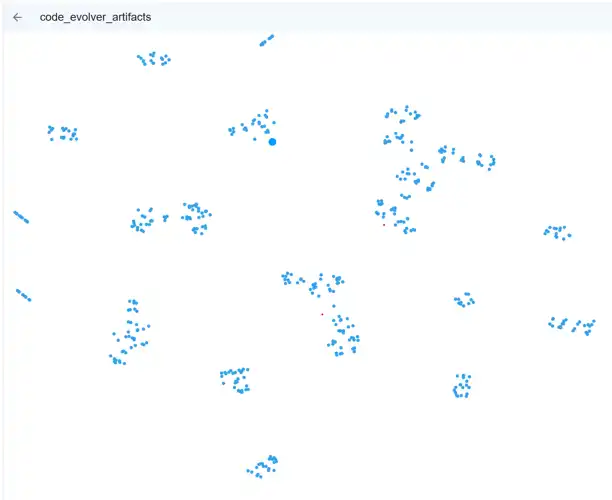
In our system we save the vectors for the embeddings into Qdrant a vector database and it gives us a neat way to see how our toolspace. This is the memory system of our workflow building system.
Divided into the original templates (yaml files in the tools directory) and every element of code generated to solve a task (and config for llms etc). Theseform to toolkit to assemble worklfows. Pre-built chunks ranging from;
This way all of the workdlow is composable and testable as each Python element has a suite of tests, BDD spec, static tools to verify correctness & multiple LLM evaluators to ensure it works.
the side effect is EVERY piece of code that will run in a workflow is right there, ready to inspect as each 'tool' creation leads to inspectable Python scripes.
You can see the toos clumoing together with each blob being a semantaically linked set of tools like:
All clustered together. Naturally specialising the by the system's nature.
In future we'd likely want to optimize these clusters to reduce the codebase to a smaller, tighter, more optimised system.
As we can track versions, usages, changes and lieage we can selectively optimised and 'cluster defrag' tnhe most used and most performance critical comopnents as a part of how the system is intrinsically structured.
Let's look at what actually exists in the system now.
LLM Tools (27 specialists):
$ ls tools/llm/
article_analyzer.yaml          # Analyzes articles for structure/quality
code_explainer.yaml            # Explains code in natural language
code_optimizer.yaml            # Hierarchical optimization (local/cloud/deep)
code_reviewer.yaml             # Reviews code for quality/security
content_generator.yaml         # General content generation
doc_generator.yaml             # Generates documentation
fast_code_generator.yaml       # Quick code generation (small models)
general.yaml                   # General-purpose fallback
long_form_writer.yaml          # Novels, books (128K context!)
model_selector.yaml            # Selects best backend/model
performance_profiler.yaml      # Profiles code performance
quick_feedback.yaml            # Fast triage/feedback
quick_translator.yaml          # Fast translation
security_auditor.yaml          # Security vulnerability scanning
signalr_connection_parser.yaml # Parses SignalR connections
signalr_llmapi_management.yaml # Manages SignalR LLM API
summarizer.yaml                # Summarizes long content
task_to_workflow_router.yaml  # Routes tasks to workflows
technical_writer.yaml          # Technical documentation
translation_quality_checker.yaml # Validates translations
workflow_documenter.yaml       # Auto-generates workflow docs
Executable Tools:
$ ls tools/executable/
call_tool_validator.yaml       # Validates call_tool() usage
connect_signalr.yaml           # SignalR connection tool
document_workflow.yaml         # Workflow documentation generator
mypy_type_checker.yaml         # Static type checking
python_syntax_validator.yaml   # Syntax validation
run_static_analysis.yaml       # Static analysis runner
save_to_disk.yaml              # Disk persistence
signalr_hub_connector.yaml     # Hub connection
signalr_websocket_stream.yaml  # WebSocket streaming
unit_converter.yaml            # Unit conversion utilities
OpenAPI Tools:
$ ls tools/openapi/
nmt_translator.yaml            # Neural machine translation API
Total Tools: 50+
Total Lines of Metadata: 5,464 lines in index.json
Let me show you the most sophisticated tool in the system: code_optimizer.
Definition: tools/llm/code_optimizer.yaml (317 lines!)
What it does:
Hierarchical Optimization:
optimization_levels:
  - name: "local"
    model_key: "escalation"  # qwen2.5-coder:14b
    cost_usd: 0.0
    expected_improvement: 0.10  # 10%
    triggers:
      - "Default for all optimizations"
      - "Quick wins, obvious inefficiencies"

  - name: "cloud"
    model_key: "cloud_optimizer"  # GPT-4/Claude
    cost_usd: 0.50
    expected_improvement: 0.30  # 30%
    triggers:
      - "Local improvement < 15%"
      - "Code is critical path"
      - "User explicitly requests it"

  - name: "deep"
    model_key: "deep_analyzer"
    cost_usd: 5.0
    expected_improvement: 0.50  # 50%
    triggers:
      - "Workflow/system-level optimization"
      - "Cloud improvement < 25%"
      - "Architectural changes needed"
Cost Management:
cost_management:
  max_daily_budget: 50.0  # USD
  fallback_on_budget_exceeded: "local"

  optimization_strategy: |
    1. Always try LOCAL first (free)
    2. Escalate to CLOUD if:
       - Local improvement < 15%
       - Reuse count > 100
    3. Escalate to DEEP if:
       - Cloud improvement < 25%
       - System-level changes needed
Test Integration:
test_integration:
  auto_update: true
  test_discovery:
    - "Find test_*.py in tests/"
    - "Identify tests for specific functions"
  test_generation:
    - "Generate missing tests"
    - "Add performance assertions"
    - "Create regression tests"
Version Management:
version_management:
  semver: true
  breaking_change_detection:
    - "Function signature changed"
    - "Return type changed"
    - "Dependencies added/removed"

  auto_migration:
    enabled: true
    conditions:
      - "No breaking changes"
      - "All tests pass"
      - "Improvement >= 10%"
This single tool orchestrates:
And it's just one tool in a system with 50+ tools.
One of the most meta tools: model_selector.
Natural Language Selection:
# User says: "using the most powerful code llm review this code"

selection = tools_manager.invoke_llm_tool(
    tool_id="model_selector",
    prompt="using the most powerful code llm review this code"
)

# Result:
{
    "backend": "anthropic",
    "model": "claude-3-opus-20240229",
    "reasoning": "Request specifies 'most powerful'. Claude Opus is the highest-quality code model.",
    "confidence": 0.95,
    "cost_tier": "very-high",
    "speed_tier": "slow",
    "quality_tier": "exceptional"
}
How It Works:
def select_model(
    self,
    task_description: str,
    constraints: Optional[Dict[str, Any]] = None
) -> List[Dict[str, Any]]:
    """Select best model for task."""

    task_lower = task_description.lower()

    # Parse natural language preferences
    backend_preference = None
    if any(kw in task_lower for kw in ["openai", "gpt"]):
        backend_preference = "openai"
    elif any(kw in task_lower for kw in ["anthropic", "claude"]):
        backend_preference = "anthropic"

    # Parse model preference
    model_preference = None
    if "gpt-4o" in task_lower:
        model_preference = "gpt-4o"
    elif "opus" in task_lower:
        model_preference = "opus"

    # Analyze task characteristics
    needs_long_context = any(w in task_lower for w in
        ["book", "novel", "document", "large", "long"])
    needs_coding = any(w in task_lower for w in
        ["code", "function", "script", "program"])
    needs_speed = any(w in task_lower for w in
        ["quick", "fast", "immediate"])
    needs_quality = any(w in task_lower for w in
        ["complex", "analysis", "reasoning"])

    # Score each model
    scores = {}
    for backend_model_id, info in self.backends.items():
        score = 50.0  # Base

        # Backend preference
        if backend_preference and info["backend"] == backend_preference:
            score += 50

        # Model preference
        if model_preference and model_preference in info["model"].lower():
            score += 100  # Strong boost

        # Context window
        if needs_long_context:
            context = info.get("context_window", 8192)
            if context >= 100000:
                score += 40

        # Speed
        if needs_speed:
            if info["speed"] == "very-fast":
                score += 30

        # Quality
        if needs_quality:
            if info["quality"] == "excellent":
                score += 30

        # Specialization
        if needs_coding:
            if "code" in info.get("best_for", []):
                score += 35

        scores[backend_model_id] = score

    # Return top-ranked models
    ranked = sorted(scores.items(), key=lambda x: x[1], reverse=True)
    return [self.backends[bid] for bid, score in ranked[:3]]
The system parses natural language to select models. You can say:
And it intelligently routes to the right backend.
The system treats external APIs the same as internal tools.
Example: NMT Translator
name: "NMT Translation Service"
type: "openapi"
description: "Neural machine translation API. VERY FAST but needs validation."

cost_tier: "low"
speed_tier: "very-fast"
quality_tier: "good"

openapi:
  spec_url: "http://localhost:8000/openapi.json"
  base_url: "http://localhost:8000"

code_template: |
  import requests

  def translate_text(text, source_lang="en", target_lang="de"):
      url = "http://localhost:8000/translate"
      params = {
          "text": text,
          "source_lang": source_lang,
          "target_lang": target_lang
      }
      response = requests.get(url, params=params)
      return response.json()["translations"][0]

tags: ["translation", "nmt", "api", "external"]
At runtime:
# System loads OpenAPI spec
openapi_tool = OpenAPITool(
    tool_id="nmt_translator",
    spec_url="http://localhost:8000/openapi.json"
)

# Parses operations
operations = openapi_tool.list_operations()
# [
#   {"operation_id": "translate", "method": "GET", "path": "/translate"},
#   {"operation_id": "get_languages", "method": "GET", "path": "/languages"}
# ]

# Invoke
result = tools_manager.invoke_openapi_tool(
    "nmt_translator",
    "translate",
    parameters={"text": "hello", "source_lang": "en", "target_lang": "de"}
)

# Result: {"success": True, "data": {"translations": ["Hallo"]}}
What gets tracked:
# Stored in RAG:
{
    "artifact_type": "API_INVOCATION",
    "tool_id": "nmt_translator",
    "operation_id": "translate",
    "status_code": 200,
    "success": True,
    "latency_ms": 124,
    "parameters": {"text": "hello", "source_lang": "en", "target_lang": "de"},
    "response": {"translations": ["Hallo"]}
}
External APIs get the same treatment:
One of the wildest tools: workflow_documenter.
What it does:
Takes a workflow (a main.py file) and automatically generates comprehensive documentation by:
README.txtAll automatically.
Definition: tools/llm/workflow_documenter.yaml (11,803 characters!)
Input:
{
    "workflow_path": "nodes/email_validator/main.py"
}
Output:
## Overview
Validates email addresses and optionally checks domain matching.

## What It Does
This workflow checks if an email address is valid using regex.
If you provide a domain, it checks if the email belongs to that domain.

## Required Inputs
- **email** (string, required)
  - The email address to validate
  - Example: "user@example.com"

- **domain** (string, optional)
  - The domain to check against
  - Example: "example.com"

## Process Flow
```mermaid
flowchart TD
    A[Start: Receive Input] --> B[Extract email and domain]
    B --> C{Email provided?}
    C -->|No| D[Error: email required]
    C -->|Yes| E[Validate email format]
    E --> F{Valid format?}
    F -->|No| G[Return: invalid]
    F -->|Yes| H{Domain provided?}
    H -->|No| I[Return: valid]
    H -->|Yes| J[Extract email domain]
    J --> K{Domains match?}
    K -->|Yes| I
    K -->|No| L[Return: domain_mismatch]
curl -X POST http://localhost:8080/execute/email_validator \
  -H "Content-Type: application/json" \
  -d '{"email": "user@example.com", "domain": "example.com"}'
result = call_tool("email_validator", {
    "email": "user@example.com",
    "domain": "example.com"
})
Q: Can this verify if an email exists? A: No, this only validates format. Use DNS/SMTP checking for existence.
Q: Does it support international domains? A: Yes, but punycode conversion may be needed.
**Saved to:** `nodes/email_validator/README.txt`

**The tool GENERATES ALL OF THIS** by analyzing the code.

## The Self-Expanding Toolkit

Here's where it gets wild: **tools generate tools**.

**Example Flow:**
User: "I need a tool that converts temperatures"
System:
New tool created: temperature_converter.yaml
**The system grows its own toolkit.**

## Tool Statistics: What The System Knows

```python
stats = tools_manager.get_statistics()

# Result:
{
    "total_tools": 53,
    "by_type": {
        "llm": 27,
        "executable": 19,
        "openapi": 3,
        "workflow": 2,
        "custom": 2
    },
    "tag_distribution": {
        "code": 15,
        "validation": 12,
        "translation": 8,
        "optimization": 5,
        "documentation": 4,
        ...
    },
    "most_used": [
        {"id": "general", "name": "General Purpose LLM", "usage": 1247},
        {"id": "code_optimizer", "name": "Code Optimizer", "usage": 89},
        {"id": "nmt_translator", "name": "NMT Translator", "usage": 67},
        {"id": "email_validator", "name": "Email Validator", "usage": 45},
        {"id": "long_form_writer", "name": "Long-Form Writer", "usage": 23}
    ]
}
The system knows:
And it uses this data to:
Let's step back and think about what we've actually built:
A system where:
We've created a self-optimizing toolkit that:
This isn't configuration management.
This is emergent tool ecology.
Tools aren't static resources. They're living artifacts in an evolutionary system.
Scenario 1: Self-Improving Critical Path
System detects: email_validator used 500 times, fitness: 0.75
Action: Trigger code_optimizer with level=cloud (high reuse count)
Result: email_validator v2.0.0, fitness: 0.92
Migration: Auto-update all 15 workflows using v1.x to v2.0.0
Validation: Re-run all tests, all pass
Outcome: 23% performance improvement, no breaking changes
The system optimized its own critical path without human intervention.
Scenario 2: Adaptive Specialization
Pattern detected: "translate article" requested 20 times
Analysis: Using nmt_translator + translation_quality_checker every time
Decision: Generate specialized "article_translator" tool
Implementation:
  - Combines both tools into one
  - Adds caching for common phrases
  - Optimizes for article-length text
  - Auto-generates documentation
Registration: article_translator v1.0.0 added to registry
Fitness: 0.89 (vs 0.73 for manual combination)
Usage: Immediately used for next translation request
The system identified a pattern and created a specialized tool.
Scenario 3: Cost-Aware Escalation
Request: "optimize this function"
Level 1 (LOCAL): qwen2.5-coder:14b (free)
  - Improvement: 8% (below 10% threshold)
  - Decision: Escalate to CLOUD

Level 2 (CLOUD): claude-3-5-sonnet ($0.50)
  - Improvement: 28% (good!)
  - Cost: $0.50 (within budget)
  - Decision: Accept

Result: Function optimized 28%, cost $0.50
Update: Store both versions in RAG
        Mark v1 as "suboptimal", v2 as "optimized"
Future: Always use v2 for this function
The system spent money intelligently to achieve better results.
Let me catalog what actually exists right now.
Code Specialist
code_explainer - Explains code in natural languagecode_optimizer - Hierarchical optimization (local/cloud/deep)code_reviewer - Quality and security reviewfast_code_generator - Quick generation with small modelssecurity_auditor - Vulnerability scanningperformance_profiler - Code profiling and analysisContent Specialists:
long_form_writer - Novels, books (128K context)content_generator - General contentarticle_analyzer - Article structure/qualitysummarizer - Summarizes long contentproofreader - Grammar and styleseo_optimizer - SEO optimizationoutline_generator - Content outlinesTranslation:
quick_translator - Fast translation (small model)translation_quality_checker - Validates translationsDocumentation:
doc_generator - Code documentationtechnical_writer - Technical documentationworkflow_documenter - Auto-generates workflow docsSystem Tools:
general - General-purpose fallbackmodel_selector - Selects best backend/modeltask_to_workflow_router - Routes tasks to workflowsquick_feedback - Fast triagesignalr_connection_parser - Parses SignalR connectionssignalr_llmapi_management - Manages SignalR LLM APIsValidation:
call_tool_validator - Validates call_tool() usagepython_syntax_validator - Syntax checkingmypy_type_checker - Static type checkingjson_output_validator - JSON format validationstdin_usage_validator - Validates stdin usagemain_function_checker - Checks for main() functionnode_runtime_import_validator - Validates importsAnalysis:
run_static_analysis - Runs static analysis toolsperformance_profiler - Profiles code performanceUtilities:
save_to_disk - Disk persistenceunit_converter - Unit conversionsrandom_data_generator - Test data generationbuffer - Buffer managementworkflow_datastore - Workflow data storagestream_processor - Stream processingsse_stream - Server-sent eventsIntegration:
connect_signalr - SignalR connectionsignalr_hub_connector - Hub connectionsignalr_websocket_stream - WebSocket streamingDocumentation:
document_workflow - Workflow documentation generatornmt_translator - Neural machine translation APITotal: 53 tools (and growing)
Here's where it gets really interesting: tools compose other tools.
And when a composed tool evolves, every workflow using it automatically improves.
Let's look at an actual composite tool from the system:
Task: "Translate this article to Spanish and validate quality"
Traditional approach:
# Manual composition (brittle, no learning)
translated = nmt_translator.translate(text, "en", "es")
quality = translation_quality_checker.check(translated)
if quality.score < 0.7:
    # Retry or error
DSE approach:
The system discovers this pattern is used frequently and automatically creates a composite tool:
# tools/llm/validated_translator.yaml (auto-generated!)
name: "Validated Translator"
type: "composite"
description: "Translates text and validates quality automatically. Created from usage pattern analysis."

workflow:
  steps:
    - id: "translate"
      tool: "nmt_translator"
      parallel: false

    - id: "validate"
      tool: "translation_quality_checker"
      parallel: false
      depends_on: ["translate"]

    - id: "retry"
      tool: "nmt_translator"
      condition: "quality_score < 0.7"
      params:
        beam_size: 10  # Higher quality on retry
      depends_on: ["validate"]

version: "1.0.0"
created_from: "usage_pattern_analysis"
parent_tools: ["nmt_translator", "translation_quality_checker"]
usage_count: 0  # Just created!
What's wild about this:
When nmt_translator evolves to v2.0.0 (maybe 20% faster), the composite tool automatically uses the new version. No code changes needed.
Result: Every workflow using validated_translator gets 20% faster without any modification.
Here's an even cooler example: parallel tool composition.
Task: "Review this code thoroughly"
Naive approach:
# Sequential (SLOW)
security_check = security_auditor.review(code)      # 8 seconds
style_check = code_reviewer.review(code)            # 12 seconds
performance_check = performance_profiler.analyze(code)  # 15 seconds
# TOTAL: 35 seconds
DSE parallel composition:
# tools/llm/code_review_committee.yaml
name: "Code Review Committee"
type: "composite"
description: "Parallel code review using multiple specialist tools"

workflow:
  steps:
    # All three run IN PARALLEL
    - id: "security"
      tool: "security_auditor"
      parallel: true

    - id: "style"
      tool: "code_reviewer"
      parallel: true

    - id: "performance"
      tool: "performance_profiler"
      parallel: true

    # Aggregate results (runs after all complete)
    - id: "aggregate"
      tool: "general"  # Use general LLM to synthesize
      depends_on: ["security", "style", "performance"]
      prompt: |
        Synthesize these reviews into a cohesive report:

        Security: {security.result}
        Style: {style.result}
        Performance: {performance.result}

        Create a prioritized action list.

execution:
  max_parallel: 3
  timeout_per_tool: 20s
  aggregate_timeout: 10s
Execution:
gantt
    title Code Review Committee (Parallel Execution)
    dateFormat  s
    axisFormat %S

    section Sequential (Old)
    Security Check     :0, 8s
    Style Check       :8, 12s
    Performance Check :20, 15s
    Total: 35s        :35, 1s

    section Parallel (New)
    Security Check     :0, 8s
    Style Check       :0, 12s
    Performance Check :0, 15s
    Aggregate Results :15, 5s
    Total: 20s        :20, 1s
Result: 35 seconds → 20 seconds (43% faster!)
And when security_auditor evolves to v3.0.0 (say, 30% faster), the whole committee gets faster automatically.
Here's the part that's genuinely wild: tools act like genes.
Observation: When a tool proves useful, it spreads through the system.
Real Example: The Quality Checker Pattern
Day 1: translation_quality_checker created
  - Usage: 1 (manual test)
  - Workflows using it: 0

Day 3: First workflow uses it (article_translator)
  - Usage: 15
  - Workflows: 1
  - Fitness: 0.78

Day 7: Quality checker "gene" spreads
  - Usage: 127
  - Workflows using it: 7
    1. article_translator
    2. validated_translator (composite)
    3. batch_translator
    4. multilingual_content_generator
    5. documentation_localizer
    6. seo_multilingual_optimizer
    7. chat_translator
  - Fitness: 0.91 (improved through evolution!)

Day 14: Mutation detected
  - translation_quality_checker v2.0.0
  - Change: Added context-aware validation
  - Breaking change: Output format different
  - All 7 workflows auto-migrate
  - New fitness: 0.94

Day 30: Specialization emerges
  - Original tool spawns specialist: article_quality_checker
  - Optimized specifically for article-length text
  - 40% faster than general checker
  - article_translator auto-switches to specialist
  - General checker still used by other 6 workflows
This is literal genetic spread:
The code path is ALWAYS optimal because:
Here's the really clever bit: you can improve all tools at once.
Scenario: You have 20 workflows, each using 5-10 tools. Total: ~100 tool invocations.
Traditional system:
Workflow 1 uses Tool A v1.0 (fitness: 0.70)
Workflow 2 uses Tool A v1.0 (fitness: 0.70)
...
Workflow 20 uses Tool A v1.0 (fitness: 0.70)

To improve: Manually edit Tool A, test on each workflow (20 tests!)
Risk: Breaking changes affect all 20 workflows
DSE system:
# Trigger evolution for Tool A
evolve_tool("translation_quality_checker")

# System automatically:
# 1. Analyzes usage patterns across all 20 workflows
# 2. Identifies common failure modes
# 3. Generates improved version (v2.0)
# 4. A/B tests v1.0 vs v2.0 on EACH workflow
# 5. Calculates fitness improvement per workflow
# 6. Auto-migrates workflows where v2.0 is better
# 7. Keeps v1.0 for workflows where v2.0 regresses
Result:
Workflow 1: Tool A v2.0 (fitness: 0.85) ✓ Migrated
Workflow 2: Tool A v1.0 (fitness: 0.72) ✗ Kept old (v2 was worse)
Workflow 3: Tool A v2.0 (fitness: 0.89) ✓ Migrated
...
Workflow 20: Tool A v2.0 (fitness: 0.91) ✓ Migrated

Total migrated: 18/20 workflows (90%)
Average fitness improvement: +15%
You trained ONE tool and improved EIGHTEEN workflows simultaneously.
The really wild part: evolution cascades through the dependency graph.
Example:
Tool: nmt_translator v1.0 (fitness: 0.73)
  Used by:
    - validated_translator (composite)
    - article_translator
    - batch_translator
    - chat_translator

Evolution triggered: nmt_translator v1.0 → v2.0
  Improvement: 25% faster, 10% better quality
  Fitness: 0.73 → 0.88

Cascade effect:
  1. validated_translator FITNESS: 0.82 → 0.91 (automatic!)
  2. article_translator FITNESS: 0.79 → 0.87 (automatic!)
  3. batch_translator FITNESS: 0.75 → 0.83 (automatic!)
  4. chat_translator FITNESS: 0.71 → 0.78 (automatic!)

Tools using those tools ALSO improve:
  - multilingual_content_generator: 0.76 → 0.84
  - documentation_localizer: 0.81 → 0.88
  - seo_multilingual_optimizer: 0.69 → 0.77

Total workflows improved: 11
Total time spent: 0 (automatic propagation!)
Total code changes: 0
One evolution event improved ELEVEN workflows without any manual intervention.
Because tools track fitness, cache results, and auto-evolve, the system always runs the best available implementation.
Example execution:
User: "Translate this article to Spanish"

System thinks:
  1. Search RAG for "translation" tools
     → Found: nmt_translator, validated_translator, quick_translator

  2. Calculate fitness for this specific task:
     - nmt_translator: 0.88 (fast, good quality)
     - validated_translator: 0.91 (slower, validated)
     - quick_translator: 0.76 (very fast, lower quality)

  3. Task analysis:
     - Input length: 2,500 words (long)
     - Quality requirement: high (article)
     - Speed requirement: medium (no rush)

  4. Decision: Use validated_translator (highest fitness + quality match)

  5. Check cache:
     - Cache key: hash(tool_id + normalized_prompt)
     - Found: 3 cached results
       - v1.0 (fitness: 0.82, age: 5 days)
       - v1.1 (fitness: 0.89, age: 2 days)
       - v2.0 (fitness: 0.91, age: 1 hour)
     - Select: v2.0 (highest fitness, most recent)

  6. Execute: Return cached v2.0 result (INSTANT)

  7. Update metrics:
     - validated_translator.usage_count++
     - validated_translator.cache_hits++
     - validated_translator.avg_latency_ms (no change, cache hit)
The system:
The code path is optimized at every step:
Let's be precise about why this is directed synthetic evolution and not just "caching with versioning":
Tools as Genes:
class Tool:
    """A tool is a genetic unit that:
    - Replicates (used by multiple workflows)
    - Mutates (evolves to new versions)
    - Competes (fitness-based selection)
    - Specializes (variants emerge)
    - Dies (low-fitness tools pruned)
    """

    # Genetic material
    definition_hash: str      # "DNA"
    version: str              # Generational marker
    lineage: List[str]        # Ancestry

    # Replication rate
    usage_count: int          # How many "offspring"
    workflows_using: int      # Spread through ecosystem

    # Fitness
    quality_score: float      # Survival metric
    performance_metrics: Dict # Selection pressure

    # Mutation
    breaking_changes: List    # Genetic incompatibility
    evolution_history: List   # Mutation record
Directed Evolution:
# Unlike natural selection (random mutations),
# DSE uses DIRECTED mutations based on data:

def evolve_tool(tool_id: str):
    """Directed evolution with learning."""

    # Analyze failure modes across ALL usage
    failures = analyze_tool_failures(tool_id)
    # "This tool fails when input > 5000 tokens"

    # Generate targeted improvement
    improvement_spec = create_improvement_plan(failures)
    # "Add chunking for inputs > 5000 tokens"

    # Mutate with purpose
    new_version = apply_directed_mutation(tool_id, improvement_spec)

    # Test fitness
    fitness_improvement = a_b_test(old_version, new_version)

    # Selection
    if fitness_improvement > threshold:
        promote_version(new_version)  # Survives
    else:
        discard_version(new_version)  # Dies
The "Gene Pool":
53 tools in registry (current generation)
├── 27 LLM tools (specialist genes)
├── 19 executable tools (utility genes)
├── 3 OpenAPI tools (external interface genes)
├── 4 composite tools (multi-gene complexes)

Total genetic variations across versions: ~200+
Active in current generation: 53
Archived (evolutionary dead-ends): ~150
Genetic Spread Visualization:
graph TB
    T1["nmt_translator v1.0<br/>Fitness: 0.73<br/>Usage: 5"] --> T2["nmt_translator v2.0<br/>Fitness: 0.88<br/>Usage: 127"]

    T2 --> W1["validated_translator<br/>Composite: nmt + quality<br/>Fitness: 0.91"]
    T2 --> W2["article_translator<br/>Uses: nmt<br/>Fitness: 0.87"]
    T2 --> W3["batch_translator<br/>Uses: nmt<br/>Fitness: 0.83"]

    W1 --> U1["multilingual_content<br/>Uses: validated<br/>Fitness: 0.84"]
    W1 --> U2["doc_localizer<br/>Uses: validated<br/>Fitness: 0.88"]

    T2 -.->|Mutation| T3["nmt_translator v3.0<br/>Specialization: articles<br/>Fitness: 0.94"]

    T3 --> W2

    style T1 fill:#ffcccc
    style T2 fill:#ccffcc
    style T3 fill:#ccccff
    style W1 fill:#ffffcc
    style W2 fill:#ffffcc
    style W3 fill:#ffffcc
    style U1 fill:#ffeecc
    style U2 fill:#ffeecc
Genetic Inheritance:
# Child tool inherits from parent
article_quality_checker:
  parent: translation_quality_checker
  inherited_attributes:
    - quality_metrics
    - validation_patterns
    - error_detection

  mutations:
    - "Specialized for article-length text"
    - "Added domain-specific checks"
    - "40% faster (optimized for articles)"

  fitness_inheritance:
    parent_fitness: 0.91
    child_fitness: 0.94  # Improvement!

  selection_advantage:
    - Chosen over parent for article tasks
    - Parent still used for general translation
Neat, right?
Yeah. It's genuinely wild.
We built a system where:
It's not a metaphor.
It's actual directed synthetic evolution.
After running this system for weeks:
If tools can:
What's next?
Here's what Part 7 didn't fully explain:
The workflows that evolve? They're made of tools. The tools that compose workflows? They evolve too. The system that manages evolution? Also tools. The metrics that track fitness? Yep, tools.
It's tools all the way down.
And every single one:
We didn't build a code generator.
We built a self-expanding, self-optimizing, self-documenting toolkit that happens to generate code.
The distinction matters.
Because when tools become evolutionary units, when they track their own fitness, when they reproduce and mutate and compete...
You don't have a toolbox.
You have an ecology.
And ecologies evolve.
But what happens when evolution breaks things? When a tool mutation introduces a critical bug? When optimization makes a tool worse instead of better?
That's where Part 9 comes in. We explore self-healing through lineage-aware pruning—a system where tools don't just evolve, they remember every failure, prune failed branches, and propagate that knowledge to prevent similar mistakes across the entire ecosystem.
When your tools can break themselves, your system should remember why and never repeat the mistake.
Repository: mostlylucid.dse
Key Files:
src/tools_manager.py (2,293 lines) - Core tools managementsrc/rag_integrated_tools.py (562 lines) - RAG integrationsrc/openapi_tool.py (313 lines) - OpenAPI supportsrc/model_selector_tool.py (460 lines) - Model selectiontools/index.json (5,464 lines) - Tool registrytools/llm/*.yaml (27 tools) - LLM specialist definitionstools/executable/*.yaml (19 tools) - Executable toolstools/openapi/*.yaml (3 tools) - API integrationsDocumentation:
LLMS_AS_TOOLS.md - LLM selection systemWORKFLOW_DOCUMENTATION_TOOL.md - Auto-documentationCHAT_TOOLS_GUIDE.md - Tool usage guideTOOL_PACKAGING.md - Tool development guideSeries Navigation:
This is Part 8 in the Semantic Intelligence series. Part 7 showed the overall DSE architecture. This article reveals the hidden complexity: every tool in the system tracks usage, evolves implementations, caches results, and participates in fitness-based selection. The toolkit is not just a resource—it's an evolutionary ecology that expands, optimizes, and documents itself. Tools generate tools. Tools improve tools. And the whole system gets smarter over time.
The code is real, running locally on Ollama, genuinely tracking metrics, and actually evolving. It's experimental, occasionally unstable, and definitely "vibe-coded." But the tools work, the tracking works, and the evolution works. The toolkit grows itself.
These explorations connect to the sci-fi novel "Michael" about emergent AI and the implications of systems that optimize themselves. The tools described here are real implementations demonstrating how evolutionary pressure creates specialization, how fitness functions guide selection, and how self-improving systems naturally develop ecology-like properties. Whether this leads to the planetary-scale tool networks of Part 6, or something completely unexpected, remains to be seen. That's what makes it an experiment.
Tags: #AI #Tools #RAG #UsageTracking #Evolution #Fitness #Caching #Versioning #Ollama #Python #EmergentIntelligence #SelfOptimization #ToolEcology

© 2026 Scott Galloway — Unlicense — All content and source code on this site is free to use, copy, modify, and sell.
