This is a viewer only at the moment see the article on how this works.
To update the preview hit Ctrl-Alt-R (or ⌘-Alt-R on Mac) or Enter to refresh. The Save icon lets you save the markdown file to disk
This is a preview from the server running through my markdig pipeline
Wednesday, 05 November 2025
ЗАУВАЖЕННЯ: Цю статтю створено як документацію для випуску у моєму пакунку nuget.
Вступ
Тебе когда-нибудь нужно было проверить API, что ещё не готово?


Немає файлів налаштувань.Не створено кінцевих пунктів вручну.Просто включи это в подробности OpenAPI и начинай делать просьбы.
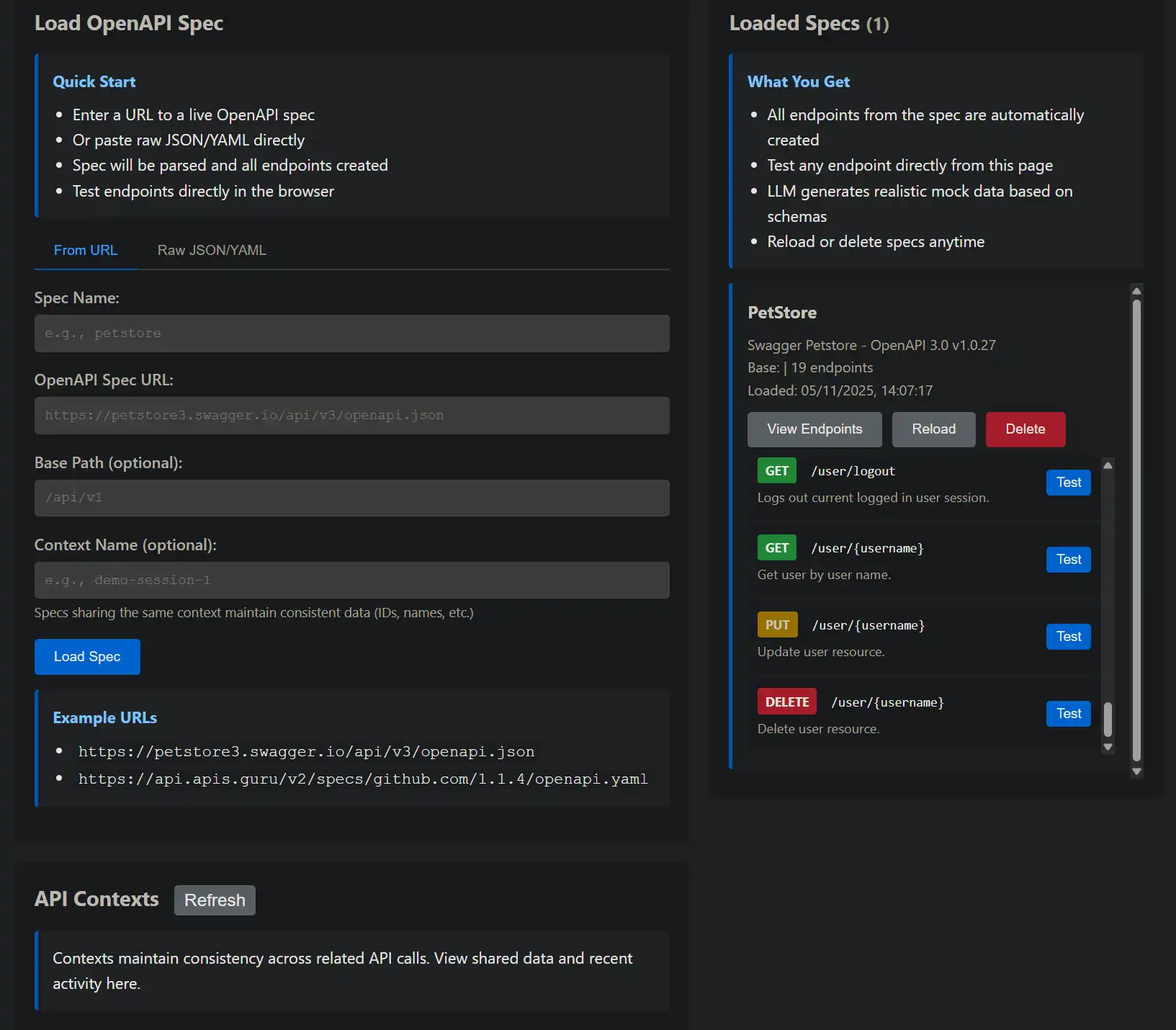
Ви можете знайти
graph TD
    A[Your App] --> B{External API}
    B -->|Not Ready| C[Development Blocked]
    B -->|Rate Limited| D[Can't Test Freely]
    B -->|Requires Auth| E[Complex Setup]
    B -->|Expensive| F[Cost Concerns]
    B -->|Unreliable| G[Flaky Tests]
GitHub тут
Під час розвитку ти стикаєшся з кількома труднощами.
sequenceDiagram
    participant Dev as Developer
    participant System as Mock System
    participant Spec as OpenAPI Spec
    participant LLM as Local LLM

    Dev->>System: Load spec from URL/file
    System->>Spec: Parse OpenAPI document
    Spec-->>System: Endpoints, schemas, descriptions
    System->>System: Register dynamic routes

    Dev->>System: GET /petstore/pet/123
    System->>LLM: Generate data for "Pet" schema
    LLM-->>System: Realistic pet data
    System-->>Dev: {"id": 123, "name": "Max", ...}
Аналізує специфікацію
graph TB
    A[HTTP Request] --> B{Route Matches?}
    B -->|No| C[404 Not Found]
    B -->|Yes| D[DynamicOpenApiManager]
    D --> E[Find Matching Endpoint]
    E --> F[OpenApiRequestHandler]
    F --> G[Extract Schema from Spec]
    G --> H[Build LLM Prompt]
    H --> I[PromptBuilder]
    I --> J[Include Context?]
    J -->|Yes| K[OpenApiContextManager]
    J -->|No| L[LLM Client]
    K --> L
    L --> M[Get Response]
    M --> N[JsonExtractor]
    N --> O[Return Mock Data]
Відкриває всі кінцеві точки
Запитувати розробника
POST /api/openapi/specs
Content-Type: application/json

{
  "name": "petstore",
  "source": "https://petstore3.swagger.io/api/v3/openapi.json",
  "basePath": "/petstore"
}
- Створює підказки LLM за схемами OpenAPI
POST /api/openapi/specs
Content-Type: application/json

{
  "name": "my-api",
  "source": "./specs/my-api.yaml",
  "basePath": "/api/v1"
}
OpenApiContextManager
POST /api/openapi/specs
Content-Type: application/json

{
  "name": "inline-api",
  "source": "data:application/json;base64,eyJvcGVuYXBpIjoiMy...",
  "basePath": "/api"
}
Завантаження специфікацій
public async Task<SpecLoadResult> LoadSpecAsync(
    string name,
    string source,
    string? basePath = null,
    string? contextName = null)
{
    // 1. Use scoped service factory for OpenApiSpecLoader
    using var scope = _scopeFactory.CreateScope();
    var specLoader = scope.ServiceProvider
        .GetRequiredService<OpenApiSpecLoader>();

    // 2. Load the OpenAPI document
    var document = await specLoader.LoadSpecAsync(source);

    // 3. Determine base path from spec or parameter
    var effectiveBasePath = basePath
        ?? document.Servers?.FirstOrDefault()?.Url
        ?? "/api";

    // 4. Store spec with configuration
    var config = new OpenApiSpecConfig
    {
        Name = name,
        Source = source,
        Document = document,
        BasePath = effectiveBasePath,
        ContextName = contextName,
        LoadedAt = DateTimeOffset.UtcNow
    };

    _specs.AddOrUpdate(name, config, (_, __) => config);

    // 5. Notify listeners via SignalR
    await NotifySpecLoaded(name, effectiveBasePath);

    return new SpecLoadResult
    {
        Name = name,
        BasePath = effectiveBasePath,
        EndpointCount = CountEndpoints(document),
        Success = true
    };
}
public OpenApiEndpointMatch? FindMatchingEndpoint(string path, string method)
{
    // Try each loaded spec
    foreach (var spec in _specs.Values)
    {
        // Remove base path prefix
        var relativePath = path;
        if (path.StartsWith(spec.BasePath))
        {
            relativePath = path.Substring(spec.BasePath.Length);
        }

        // Find matching path in OpenAPI document
        var (pathTemplate, operation) = FindOperation(
            spec.Document,
            relativePath,
            method);

        if (operation != null)
        {
            return new OpenApiEndpointMatch
            {
                Spec = spec,
                PathTemplate = pathTemplate,
                Operation = operation,
                Method = ParseMethod(method)
            };
        }
    }

    return null;
}
public async Task<string> HandleRequestAsync(
    HttpContext context,
    OpenApiDocument document,
    string path,
    OperationType method,
    OpenApiOperation operation,
    string? contextName = null,
    CancellationToken cancellationToken = default)
{
    // 1. Extract request body
    var requestBody = await ReadRequestBodyAsync(context.Request);

    // 2. Get success response schema
    var shape = ExtractResponseSchema(operation);

    // 3. Get context history if using contexts
    var contextHistory = !string.IsNullOrWhiteSpace(contextName)
        ? _contextManager.GetContextForPrompt(contextName)
        : null;

    // 4. Build prompt from OpenAPI metadata
    var description = operation.Summary ?? operation.Description;
    var prompt = _promptBuilder.BuildPrompt(
        method.ToString(),
        path,
        requestBody,
        new ShapeInfo { Shape = shape },
        streaming: false,
        description: description,
        contextHistory: contextHistory);

    // 5. Get response from LLM
    var rawResponse = await _llmClient.GetCompletionAsync(
        prompt,
        cancellationToken);

    // 6. Extract clean JSON
    var jsonResponse = JsonExtractor.ExtractJson(rawResponse);

    // 7. Store in context if configured
    if (!string.IsNullOrWhiteSpace(contextName))
    {
        _contextManager.AddToContext(
            contextName,
            method.ToString(),
            path,
            requestBody,
            jsonResponse);
    }

    return jsonResponse;
}
private string? ExtractResponseSchema(OpenApiOperation operation)
{
    // Look for successful response (2xx)
    var successResponse = operation.Responses
        .FirstOrDefault(r => r.Key.StartsWith("2"))
        .Value;

    if (successResponse == null)
        return null;

    // Get JSON content
    var jsonContent = successResponse.Content
        .FirstOrDefault(c => c.Key.Contains("json"))
        .Value;

    if (jsonContent?.Schema == null)
        return null;

    // Convert OpenAPI schema to JSON Schema
    return ConvertToJsonSchema(jsonContent.Schema);
}

private string ConvertToJsonSchema(OpenApiSchema schema)
{
    // Recursively build JSON Schema representation
    var builder = new StringBuilder();
    builder.Append("{");

    if (schema.Type != null)
    {
        builder.Append($"\"type\":\"{schema.Type}\"");
    }

    if (schema.Properties?.Count > 0)
    {
        builder.Append(",\"properties\":{");
        var props = schema.Properties
            .Select(p => $"\"{p.Key}\":{ConvertToJsonSchema(p.Value)}");
        builder.Append(string.Join(",", props));
        builder.Append("}");
    }

    if (schema.Items != null)
    {
        builder.Append(",\"items\":");
        builder.Append(ConvertToJsonSchema(schema.Items));
    }

    builder.Append("}");
    return builder.ToString();
}
Ось що відбувається, коли ви завантажуєте специфікацію:
Порівнювання динамічного маршруту
POST /api/openapi/specs
Content-Type: application/json

{
  "name": "petstore",
  "source": "https://petstore3.swagger.io/api/v3/openapi.json",
  "basePath": "/petstore"
}
Після отримання запиту система відповідає їй за всі завантажені специфікації:
{
  "name": "petstore",
  "basePath": "/petstore",
  "endpointCount": 19,
  "endpoints": [
    {"path": "/petstore/pet", "method": "POST"},
    {"path": "/petstore/pet/{petId}", "method": "GET"},
    {"path": "/petstore/pet/findByStatus", "method": "GET"},
    ...
  ],
  "success": true
}
Обробка запитів
Після виявлення відповідної кінцевої точки обробник створює відповідь:
### Get a pet by ID
GET /petstore/pet/123

### Response (auto-generated):
{
  "id": 123,
  "name": "Max",
  "category": {
    "id": 1,
    "name": "Dogs"
  },
  "photoUrls": [
    "https://example.com/max1.jpg"
  ],
  "tags": [
    {"id": 1, "name": "friendly"},
    {"id": 2, "name": "trained"}
  ],
  "status": "available"
}
### Find pets by status
GET /petstore/pet/findByStatus?status=available

### Response (auto-generated array):
[
  {
    "id": 42,
    "name": "Buddy",
    "status": "available",
    ...
  },
  {
    "id": 43,
    "name": "Luna",
    "status": "available",
    ...
  }
]
Видобування схеми
GET /api/openapi/specs/petstore

### Shows full details:
### - All endpoints
### - Load time
### - Context configuration
### - Base path
Система видобуває схеми відповідей з визначень OpenAPI:
POST /api/openapi/specs/petstore/reload
Використання у реальному світі
DELETE /api/openapi/specs/petstore
Давайте пройдемо через глум над класичним API Petstore:
### Load Petstore at /petstore
POST /api/openapi/specs
{"name": "petstore", "source": "...", "basePath": "/petstore"}

### Load GitHub API at /github
POST /api/openapi/specs
{"name": "github", "source": "...", "basePath": "/github"}

### Load Stripe API at /stripe
POST /api/openapi/specs
{"name": "stripe", "source": "...", "basePath": "/stripe"}

### All three APIs now available simultaneously:
GET /petstore/pet/123
GET /github/users/octocat
GET /stripe/customers/cus_123
Відповідь:
POST /api/openapi/specs
Content-Type: application/json

{
  "name": "petstore",
  "source": "https://petstore3.swagger.io/api/v3/openapi.json",
  "basePath": "/petstore",
  "contextName": "petstore-session"
}
Крок 2: Використовувати кінцеві точки
### Create a pet
POST /petstore/pet
{"name": "Max", "status": "available"}

### Response: {"id": 42, "name": "Max", "status": "available"}

### Get the pet (will reference same ID and name)
GET /petstore/pet/42

### Response: {"id": 42, "name": "Max", "status": "available"}
### Notice: Consistent ID and name from context
Крок 3. Пильнуй за ходом подій
POST /api/openapi/test
Content-Type: application/json

{
  "specName": "petstore",
  "path": "/pet/123",
  "method": "GET"
}

### Returns mock response without affecting routes
Крок 4: Перезавантажити, якщо зміни у спектрі
Для ще більш реалізму, призначте контекст умовам:http://localhost:5116/OpenApi:
graph TD
    A[OpenAPI Manager UI] --> B[Load Spec Section]
    A --> C[Spec List]
    A --> D[Context Viewer]

    B --> E[URL Input]
    B --> F[JSON Input]
    B --> G[Context Configuration]

    C --> H[Spec Card]
    H --> I[Reload Button]
    H --> J[Delete Button]
    H --> K[View Endpoints]

    D --> L[Active Contexts]
    L --> M[Context Details]
    L --> N[Clear Context]
Тепер всі точки перетину тварин мають однаковий контекст:
# OpenAPI Spec
/pet/{petId}:
  get:
    parameters:
      - name: petId
        in: path
        schema:
          type: integer
GET /petstore/pet/123
### LLM receives: "Generate data for Pet with petId=123"
### Response: {"id": 123, ...}
/pet/findByStatus:
  get:
    parameters:
      - name: status
        in: query
        schema:
          type: string
          enum: [available, pending, sold]
GET /petstore/pet/findByStatus?status=available
### LLM receives: "Generate array of Pets with status=available"
### Response: [{"status": "available", ...}, ...]
/pet:
  post:
    requestBody:
      content:
        application/json:
          schema:
            $ref: '#/components/schemas/Pet'
POST /petstore/pet
Content-Type: application/json

{"name": "Max", "status": "available"}

### LLM receives: "Generate response for creating Pet with name=Max, status=available"
### Response: {"id": 42, "name": "Max", "status": "available"}
/pet/{petId}:
  get:
    summary: Find pet by ID
    description: Returns a single pet based on the ID provided
Додаткові можливості
Параметри шляху буде автоматично видобуто:
responses:
  '200':
    description: Successful operation
    content:
      application/json:
        schema:
          $ref: '#/components/schemas/Pet'
  '404':
    description: Pet not found
Параметри запиту
Потрібні тіла
public async Task NotifySpecLoaded(string name, string basePath)
{
    await _hubContext.Clients.All.SendAsync("SpecLoaded", new
    {
        name,
        basePath,
        timestamp = DateTimeOffset.UtcNow
    });
}

public async Task NotifySpecDeleted(string name)
{
    await _hubContext.Clients.All.SendAsync("SpecDeleted", new
    {
        name,
        timestamp = DateTimeOffset.UtcNow
    });
}
Тіла POST/PUT включено до запрошення:
const connection = new signalR.HubConnectionBuilder()
    .withUrl('/hubs/openapi')
    .build();

connection.on('SpecLoaded', (data) => {
    showNotification(`Spec "${data.name}" loaded at ${data.basePath}`, 'success');
    refreshSpecList();
});

connection.on('SpecDeleted', (data) => {
    showNotification(`Spec "${data.name}" deleted`, 'info');
    refreshSpecList();
});
Описи OpenAPI стосуються LLM:
Якщо специфікації завантажено/ вилучено, програма UI отримує сповіщення у режимі реального часу за допомогою SignR:
 Bad:  {"name": "spec1", ...}
 Good: {"name": "github-v3", ...}
OpenAPI 3. 0. x
### Good separation
/petstore/...
/github/...
/stripe/...

### Bad (conflicts!)
/api/... (multiple specs)
Swagger 2. 0
POST /api/openapi/specs/my-api/reload
POST /api/openapi/specs
{
  "name": "petstore",
  "source": "...",
  "contextName": "test-session"
}

### Now all petstore calls maintain consistency
І специфікації JSON, і YAML автоматично розпізнаються і аналізуються.
DELETE /api/openapi/specs/old-spec
Очищення після випробування/api/mockВилучити специфікації, які ви більше не використовуєте:
### OpenAPI-based (from spec)
GET /petstore/pet/123
### Uses Pet schema from OpenAPI spec

### Regular mock (shape-based)
GET /api/mock/custom?shape={"id":0,"name":"string"}
### Uses explicit shape parameter
Обмеження
Розпізнавання
private readonly ConcurrentDictionary<string, OpenApiSpecConfig> _specs = new();
DynamicOpenApiManagerПеревірка
Стан
### Send these simultaneously
POST /api/openapi/specs {"name": "spec1", ...}
POST /api/openapi/specs {"name": "spec2", ...}
POST /api/openapi/specs {"name": "spec3", ...}
Інтеграція з регулярними точками Mock EndsСпецифічні специфікації OpenAPI працюють разом з звичайними
кінцеві точки:
**Это одинак, так что предположения остаются заряжены на всю программу.**Завантаження паралельного спектру
Декілька специфікацій можна завантажити паралельно:
/petstore + /pet/123 = /petstore/pet/123Помилка завантаження specialВирішення:
Перевірте, чи доступна адреса URL
Проблема:
404 на очікуваній кінцевій точці
Пам' ятайте: покоління LLM є пробабілістичним, а не детерміністським
Висновки

© 2026 Scott Galloway — Unlicense — All content and source code on this site is free to use, copy, modify, and sell.
